
Copper+
An overhaul for Copper that adds gear and magic
Screenshots
About this Mod
Copper+ is currently in a low-priority redesign phase. It's low on my project priority list and I will not be actively making update logs or developing new features for a while.
More of Items+: Items Plus Series
Description
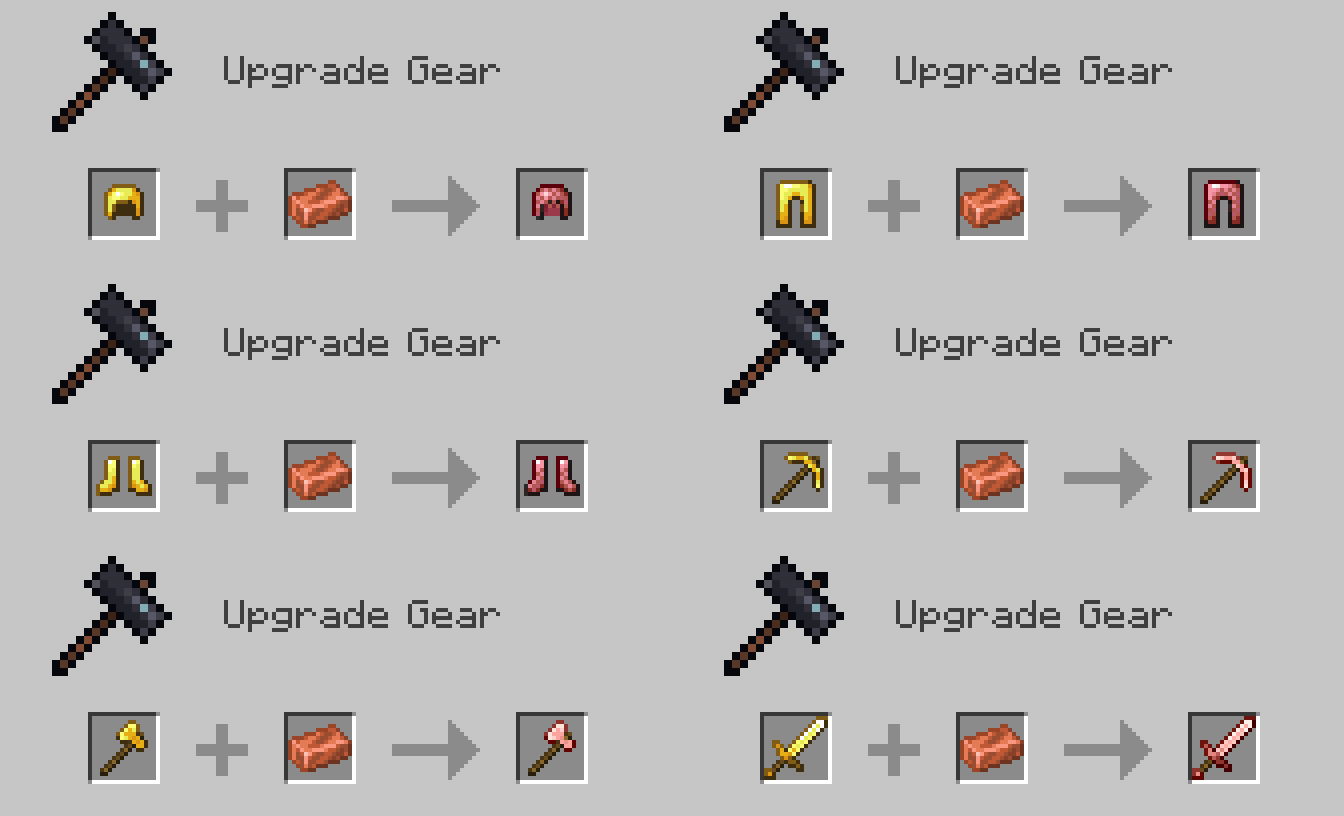
This mod adds Rosegold tools, the new Rosemail set of armor, and the copper wrench.
Added Content
Below is all the content the latest version adds.
Rosemail Armor
If you have enchanted golden armor, upgrade it in the Smithing table with a Waxed Copper Ingot.
What does this do?
Upgrading Gold to Rosemail will increase its durability above Iron. This is also the only set of armor before the diamond level with toughness, and what makes it even more worthwhile is that you can now repair your once-golden armor with one of the most common ores: Waxed Copper Ingots!
Lastly, Rosemail will also keep Piglins neutral making it an overall upgrade from Golden Armor in the Nether (potential lore could be that they don't see that it's gold, but they smell it on you).
Rosegold Tools
While on the way to getting diamond tools, you should also consider getting a Rosegold pickaxe along with some of the other Rosegold tools which all have the same efficiency and enchantability as golden tools while, just like the Rosemail armor, having the improved durability of iron tools and the ability to repair them with copper.
Turn your gold tools into Rosegold, just as Rosemail, by upgrading them at the Smithing table with Waxed Copper Ingots.
Future Additions/Changes
This mod is very early in the planning stage, so these ideas will likely change once I begin working on the full release.
Charged Copper Block
When a Copper Block gets struck by lightning it will gain a 30% charge and divide that across directly connected copper blocks (1 distance max). if a Lightning Rod gets struck it will charge up to 9 Copper Blocks within 2 blocks from the rod and each Copper Block will get a charge depending on how many there are (8% if there are 7-9 blocks, 16% if there are 4-6, and 30% if there are 1-3). Once charged, they can be picked up and placed where ever you wish. Charged Copper Blocks will also send their charge through uncharged Copper Blocks, they won't become charged blocks but will instead just send it through them (similarly to a Redstone Torch charging Redstone Dust) with a max reach of 25 blocks.
Charged Rosemail
When standing on top of a Charged Copper Block (or a Copper Block connected to one) the Rosemail will begin taking 2%/second of charge, and every 10 seconds it will lose 1% of its own charge. While the armor is charged the player will gain different abilities depending on the pieces of Rosemail they're wearing. Boots will likely increase the player's speed, Leggings their jump, and Chestplate mining speed. The Helmet is undecided, but the idea at the moment is it gives the player Night Vision, or it simply does nothing allowing it to be switched out with a stronger armor piece. Tools can also be charged, but only if the player has a piece of Rosemail armor.
Mod Info
Stats
Status: On Hold
Loader: Fabric (full release and beta)
Stage: Alpha
Legal
Copyright © IrønBrandon (Brandon Scott Miller) 2022
Apache-2.0 License
Available Versions
How to Install Copper+ on Your Server
Order Server
Order a Minecraft Java server with at least 3 GB RAM (4 GB recommended).
Set forge Loader
In the panel under "Egg", select the forge loader and matching Minecraft version (1.18.2).
Install Mod
Open the mod browser in the dashboard and search for "Copper+". Click "Install" – done! Alternatively, upload the .jar via SFTP to the /mods folder.
Compatibility
Mod Loaders
Minecraft Versions
1.18.2
Server-side
✓ RequiredRecommended RAM
4 GB(min. 3 GB)Frequently Asked Questions
Copper+ server crashes on startup – what to do?
Most common cause: wrong forge version or insufficient RAM. Check the server log (latest.log) for "OutOfMemoryError" or "Mixin" errors. With Mado Hosting: ensure at least 3 GB RAM is allocated and the loader matches the mod version (1.18.2). You can switch loaders with one click in the panel.
Is Copper+ compatible with forge?
Copper+ officially supports forge for Minecraft 1.18.2. The Mado dashboard automatically detects incompatible loader combinations.
Server lagging with Copper+ – how to optimize performance?
Recommended RAM: 4 GB (per 8 players). Use /spark profiler to check if Copper+ consumes the most tick time. Common fixes: reduce server view-distance to 8-10, install "performant" or "starlight" as supplementary mods on Forge. With Mado Hosting, your server runs on NVMe SSDs with dedicated CPU cores for minimal latency.
Similar Mods




![[TaCZ] Timeless and Classics Zero](https://cdn.modrinth.com/data/SzzJttH8/fd27766d2bb8390d284696b1dbd358f87e081439_96.webp)

Rent Modded Server
Install Copper+ with just one click on your server.