
CopperTools
Adds tools for many modded metals (old 1.7.10 mod)
Screenshots
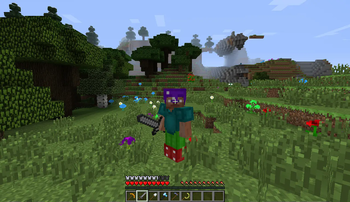
About this Mod
This mod has not been updated since 2015, I've put it up on Modrinth for archival reasons.
CopperTools is a small open-source mod that allows you to make tools, armor and sickles out of lots of materials from other mods. These include common materials that are present in nearly every modpack, like copper or silver, and also specific materials from mods (e.g. Compressed Iron from PneumaticCraft). All of those materials have their own unique properties, to make sure that none of them are useless. For example, even though copper is less durable than iron and can't mine diamonds, it's actually better at enchanting and mines faster than iron.
Content so far:
- copper, platinum, lead, silver, compressed iron and enderium tool sets
- peridot, sapphire, ruby and amethyst armor
- sickles for Thaumcraft, Botania, Twilight Forest and Flaxbeard's Steam Power
- config option to include sickles made out of vanilla materials. (false by default)
Plans for the future include Natura integration for sickles.
Material properties are not listed here, go download the mod and figure them out yourself! Although if you really, really want to know the exact numbers, you'll have to take a look at the source code.
Find the FTB forum thread here: link
Available Versions
How to Install CopperTools on Your Server
Order Server
Order a Minecraft Java server with at least 3 GB RAM (4 GB recommended).
Set forge Loader
In the panel under "Egg", select the forge loader and matching Minecraft version (1.7.10).
Install Mod
Open the mod browser in the dashboard and search for "CopperTools". Click "Install" – done! Alternatively, upload the .jar via SFTP to the /mods folder.
Compatibility
Mod Loaders
Minecraft Versions
1.7.10
Server-side
✓ RequiredRecommended RAM
4 GB(min. 3 GB)Frequently Asked Questions
CopperTools server crashes on startup – what to do?
Most common cause: wrong forge version or insufficient RAM. Check the server log (latest.log) for "OutOfMemoryError" or "Mixin" errors. With Mado Hosting: ensure at least 3 GB RAM is allocated and the loader matches the mod version (1.7.10). You can switch loaders with one click in the panel.
Is CopperTools compatible with forge?
CopperTools officially supports forge for Minecraft 1.7.10. The Mado dashboard automatically detects incompatible loader combinations.
Server lagging with CopperTools – how to optimize performance?
Recommended RAM: 4 GB (per 8 players). Use /spark profiler to check if CopperTools consumes the most tick time. Common fixes: reduce server view-distance to 8-10, install "performant" or "starlight" as supplementary mods on Forge. With Mado Hosting, your server runs on NVMe SSDs with dedicated CPU cores for minimal latency.
Similar Mods



![[TaCZ] Timeless and Classics Zero](https://cdn.modrinth.com/data/SzzJttH8/fd27766d2bb8390d284696b1dbd358f87e081439_96.webp)


Rent Modded Server
Install CopperTools with just one click on your server.