
CoreProtectNeo
Server-side block logging and rollback for NeoForge 1.21.1. Inspect blocks with /co i, rollback griefing, and browse chest history — inspired by CoreProtect
Screenshots
About this Mod
CoreProtectNeo
CoreProtectNeo is a server-side block logging and rollback mod for NeoForge 1.21.1, inspired by CoreProtect. Record who changed what, inspect block history in chat, and roll back griefing by time — clients do not need the mod.
Server-only mod. All data is stored locally in SQLite. No MySQL or external services required.
Features
Block logging
- Block place and break
- Interact actions (doors, buttons, levers, etc.)
- Container open and close
- World-gen blocks are not removed on rollback if they were never logged

Container logging
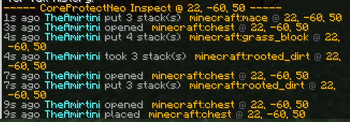
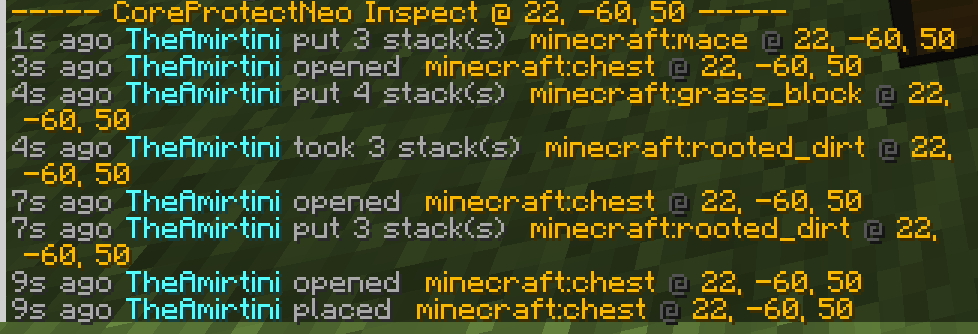
- Logs items put into and taken from chests, barrels, furnaces, and more
- Per-slot tracking — rollback restores items to the correct slots
- Double chests supported as one unit (both halves, 54 slots)
- Item icons and registry IDs in inspect output (vanilla + modded items)
Player inventory logging
- Tracks inventory changes over time
- Rollback inventory by time
Inspector — /co i
- Available to all players
- Left/right-click a block for full paginated history in chat
- ◀ ▶ page navigation (like CoreProtect)
- Action bar indicator when inspector is active
- Short UI click sound on toggle
Rollback — admin only
/co rollback block <time>— rollback the block you are looking at/co rollback area <radius> <time>— rollback logged blocks in a radius/co rollback inventory <time>— rollback your inventory- Time format:
30s,5m,1h,2d,1h 30m - Success sound when rollback completes
Nearby lookup — admin only
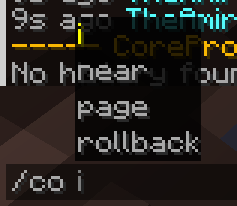
/co near <radius>— recent activity nearby (radius 1–50)- Paginated with
/co page
Localization
Configure in config/coreprotectneo-common.toml:
language = "ru" — Russianlanguage = "en" — English (alias: eu)
All mod messages use config language, not the client locale.
Commands
| Command | Access | Description |
|---|---|---|
/co i |
Everyone | Toggle block inspector |
/co help |
Everyone | List all commands |
/co page <n> |
Everyone | Browse history pages |
/co near <radius> |
Admin (OP 2) | Logs near you |
/co rollback block <time> |
Admin | Rollback looked-at block |
/co rollback area <radius> <time> |
Admin | Rollback area |
/co rollback inventory <time> |
Admin | Rollback your inventory |
Requirements
- Minecraft: 1.21.1
- Loader: NeoForge 21.1+
- Side: Server only
Configuration
Config file: config/coreprotectneo-common.toml
Database: config/coreprotectneo/database.db
Available Versions
How to Install CoreProtectNeo on Your Server
Order Server
Order a Minecraft Java server with at least 3 GB RAM (4 GB recommended).
Set neoforge Loader
In the panel under "Egg", select the neoforge loader and matching Minecraft version (1.21.1).
Install Mod
Open the mod browser in the dashboard and search for "CoreProtectNeo". Click "Install" – done! Alternatively, upload the .jar via SFTP to the /mods folder.
Compatibility
Mod Loaders
Minecraft Versions
1.21.1
Server-side
✓ RequiredRecommended RAM
4 GB(min. 3 GB)Frequently Asked Questions
CoreProtectNeo server crashes on startup – what to do?
Most common cause: wrong neoforge version or insufficient RAM. Check the server log (latest.log) for "OutOfMemoryError" or "Mixin" errors. With Mado Hosting: ensure at least 3 GB RAM is allocated and the loader matches the mod version (1.21.1). You can switch loaders with one click in the panel.
Is CoreProtectNeo compatible with neoforge?
CoreProtectNeo officially supports neoforge for Minecraft 1.21.1. The Mado dashboard automatically detects incompatible loader combinations.
Server lagging with CoreProtectNeo – how to optimize performance?
Recommended RAM: 4 GB (per 8 players). Use /spark profiler to check if CoreProtectNeo consumes the most tick time. Common fixes: reduce server view-distance to 8-10, install "performant" or "starlight" as supplementary mods on Forge. With Mado Hosting, your server runs on NVMe SSDs with dedicated CPU cores for minimal latency.
Similar Mods






Rent Modded Server
Install CoreProtectNeo with just one click on your server.