
Cosmic Additions – Oxygen & Survival Addon
Cosmic Additions is an exciting addon for the Cosmic Horizons mod that introduces new mechanics such as oxygen system, radiation, and temperature, enhancing the survival experience.
Screenshots

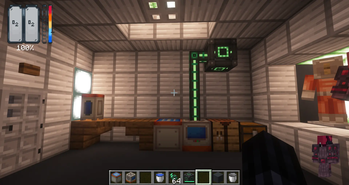
About this Mod
Cosmic Additions expands the vast universe of Cosmic Horizons by adding realistic survival challenges to space exploration. Designed for players who love the thrill of interplanetary travel, this addon brings depth to your adventures with three core mechanics: oxygen supply, radiation exposure, and extreme temperatures. Craft and upgrade space suits to withstand the harsh environments of planets, moons, and galaxies, turning every expedition into a test of strategy and preparation.
Key Features
- Oxygen Management: Equip suits to monitor and consume oxygen levels. Run low, and you'll see bubble effects as your air supply depletes—find an Oxygen Distributor or risk suffocation!
- Radiation Resistance: In high-radiation zones like Mercury or Pluto, exposure builds over time. Suits reduce accumulation rates, but exceeding your threshold triggers the radiation effect, causing damage and debuffs like nausea and slowness.
- Build in Sealed Areas: Establish your own protected bases in designated Sealed Areas — safe from environmental hazards and hostile mobs, perfect for storing your resources and crafting equipment.
- Temperature Regulation: Each planet has a fixed temperature (inspired by NASA data, scaled for gameplay). Suits provide safe ranges—Steel handles Mars (-65°C) and Luna (+120°C), Titanium opens most of the solar system, and Nickel is essential for extremes like Venus (+460°C) or Pluto (-225°C). Stray outside your suit's limits, and suffer burning or freezing effects.
- Customizable Suits: Four tiers of suits (Improvised, Steel, Titanium, Nickel) with increasing protection. Mix and match pieces for partial coverage, but missing parts reduce effectiveness.
- HUD Integration: A clean overlay shows real-time oxygen bars, radiation levels, and a dynamic thermometer for temperature, making monitoring intuitive.
How to Get Started
Installation: Cosmic Additions is an addon for Cosmic Horizons, so install Cosmic Horizons first from Modrinth or CurseForge. Add Cosmic Additions to your mods folder. Requires Minecraft 1.20.1 with Forge loader. No additional dependencies, but compatible with JEI for recipes.
Crafting Suits: Start with basic materials (Steel for tier 1, titanium for Tier 2). Use an anvil or crafting table to assemble helmets, chestplates, leggings, and boots.
Exploration Tips:
- Tier 1 (Steel): Perfect for Mars, Luna, and space travel (-80°C to +120°C safe range).
- Tier 2 (Titanium): Handles Jupiter, Europa, and Mercury (-150°C to +300°C).
- Tier 3 (Nickel): Endgame gear for Venus, Neptune, Uranus, and Pluto (-250°C to +500°C).
Survival Guide:

HUD Overview: Your heads-up display (HUD) is your lifeline. It shows:
- Oxygen Bar: A segmented bar (0-10 levels) indicating oxygen levels (0-100%). Bubbles decrease as oxygen depletes.
- Radiation Bar: A segmented bar showing exposure (0-60 units). Fills faster in high-radiation planets like Mercury or Pluto.
- Temperature Bar: A thermometer with a moving line indicating current temperature (°C). 0°C is neutral (center). Blue for cold, red for hot.
Oxygen Management
How it Works: Oxygen is consumed in hostile dimensions (e.g., space, moons, planets) at a rate based on your suit tier and activity. The variable OxygenLevel starts at 100% and decreases over time. When it reaches 0%, bubble effects appear, and you take damage (delegated to DecreaseProcedure).
Consumption Rate (per second):
No Suit: 2.0 (rapid depletion).
Improvised/Steel (Tier 1): 0.5 (moderate, good for short trips).
Titanium (Tier 2): 0.25 (slow, for longer explorations).
Nickel (Tier 3): 0.1 (minimal, endgame).
Missing suit pieces increase consumption by 0.2 per piece.
Tips: Monitor the oxygen bar—bubbles mean you're low. Use oxygen tanks for quick escapes; they pause consumption. Experiment with partial suits, but full sets are essential for deep space.
Radiation Resistance
How it Works: Radiation accumulates in specific planets (e.g. Mercury, Pluto) as RadiationExposure (0-60 units). It increases at a rate based on your suit:
No Suit/Improvised: +4/s (reaches 60 in 15s).
Steel (Tier 1): +2/s (reaches 60 in 30s).
Titanium (Tier 2): +1/s (reaches 60 in 60s).
Nickel (Tier 3): +0/s (inmune).
When RadiationExposure reaches the threshold (15 for no suit, 30 for Steel, 60 for Titanium), it triggers the radiation effect, causing damage (1 HP/s), nausea, slowness, and accelerated oxygen consumption (if below 50%).

Tips: The radiation bar fills progressively. Use Titanium for medium-risk planets, Nickel for high-radiation ones. Partial suits increase exposure rate.
Temperature Regulation
How it Works: Each planet has a fixed temperature (inspired by NASA data, scaled for gameplay). TemperatureValue starts at 0°C and moves progressively toward the planet's temperature at a rate based on your suit:
No Suit/Improvised: +15/s (rapid).
Steel (Tier 1): +6/s (moderate).
Titanium (Tier 2): +3/s (slow).
Nickel (Tier 3): +0/s (inmune).
When TemperatureValue exceeds your suit's safe range, it triggers freeze (cold) or burning (hot) effects, causing damage, debuffs, and particles.
Safe Ranges:
Steel: -80°C to +120°C.
Titanium: -150°C to +300°C.
Nickel: -250°C to +500°C.
Planet Temperatures:
Dimensions & Safety: Solar System (-60°C, hostile, tier 1)
Earth’s Moon (120°C, hostile, tier 1)
Mars Lands (-65°C, hostile, tier 2)
Mercury Wasteland (200°C, hostile, radiation, tier 2)
Venus Lands (460°C, hostile, tier 3)
Jupiter Lands (-110°C, hostile, tier 1)
J1407b Lands (-100°C, hostile, tier 1)
J1900 Planet (300°C, hostile, tier 1)
Europa Lands (-160°C, hostile, tier 1)
Glacio Lands (-150°C, hostile, tier 1)
Gaia Black Hole 1 (20°C, hostile, tier 1)
Neptune Lands (-200°C, hostile, tier 3)
Uranus Lands (-195°C, hostile, tier 1)
Pluto Wastelands (-225°C, hostile, radiation, tier 3)
Cosmic Moon (120°C, hostile, tier 1)
B1400 Centauri (0°C, hostile, tier 1)
Overworld (15°C, safe, tier 0)
Nether (228.88°C, safe, tier 0)
Safe Entities: Space nodules
Available Versions
How to Install Cosmic Additions – Oxygen & Survival Addon on Your Server
Order Server
Order a Minecraft Java server with at least 3 GB RAM (4 GB recommended).
Set forge Loader
In the panel under "Egg", select the forge loader and matching Minecraft version (1.20.1).
Install Mod
Open the mod browser in the dashboard and search for "Cosmic Additions – Oxygen & Survival Addon". Click "Install" – done! Alternatively, upload the .jar via SFTP to the /mods folder.
Compatibility
Mod Loaders
Minecraft Versions
1.20.1
Server-side
✓ RequiredRecommended RAM
4 GB(min. 3 GB)Frequently Asked Questions
Cosmic Additions – Oxygen & Survival Addon server crashes on startup – what to do?
Most common cause: wrong forge version or insufficient RAM. Check the server log (latest.log) for "OutOfMemoryError" or "Mixin" errors. With Mado Hosting: ensure at least 3 GB RAM is allocated and the loader matches the mod version (1.20.1). You can switch loaders with one click in the panel.
Is Cosmic Additions – Oxygen & Survival Addon compatible with forge?
Cosmic Additions – Oxygen & Survival Addon officially supports forge for Minecraft 1.20.1. The Mado dashboard automatically detects incompatible loader combinations.
Server lagging with Cosmic Additions – Oxygen & Survival Addon – how to optimize performance?
Recommended RAM: 4 GB (per 8 players). Use /spark profiler to check if Cosmic Additions – Oxygen & Survival Addon consumes the most tick time. Common fixes: reduce server view-distance to 8-10, install "performant" or "starlight" as supplementary mods on Forge. With Mado Hosting, your server runs on NVMe SSDs with dedicated CPU cores for minimal latency.
Similar Mods




Rent Modded Server
Install Cosmic Additions – Oxygen & Survival Addon with just one click on your server.