
Cozy Cafe
The cafe experience brought to Minecraft. With colorful and convenient drinks!
Screenshots
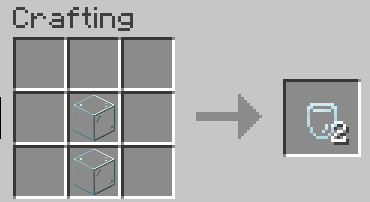
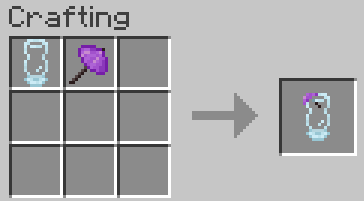
About this Mod
Cozy Cafe v2.0 is now out
Updated gallery coming soon.
Feel free to use this mod in your modpack!
About
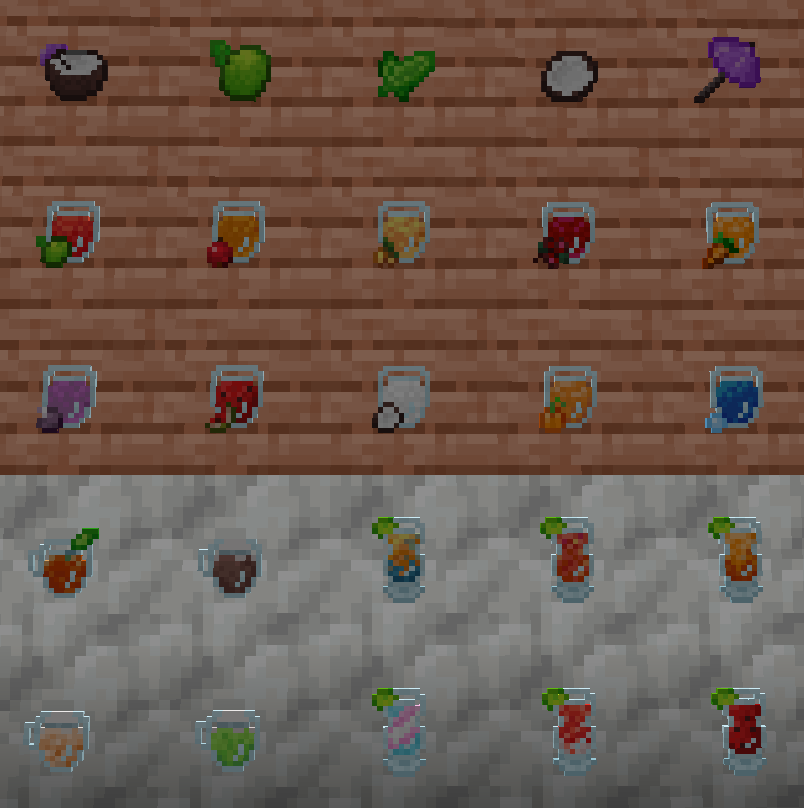
Cozy Cafe is a mod that adds customizable food items in the form of drinks.
Drinks are made of at least a liquid and a flavor, and at most a liquid, a sweetener, a main flavor and a secondary flavor.
Nearly 10,000 possible ingredient combinations, not counting different potions.
Additionally, there are 6 drink containers available, each being dyeable in all 16 colors on top of the default:
- Cocktail glass - 3 uses, very fast, 1 flavor max
- Split coconut - 3 uses, fast, 2 flavor max
- Glass cup - 6 uses, fast, 1 flavor max
- Soda bottle - 6 uses, average, 2 flavor max
- Glass can - 9 uses, average, 1 flavor max
- Glass tumbler - 9 uses, slow, 2 flavor max
Each container possesses different properties.
Note that slow here corresponds to the vanilla eating speed
Making a drink is as simple as adding the ingredients in a mixing cup and mixing until it is read.
Then, filling your desired (and compatible) container with a right click
Ingredients
Note that the *secondary flavor* has a halved effectivenessLiquids:
- Water
- Sparkling water
- Milk
- Coconut milk
- Chocolate milk
- Dragon's breath
Sweeteners:
- Sugar
- Honey
- Nether wart - allows to add potions as flavors
- Glow ink - reveals nearby mobs
- Glowstone - reveals nearby mobs
- Ghast tear
- Magma cream
Flavors:
- Bamboo
- Cherry
- Chorus - allows to teleport a short distance
- Glow berries
- Sweet berries
- Pumpkin
- Melon
- Matcha
- Spore blossom
- Apple
- Sculk
- Potion
Dyeing
The mod adds a new placeable item for all your dyeing needs, the dye vat.Place the dye vat in the world and insert your chosen dye inside.
You are then able to insert containers, drinks, wool, concrete, candles, terracotta and glass to be dyed with some time.
Remove the dye vat's current color with an empty hand.
(Mod compatibility would have to be done manually, don't expect other mod's blocks and item to be dyeable by it just yet)
Juicing
All flavors but matcha and potions have to be juiced to be used in a drink.For this purpose, their base ingredient has to be inserted in a juicer as well as empty bottles.
(cozy cafe bottle and not vanilla)
Finally, right-click the juice to start the process.
Additional features
The ingredient shelf can display up to 4 stacks of items.
It can be pulled from to fill a mixing cup for mixing by right-clicking the cup when the shelf is in range
Coconuts are dropped by decaying jungle leaves.
Throwing one splits in half and drops 2 split coconuts usable as drink containers.
Matcha tea bags can be found in village chests and sold by wandering trader
Upcoming
I plan to bring this mod to 1.20.1 when I have the time to.
The biggest features I'm working on are a cafe minigame and an ingredient book.
Thank you
I make mods as a hobby, and I'm excited to polish and expand on them.
Stay tuned as I have many mods planned, each better than the last!
Thank you for viewing my mods <3
Available Versions
How to Install Cozy Cafe on Your Server
Order Server
Order a Minecraft Java server with at least 3 GB RAM (4 GB recommended).
Set fabric Loader
In the panel under "Egg", select the fabric loader and matching Minecraft version (1.21.1).
Install Mod
Open the mod browser in the dashboard and search for "Cozy Cafe". Click "Install" – done! Alternatively, upload the .jar via SFTP to the /mods folder.
Compatibility
Mod Loaders
Minecraft Versions
1.21.1, 1.20.1
Server-side
✓ RequiredRecommended RAM
4 GB(min. 3 GB)Frequently Asked Questions
Cozy Cafe server crashes on startup – what to do?
Most common cause: wrong fabric version or insufficient RAM. Check the server log (latest.log) for "OutOfMemoryError" or "Mixin" errors. With Mado Hosting: ensure at least 3 GB RAM is allocated and the loader matches the mod version (1.21.1). You can switch loaders with one click in the panel.
Is Cozy Cafe compatible with fabric and forge and neoforge?
Cozy Cafe officially supports fabric, forge, neoforge for Minecraft 1.21.1, 1.20.1. Note: Forge and Fabric mods are NOT cross-compatible – pick one loader and stick with it. The Mado dashboard automatically detects incompatible loader combinations.
Server lagging with Cozy Cafe – how to optimize performance?
Recommended RAM: 4 GB (per 8 players). Use /spark profiler to check if Cozy Cafe consumes the most tick time. Common fixes: reduce server view-distance to 8-10, install "performant" or "starlight" as supplementary mods on Forge. With Mado Hosting, your server runs on NVMe SSDs with dedicated CPU cores for minimal latency.
Similar Mods



Rent Modded Server
Install Cozy Cafe with just one click on your server.