
Craft Obsidian
Craft Obsidian by crafting together buckets of water and lava!
About this Mod
Obsidian Crafting Mod
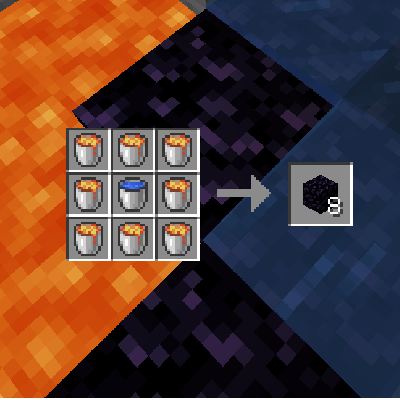
Easily craft obsidian with the Obsidian Crafting Mod!
Tired of mining obsidian blocks? The Obsidian Crafting Mod simplifies the process by allowing you to craft obsidian using water and lava buckets. Save time and effort by crafting obsidian directly in your crafting table.
Features:
- Simple Crafting Recipe: Combine one bucket of water with at least one bucket of lava to create obsidian.
- Scalable Production: Use up to eight buckets of lava with one bucket of water to craft up to eight obsidian blocks in a single recipe.
Efficient Resource Management:
- Perfect for players looking to streamline their resource collection and crafting processes.
- Ideal for large-scale builds or projects requiring significant amounts of obsidian.
Seamless Integration:
- Crafting recipes are easy to use and fit naturally within the vanilla Minecraft crafting system.
With the Obsidian Crafting Mod, you can focus more on building and less on tedious mining. It's a practical addition for any Minecraft player looking to enhance their gameplay efficiency.
Download now and simplify your obsidian crafting with the Obsidian Crafting Mod!
Compatibility:
The Craft Obsidian mod is compatible with the following Minecraft versions for Fabric:
Explore More at ExlineMods!
Thank you for using our mods! For the best experience, visit our official website, Exline Mods.
Why Visit Our Website?
- Early Updates: Get the latest updates faster than other sites.
- Exclusive Tools: Download our mod setup program, also available on Nexus Mods.
- Crafting Recipes: Find detailed crafting recipes for our mods.
- Join the Community: Connect with fellow modders and get support via our Discord server.
- Direct Support and Feedback: Reach out directly for support and share feedback on Discord.
Get Started!
Visit Exline Mods now and join our Discord Server to be part of our community. We look forward to seeing you there!

Promotional Message:
Why Choose Bisect Hosting?
- Easy Setup: Get your server up and running in minutes.
- 24/7 Support: Reliable assistance whenever you need it.
- Customizable: Tailor your server settings to your liking.
Visit Bisect Hosting now and take your Minecraft adventures to the next level!
Available Versions
How to Install Craft Obsidian on Your Server
Order Server
Order a Minecraft Java server with at least 3 GB RAM (4 GB recommended).
Set fabric Loader
In the panel under "Egg", select the fabric loader and matching Minecraft version (1.21).
Install Mod
Open the mod browser in the dashboard and search for "Craft Obsidian". Click "Install" – done! Alternatively, upload the .jar via SFTP to the /mods folder.
Compatibility
Mod Loaders
Minecraft Versions
1.21, 1.20.6, 1.20.5 (+24 more)
Server-side
✓ RequiredRecommended RAM
4 GB(min. 3 GB)Frequently Asked Questions
Craft Obsidian server crashes on startup – what to do?
Most common cause: wrong fabric version or insufficient RAM. Check the server log (latest.log) for "OutOfMemoryError" or "Mixin" errors. With Mado Hosting: ensure at least 3 GB RAM is allocated and the loader matches the mod version (1.21). You can switch loaders with one click in the panel.
Is Craft Obsidian compatible with fabric?
Craft Obsidian officially supports fabric for Minecraft 1.21, 1.20.6, 1.20.5. The Mado dashboard automatically detects incompatible loader combinations.
Server lagging with Craft Obsidian – how to optimize performance?
Recommended RAM: 4 GB (per 8 players). Use /spark profiler to check if Craft Obsidian consumes the most tick time. Common fixes: reduce server view-distance to 8-10, install "performant" or "starlight" as supplementary mods on Forge. With Mado Hosting, your server runs on NVMe SSDs with dedicated CPU cores for minimal latency.
Similar Mods


Rent Modded Server
Install Craft Obsidian with just one click on your server.