
CraftMusic
A simple Minecraft built-in music player mod
Screenshots
About this Mod
CraftMusic
CraftMusic is a client-side local music player for Minecraft (NeoForge). It plays audio files from your computer inside the game and shows synchronized lyrics.
What it does
- Plays local audio files placed in the game folder
CraftMusic/. - Supports ogg, mp3, flac, wav. Fully supports Chinese file names/paths on Windows.
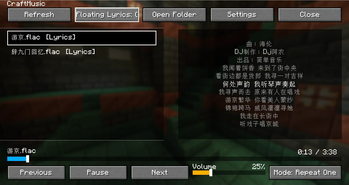
- Provides an in-game UI for browsing and controlling playback, plus optional floating (on-screen) lyrics.
Key features
- Playback: play/pause/resume, previous/next, seek by dragging, volume control, and modes: Sequential / Repeat All / Shuffle / Repeat One.
- UI: QuickPlay screen with track list (double-click to play), seekbar, time text, volume bar, mode switch, refresh, open folder, settings.
- Lyrics: auto-detects same-name
.lrcfiles (UTF-8/GBK); centered panel with current line highlight and gentle scaling; shows “No lyrics / Instrumental” when absent. - Floating lyrics: toggle on/off; render scope Global or In-World only; position Top-Left/Top-Right/Bottom-Left/Bottom-Right (left edges left-aligned, right edges right-aligned).
- Keybinding: default M opens the UI. Also a title-screen button.
- Commands:
/craftmusic play <path>,/craftmusic stop,/craftmusic ui,/craftmusic tone. - Persistence: settings saved to
config/craftmusic-client.json.
Supported Languages
CraftMusic now supports 12 languages for a truly global experience:
- English (en_us) 🇬🇧
- Simplified Chinese (zh_cn) 🇨🇳
- Traditional Chinese - Hong Kong (zh_hk) 🇭🇰
- Traditional Chinese - Taiwan (zh_tw) 🇹🇼
- Classical Chinese (lzh) - Literary style
- Korean (ko_kr) 🇰🇷
- Japanese (ja_jp) 🇯🇵
- Spanish (es_es) 🇪🇸
- French (fr_fr) 🇫🇷
- German (de_de) 🇩🇪
- Russian (ru_ru) 🇷🇺
- LOLCAT (lol_us) - I can has mewsic!
How to use
- Place your audio files into
<Minecraft Game Directory>/CraftMusic/. - Launch the game. Press M or click the title-screen button “CraftMusic” to open the player.
- Double-click a song to play. Use bottom controls to seek, switch tracks, adjust volume, and change mode.
- Lyrics: put a same-named
.lrcnext to the audio file. If found, lyrics sync automatically. - Floating lyrics: open Settings to control on/off, render scope (Global / In-World), and position.
Configuration (config/craftmusic-client.json)
volume: float 0.0–1.0mode:SEQUENTIAL|REPEAT_ALL|SHUFFLE|REPEAT_ONElyricEffects: boolean, enables lyric scrolling/scale effectsfloatingLyrics: boolean, floating lyrics on/offfloatingLyricsRender:GLOBAL(all screens) |WORLD(only in-game)floatingLyricsPosition:TOP_LEFT|TOP_RIGHT|BOTTOM_LEFT|BOTTOM_RIGHT
Requirements
- Client-side, NeoForge-based Minecraft.
- Windows only. The native audio backend (miniaudio) is distributed as a Windows DLL.
Limitations
- Windows platform only.
Credits
- Audio backend: miniaudio.
Troubleshooting
- “Audio output not ready”: ensure the native DLL is properly loaded (Windows) and restart the game.
- Chinese filenames not playing: the mod uses wide-character APIs on Windows; ensure the file exists and is readable.
Available Versions
How to Install CraftMusic on Your Server
Order Server
Order a Minecraft Java server with at least 3 GB RAM (4 GB recommended).
Set neoforge Loader
In the panel under "Egg", select the neoforge loader and matching Minecraft version (1.21.5).
Install Mod
Open the mod browser in the dashboard and search for "CraftMusic". Click "Install" – done! Alternatively, upload the .jar via SFTP to the /mods folder.
Compatibility
Mod Loaders
Minecraft Versions
1.21.5, 1.21.4, 1.21.3 (+2 more)
Server-side
✗ UnsupportedRecommended RAM
4 GB(min. 3 GB)Frequently Asked Questions
CraftMusic server crashes on startup – what to do?
Most common cause: wrong neoforge version or insufficient RAM. Check the server log (latest.log) for "OutOfMemoryError" or "Mixin" errors. With Mado Hosting: ensure at least 3 GB RAM is allocated and the loader matches the mod version (1.21.5). You can switch loaders with one click in the panel.
Is CraftMusic compatible with neoforge?
CraftMusic officially supports neoforge for Minecraft 1.21.5, 1.21.4, 1.21.3. The Mado dashboard automatically detects incompatible loader combinations.
Server lagging with CraftMusic – how to optimize performance?
Recommended RAM: 4 GB (per 8 players). Use /spark profiler to check if CraftMusic consumes the most tick time. Common fixes: reduce server view-distance to 8-10, install "performant" or "starlight" as supplementary mods on Forge. With Mado Hosting, your server runs on NVMe SSDs with dedicated CPU cores for minimal latency.
Similar Mods





Rent Modded Server
Install CraftMusic with just one click on your server.