
CraftTweaker GUI
Allows editing and managing edited recipes for CraftTweaker
Screenshots
About this Mod
With CraftTweaker GUI you can easily create new recipes or edit existing ones. When you are done, you can export your recipes to CraftTweaker and they will work after a simple reload. The recipes you changed are saved, so you can always see a list of changed recipes and also edit them again. CT GUI is completely client-side and does nothing on a server.
How does it work?
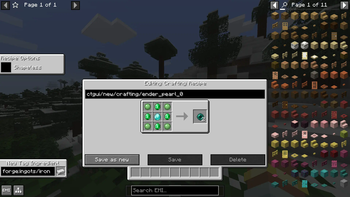
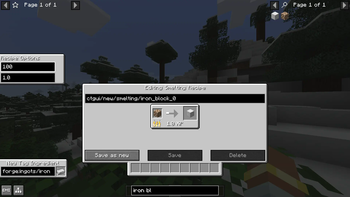
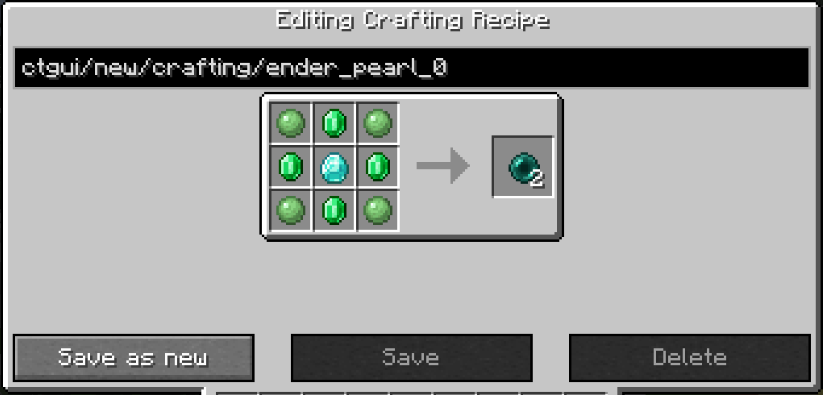
To start editing a recipe, you first need to open EMI (or JEI but EMI is recommended) and either click on the plus icon next to the category name, to create a new recipe, or click on the CT GUI icon next to each recipe to edit the recipe. In the editing screen, you can drag and drop items from EMI or the recipe itself into slots of the recipe. You can right-click slots to delete the item inside and scroll while hovering over them to increase or decrease the amount. On the bottom left, you can create a new Tag-Ingredient and drag it into the recipe. Some recipes also have extra options that you can configure on the side, for example shapeless when creating crafting recipes. Over the recipe itself you can change the recipe id, it will also be assigned automatically when you give the recipe an output unless you changed it before. Under the recipe you have the option to delete the original recipe you are editing, edit/replace it with the recipe you made or just create a new recipe without affecting the original one. Even when you have not exported your recipe, it will already be visible in EMI but not actually work.
Managing changed recipes
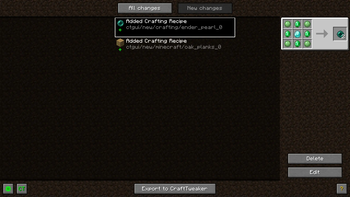
After editing a recipe or when clicking the CT button in the pause menu, you get to the changed recipes list. There you can see all changes you made and filter for the ones you have not exported yet. This is also the place to delete or edit changes you made and export them to CraftTweaker. You can also disable the edit mode and the pause menu button here or in the config.
View the full list of supported recipe types here
Tag editing is a bit special because it is not an actual recipe. Instead of the recipe id you enter the name of the tag and because Emi does not display tags with one or no items you have to create a new tag with the same name to add items to those.
One of the things that are disabled in the editing screen, is tag collapsing, so when editing the recipe for iron doors for example, you will see that it actually accepts the tag for iron ingots not just iron ingots themselves. You can also enable this everywhere in the config. This only works in EMI.
Available Versions
How to Install CraftTweaker GUI on Your Server
Order Server
Order a Minecraft Java server with at least 3 GB RAM (4 GB recommended).
Set fabric Loader
In the panel under "Egg", select the fabric loader and matching Minecraft version (1.21.1).
Install Mod
Open the mod browser in the dashboard and search for "CraftTweaker GUI". Click "Install" – done! Alternatively, upload the .jar via SFTP to the /mods folder.
Compatibility
Mod Loaders
Minecraft Versions
1.21.1, 1.20.4
Server-side
✗ UnsupportedRecommended RAM
4 GB(min. 3 GB)Frequently Asked Questions
CraftTweaker GUI server crashes on startup – what to do?
Most common cause: wrong fabric version or insufficient RAM. Check the server log (latest.log) for "OutOfMemoryError" or "Mixin" errors. With Mado Hosting: ensure at least 3 GB RAM is allocated and the loader matches the mod version (1.21.1). You can switch loaders with one click in the panel.
Is CraftTweaker GUI compatible with fabric and neoforge?
CraftTweaker GUI officially supports fabric, neoforge for Minecraft 1.21.1, 1.20.4. The Mado dashboard automatically detects incompatible loader combinations.
Server lagging with CraftTweaker GUI – how to optimize performance?
Recommended RAM: 4 GB (per 8 players). Use /spark profiler to check if CraftTweaker GUI consumes the most tick time. Common fixes: reduce server view-distance to 8-10, install "performant" or "starlight" as supplementary mods on Forge. With Mado Hosting, your server runs on NVMe SSDs with dedicated CPU cores for minimal latency.
Similar Mods






Rent Modded Server
Install CraftTweaker GUI with just one click on your server.