
Crawfish
A Minecraft mod that introduces a crawfish trapping and cooking mechanic, complete with custom rewards and custom food items.
Screenshots
About this Mod
Crawfish Mod
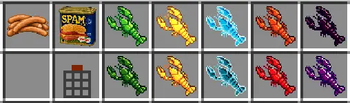
This mod expands Minecraft's swamps and oceans by adding a fully automated trapping system and a unique cooking mechanic for Crawfish. It adds 5 different crawfish variants, a custom block, and new high-tier food options.
How it works
1. Catching Crawfish
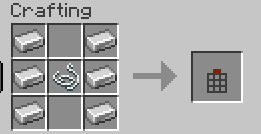
To start, you need to craft a Crawfish Trap. Place it underwater in any swamp, river, or ocean biome. The trap works automatically over time and will slowly collect raw crawfish. You have to put spam, chicken, kelp, bread or any other meat i8n the trap so it works.
There are 5 different color variants you can catch:
- Blue Crawfish
- Yellow Crawfish
- Green Crawfish
- Purple Crawfish
- Orange Crawfish
2. Boiling Mechanics (Cauldron Cooking)
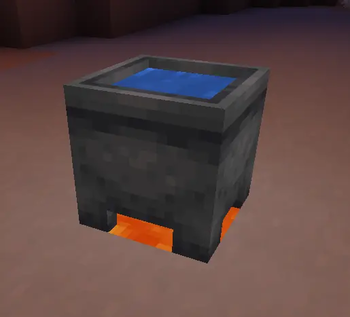
You cannot cook these crawfish in a standard furnace or smoker. Instead, you have to boil them using a water cauldron.
- Place a Cauldron down and fill it with Water.
- Place a Lava block directly underneath the cauldron to heat it up.
- Toss your raw crawfish into the boiling water.
- The crawfish will cook instantly, showing bubble and smoke particles, and pop out as a finished item.
3. Food Values
Eating raw crawfish isn't very effective (restores only 1 hunger bar). However, once boiled, any of the 5 cooked crawfish variants becomes an excellent food source, restoring 5 full hunger bars (10 hunger points) with high saturation.
Available Versions
How to Install Crawfish on Your Server
Order Server
Order a Minecraft Java server with at least 3 GB RAM (4 GB recommended).
Set fabric Loader
In the panel under "Egg", select the fabric loader and matching Minecraft version (1.21.11).
Install Mod
Open the mod browser in the dashboard and search for "Crawfish". Click "Install" – done! Alternatively, upload the .jar via SFTP to the /mods folder.
Compatibility
Mod Loaders
Minecraft Versions
1.21.11
Server-side
✓ RequiredRecommended RAM
4 GB(min. 3 GB)Frequently Asked Questions
Crawfish server crashes on startup – what to do?
Most common cause: wrong fabric version or insufficient RAM. Check the server log (latest.log) for "OutOfMemoryError" or "Mixin" errors. With Mado Hosting: ensure at least 3 GB RAM is allocated and the loader matches the mod version (1.21.11). You can switch loaders with one click in the panel.
Is Crawfish compatible with fabric?
Crawfish officially supports fabric for Minecraft 1.21.11. The Mado dashboard automatically detects incompatible loader combinations.
Server lagging with Crawfish – how to optimize performance?
Recommended RAM: 4 GB (per 8 players). Use /spark profiler to check if Crawfish consumes the most tick time. Common fixes: reduce server view-distance to 8-10, install "performant" or "starlight" as supplementary mods on Forge. With Mado Hosting, your server runs on NVMe SSDs with dedicated CPU cores for minimal latency.
Similar Mods



Rent Modded Server
Install Crawfish with just one click on your server.