Create: Alloys
This mod adds various netherite alloys and ores from the create.
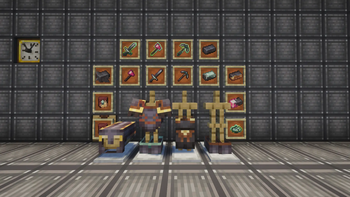
Screenshots
About this Mod
Create: Alloys is a major expansion for the Create mod that bridges the gap between advanced engineering and vanilla endgame materials. Forget standard netherite; it’s time to fuse the raw power of ancient debris with the versatility of brass, zinc, and charged rose quartz.
Unlock the true potential of your kinetic machinery and forge next-generation gear with unprecedented capabilities!
🚀 Key FeaturesAdvanced Metallurgy:
- Melt and alloy Netherite with core components from Create (Brass, Zinc, and Rose Quartz) to craft high-tier composite materials.
- Upgraded Arsenal: Forge everything from high-tech tools to heavy-duty custom armor sets tailored for automated warfare and survival.
- Smithing Templates: Utilize dedicated Zinc & Brass templates to streamline your gear upgrading process.
- Modpack Ready: Perfectly balanced recipes make this mod an excellent and seamless addition to any tech-focused or progression-based modpack.
Warning! The mod will not work properly without Create
Available Versions
How to Install Create: Alloys on Your Server
Order Server
Order a Minecraft Java server with at least 4 GB RAM (6 GB recommended).
Set neoforge Loader
In the panel under "Egg", select the neoforge loader and matching Minecraft version (1.21.1).
Install Mod
Open the mod browser in the dashboard and search for "Create: Alloys". Click "Install" – done! Alternatively, upload the .jar via SFTP to the /mods folder.
Compatibility
Mod Loaders
Minecraft Versions
1.21.1
Server-side
✓ RequiredRecommended RAM
6 GB(min. 4 GB)Frequently Asked Questions
Create: Alloys server crashes on startup – what to do?
Most common cause: wrong neoforge version or insufficient RAM. Check the server log (latest.log) for "OutOfMemoryError" or "Mixin" errors. With Mado Hosting: ensure at least 4 GB RAM is allocated and the loader matches the mod version (1.21.1). You can switch loaders with one click in the panel.
Is Create: Alloys compatible with neoforge?
Create: Alloys officially supports neoforge for Minecraft 1.21.1. The Mado dashboard automatically detects incompatible loader combinations.
Server lagging with Create: Alloys – how to optimize performance?
Recommended RAM: 6 GB (per 5 players). Use /spark profiler to check if Create: Alloys consumes the most tick time. Common fixes: reduce server view-distance to 8-10, install "performant" or "starlight" as supplementary mods on Forge. With Mado Hosting, your server runs on NVMe SSDs with dedicated CPU cores for minimal latency.
Similar Mods




![[TaCZ] Timeless and Classics Zero](https://cdn.modrinth.com/data/SzzJttH8/fd27766d2bb8390d284696b1dbd358f87e081439_96.webp)

Rent Modded Server
Install Create: Alloys with just one click on your server.