
Create: Brassworks Missions
A Create addon adding missions with a clean, Create-style UI, HUD tracking, and full data-driven customization.
Screenshots
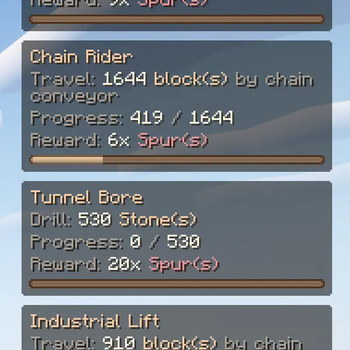
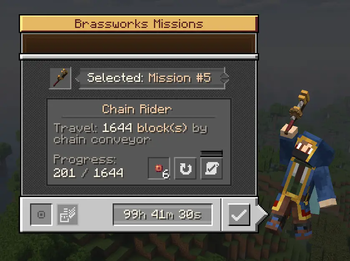
About this Mod
Create: Brassworks Missions


Create: Brassworks Missions is an addon for Create that introduces a fully data-driven missions system for Minecraft 1.21.1.
Originally made for the Brassworks SMP, but available for anyone to use.
License
This project is licensed under the MIT License.
While credit is not required, giving acknowledgment to swzo when forking or reusing parts of this project is always appreciated.
Contributions, suggestions, and improvements are welcome, feel free to open a pull request or start a discussion!
Features
- Track missions directly on your HUD.
- Clean, Create-style UI.
- Open the missions menu with the default keybind H.
- Administrator commands to manage player missions.
- 24 unique mission types (with more planned).
- Fully data-driven – add your own missions via datapacks.
Custom Missions
Custom missions are stored in datapacks. Place your mission definitions in:
data/brassworksmissions/missions/missions.json
An example datapack can be found here Example Datapack, and a guide for the datapacks contents can be found below
Example JSON
data/brassworksmissions/missions/missions.json
{
  "id": "brassworksmissions:crush_item",
  "weight": 4.0,
  "titles": [
    "Ore Processor",
    "Crushing it!",
    "Wheel of Fortune"
  ],
  "requirement": {
    "requirementType": "item",
    "item": "create:crushed_raw_iron",
    "minAmount": 128,
    "maxAmount": 256
  },
  "reward": {
    "minAmount": 8,
    "maxAmount": 16
  }
}
data/brassworksmissions/missions/missions_reward.json
{
  "item": "numismatics:spur" //This can be any item, this dictates what the reward item for the missions will be
}
Notes
- Works in both singleplayer and multiplayer.
- Developed for the Brassworks SMP but free for use on any server or world.
Contributing
Localizations and pull requests are welcome! Feel free to open issues or PRs to help improve the project.
Available Versions
How to Install Create: Brassworks Missions on Your Server
Order Server
Order a Minecraft Java server with at least 4 GB RAM (6 GB recommended).
Set neoforge Loader
In the panel under "Egg", select the neoforge loader and matching Minecraft version (1.21.1).
Install Mod
Open the mod browser in the dashboard and search for "Create: Brassworks Missions". Click "Install" – done! Alternatively, upload the .jar via SFTP to the /mods folder.
Compatibility
Mod Loaders
Minecraft Versions
1.21.1
Server-side
✓ RequiredRecommended RAM
6 GB(min. 4 GB)Frequently Asked Questions
Create: Brassworks Missions server crashes on startup – what to do?
Most common cause: wrong neoforge version or insufficient RAM. Check the server log (latest.log) for "OutOfMemoryError" or "Mixin" errors. With Mado Hosting: ensure at least 4 GB RAM is allocated and the loader matches the mod version (1.21.1). You can switch loaders with one click in the panel.
Is Create: Brassworks Missions compatible with neoforge?
Create: Brassworks Missions officially supports neoforge for Minecraft 1.21.1. The Mado dashboard automatically detects incompatible loader combinations.
Server lagging with Create: Brassworks Missions – how to optimize performance?
Recommended RAM: 6 GB (per 5 players). Use /spark profiler to check if Create: Brassworks Missions consumes the most tick time. Common fixes: reduce server view-distance to 8-10, install "performant" or "starlight" as supplementary mods on Forge. With Mado Hosting, your server runs on NVMe SSDs with dedicated CPU cores for minimal latency.
Similar Mods




![CobbleDollars [Cobblemon Addon]](https://cdn.modrinth.com/data/s7N7AsqL/684040a264fc1d7f9b856ec5d2da39767398c7ad.png)
Rent Modded Server
Install Create: Brassworks Missions with just one click on your server.