
Create Cannon 2
The original mod for "Create Cannon 2"
Screenshots
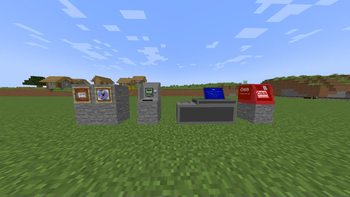
About this Mod
Main features of the mod
1. ATM and bank functions
The mod adds various banking and ATM functions that allow players to interact with money and perform transactions.
ATM (Automated Teller Machine):**
Players can perform the following transactions at ATMs:- deposit money
- Withdrawal of money with fixed amounts such as:
- 1€, 2€, 5€, 10€, 50€, 100€, 200€
Deposit machine:
A special machine that allows players to deposit money into their account.- Tooltip: "You can withdraw money here. ”
2. ticket vending machines
Ticket vending machines act as sales systems where players can buy tickets.
- Prices:
- 1* : 5€
Players can purchase tickets to gain access to different areas or functions and to settle outstanding amounts.
3. Scoreboard integration
The mod offers Scoreboard integration to manage players' bank accounts and balances.
- Scoreboard:
A scoreboard that runs under the "bank ‘ label to display and manage players’ financial data.
4. Items
The mod adds special items that can be used in the game:
Train Ticket:
A train ticket that can be used by players to travel within the game or perform certain actions.Logo:
A decorative item that serves as a cosmetic element.
5. Creative Mode Menu
In creative mode, there is a new entry in the player's inventory for the specified item/blocks.
Setup of the mod outside the official server
1. Create scoreboards
/scoreboard objectives add bank
/scoreboard objectives setdisplay sidebar bank
2. Add player to scoreboard
/scoreboard players add @a bank 1
Available Versions
How to Install Create Cannon 2 on Your Server
Order Server
Order a Minecraft Java server with at least 4 GB RAM (6 GB recommended).
Set forge Loader
In the panel under "Egg", select the forge loader and matching Minecraft version (1.20.1).
Install Mod
Open the mod browser in the dashboard and search for "Create Cannon 2". Click "Install" – done! Alternatively, upload the .jar via SFTP to the /mods folder.
Compatibility
Mod Loaders
Minecraft Versions
1.20.1
Server-side
✗ UnsupportedRecommended RAM
6 GB(min. 4 GB)Frequently Asked Questions
Create Cannon 2 server crashes on startup – what to do?
Most common cause: wrong forge version or insufficient RAM. Check the server log (latest.log) for "OutOfMemoryError" or "Mixin" errors. With Mado Hosting: ensure at least 4 GB RAM is allocated and the loader matches the mod version (1.20.1). You can switch loaders with one click in the panel.
Is Create Cannon 2 compatible with forge?
Create Cannon 2 officially supports forge for Minecraft 1.20.1. The Mado dashboard automatically detects incompatible loader combinations.
Server lagging with Create Cannon 2 – how to optimize performance?
Recommended RAM: 6 GB (per 5 players). Use /spark profiler to check if Create Cannon 2 consumes the most tick time. Common fixes: reduce server view-distance to 8-10, install "performant" or "starlight" as supplementary mods on Forge. With Mado Hosting, your server runs on NVMe SSDs with dedicated CPU cores for minimal latency.
Rent Modded Server
Install Create Cannon 2 with just one click on your server.