
Create: Collection Bundles
An experimental mod adding feature for `Create` logistic system to extract items from several types of blocks
Screenshots
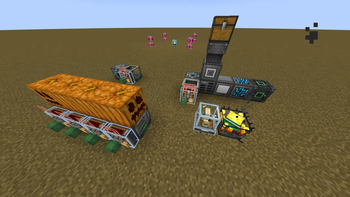
About this Mod
Create: Collection Bundles
An experimental mod adding feature for Create logistic system (packagers and traditional funnels) to extract items from several types of blocks
Current Contents
- Carving pumpkins by extracting its seed
Refined Storagecompat: extracting items inside network through:- (normal & creative) controller blocks
- network transmitter/receiver blocks
- NOTE: due to some undefined behaviors, inserting items into these blocks are not supported, only extracting allowed
Applied Energistics 2compat: extracting items inside grid through:- controller blocks
- NOTE: same as above, inserting not allowed yet
Future Plans
supportingAE2network- interaction thru cables
- supporting QIO network from
Mekanism - custom registration API via
KubeJS - porting to Fabric and other versions
- special support for chutes
Available Versions
How to Install Create: Collection Bundles on Your Server
Order Server
Order a Minecraft Java server with at least 4 GB RAM (6 GB recommended).
Set forge Loader
In the panel under "Egg", select the forge loader and matching Minecraft version (1.20.1).
Install Mod
Open the mod browser in the dashboard and search for "Create: Collection Bundles". Click "Install" – done! Alternatively, upload the .jar via SFTP to the /mods folder.
Compatibility
Mod Loaders
Minecraft Versions
1.20.1
Server-side
✓ RequiredRecommended RAM
6 GB(min. 4 GB)Frequently Asked Questions
Create: Collection Bundles server crashes on startup – what to do?
Most common cause: wrong forge version or insufficient RAM. Check the server log (latest.log) for "OutOfMemoryError" or "Mixin" errors. With Mado Hosting: ensure at least 4 GB RAM is allocated and the loader matches the mod version (1.20.1). You can switch loaders with one click in the panel.
Is Create: Collection Bundles compatible with forge?
Create: Collection Bundles officially supports forge for Minecraft 1.20.1. The Mado dashboard automatically detects incompatible loader combinations.
Server lagging with Create: Collection Bundles – how to optimize performance?
Recommended RAM: 6 GB (per 5 players). Use /spark profiler to check if Create: Collection Bundles consumes the most tick time. Common fixes: reduce server view-distance to 8-10, install "performant" or "starlight" as supplementary mods on Forge. With Mado Hosting, your server runs on NVMe SSDs with dedicated CPU cores for minimal latency.
Rent Modded Server
Install Create: Collection Bundles with just one click on your server.