
Create: Commerce
A physical village-based wholesale logistics trade economy mod, built with Create automation in mind.
Screenshots


About this Mod

📦 Create: Commerce
A physical village-based wholesale logistics trade economy mod, built with Create automation in mind.
✨ Overview
Create: Commerce adds a fully physical, logistics-based economy to Minecraft.
Produce, pack, dispatch, and deliver goods to get paid.
Villages become real economic endpoints, and your Create factory becomes part of a living supply network.
Create: Commerce is designed first for modpack devs to configure values of bulk trade items, ie. an incentive to mass produce items in Create. You can configure all values of all items to fit your specific needs, but as time goes on I will try to ensure the default values are accurate enough for plug-and-play.
⚙️ Key Features
🏪 Village Trade System
- Every village has a unique commerce profile
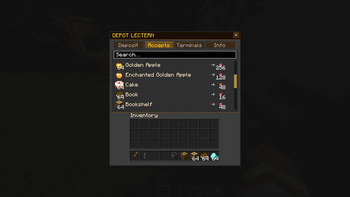
- Villages accept specific goods based on their village type
- Fixed, configurable pricing using the Create: Numismatics Spur currency
- Configurable daily/weekly/whenever caps ensure anti-cheese and natural competition (or alliance) between players
📊 Block 1: Trade Terminal
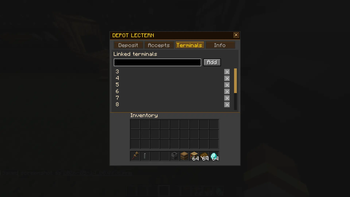
- View all linked villages
- See eligible items, caps, and payouts
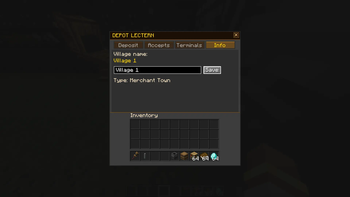
- Village details and coordinates
📚 Block 2: Depot Lectern
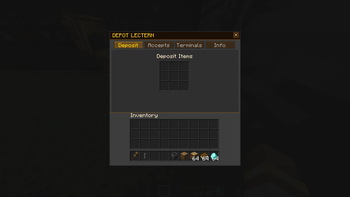
- Accepts items from the block UI, hoppers on the sides, or dropped into the top face
- Converts goods into Spur instantly
- Fully automatable
📋 Dependencies
Required:
- Neoforge 21.1.187 or higher
- Create 6.0.6 or higher
- Create: Numismatics 1.0.18 or higher
Recommended:
- Areas / Random Village Names for automatic village naming
🗺️ Roadmap
- Village orders/contracts (specific item requests for higher payouts)
- Plan delivery routes in the Trade Terminal
- Advanced compatibility with Create: Aeronautics and other addons
- Option to require the Trade Terminal be powered by SU from the bottom (enabled by default)
❔ FAQ
Can I...?
- Do whatever you want with the mod, as long as it remains free & open source (GPLv3 License)
How do I adjust trades, values, village types, etc?
Configs will generate in the 'Create_Commerce' folder upon world load.
Easiest way is to open the create_commerce-items.json in Notepad++, select 'View' > 'Fold All', then open up the "item_overrides" tab. You will see all auto-detected eligible items sectioned by mod. You can edit values, and add or remove items from the list.
Village types can be fully configured in create_commerce-villages.json. You can add your own types, remove default ones, or edit any parameter.
Will you port to...?
- My objective is to polish 1.21.1 NeoForge before considering other versions.
Mod compatibility?
- This mod automatically detects eligible items from other mods, adds a section into the config file, and assigns values to those items based on criteria. You can then configure those items or add new ones.
What if I update a mod and new items are added?
- The config will automatically add any eligible items.
Available Versions
How to Install Create: Commerce on Your Server
Order Server
Order a Minecraft Java server with at least 4 GB RAM (6 GB recommended).
Set neoforge Loader
In the panel under "Egg", select the neoforge loader and matching Minecraft version (1.21.1).
Install Mod
Open the mod browser in the dashboard and search for "Create: Commerce". Click "Install" – done! Alternatively, upload the .jar via SFTP to the /mods folder.
Compatibility
Mod Loaders
Minecraft Versions
1.21.1
Server-side
✓ RequiredRecommended RAM
6 GB(min. 4 GB)Frequently Asked Questions
Create: Commerce server crashes on startup – what to do?
Most common cause: wrong neoforge version or insufficient RAM. Check the server log (latest.log) for "OutOfMemoryError" or "Mixin" errors. With Mado Hosting: ensure at least 4 GB RAM is allocated and the loader matches the mod version (1.21.1). You can switch loaders with one click in the panel.
Is Create: Commerce compatible with neoforge?
Create: Commerce officially supports neoforge for Minecraft 1.21.1. The Mado dashboard automatically detects incompatible loader combinations.
Server lagging with Create: Commerce – how to optimize performance?
Recommended RAM: 6 GB (per 5 players). Use /spark profiler to check if Create: Commerce consumes the most tick time. Common fixes: reduce server view-distance to 8-10, install "performant" or "starlight" as supplementary mods on Forge. With Mado Hosting, your server runs on NVMe SSDs with dedicated CPU cores for minimal latency.
Similar Mods




Rent Modded Server
Install Create: Commerce with just one click on your server.