
Create: Factory Controller
Centralized Factory Gauge management with a virtual dashboard and advanced logistics control.
Screenshots
About this Mod
Create: Factory Controller
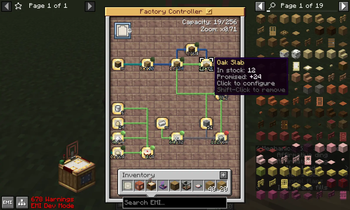
Create: Factory Controller addon introduced a new block "Factory Controller" to allow you to easily manage your Factory Gauges in a GUI. Instead of having wall of Factory Gauges in the game world, the Controller block can keep the gauges in a virtual board for you (Important: Factory Controller currently cannot manage existing factory gauge wall). Factory Controller integrate and reimplement the dispatch logic of Factory Gauges, so the gauges managed by Factory Controller work more smoothly and received a number of powerful new features. The mod still in early development stage, any bug report and suggestion would be greatly appreciated.
Features
- Factory Controller: Provides a centralized place for you to keep and managing up to 256 gauges (configurable).
- Virtual Board: You can move & zoom view in the virtual board like a 2D canvas; the board size also automatically adjusted by screen size.
- Full Overlay: You can see the count label of ALL gauges by toggle Full Overlay mode (default keybinding: Alt).
- Connection Rotate: You can cycle arrow mode like real gauge by press "R" key (could be changed in keybinding).
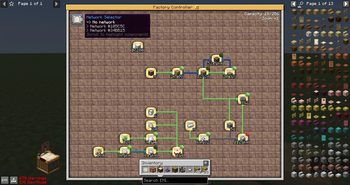
- Network Selector: A component in the GUI which keeps list of known networks on the virtual board, and you can scroll it to highlight the gauges which belong to chosen network.
- Quick Tune: When holding a gauge item on cursor and scroll the Network Selector component in GUI (or just Shift+Scroll), you can directly tune the gauge to a known network.
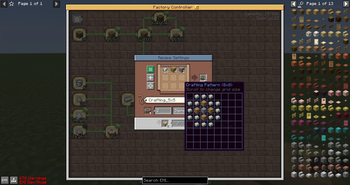
- JEI/EMI Integration: Allow to set gauge filter without to actually have the item in inventory.
- Redstone Control: When controller block is powered by redstone signal, all of stored gauges will temporarily stop sending new requests.
- Redstone Link Support: Redstone Link could be used in controller as well, it is as large as gauge in controller's grid.
- Improved Factory Gauges: Gauges in virtual board (not include the gauges in game world) receive the following new features:
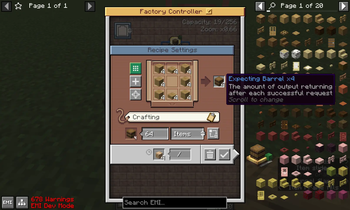
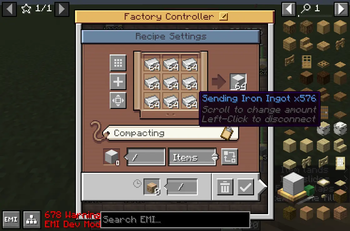
- Batch Crafting: You can modify batch size in crafting mode gauge now. The gauge will attempt to send out multiple set of ingredients in one single package, and re-packager can split the package to multiple single-craft packages.
- Larger Crafting Grid: You can now use larger than 3x3 recipes in the crafting mode gauge, as long as a single package can fit the crafting ingredients. Compatible with Batch Crafting feature.
- Larger Ingredient Amount per Connection: Each connected ingredient no longer only able to have up to 64 items. You can continue to scroll & increase the request amount exceed 64, as long as you have non-occupied slots to use.
- Ignore Item Data: You can turn on "Ignore Data" when set item to gauge now. While this option is enabled, the gauge will monitor all items for specified type. Due to internal limitation, batch crafting and large crafting is disabled if any ingredient is in ignore data mode.
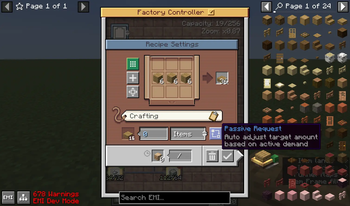
- Follow Demand Mode: You cannot manually set request amount of the Passive mode gauge. Instead, the request amount is automatically set when connected gauges need the item for their craft, so you do not need to keep intermediate items in stock. Chain multiple passive mode gauges is also supported.
- Follow Demand and Order: Beyond automatically set request amount, the recipe of the gauge would be added to Stock Keeper GUI to allow manually initialize production orders. You can also track ongoing production order in Stock Keeper now.
- Mod Compatibility: The mod "replicate" a new gauge system, so it should not conflict with other gauge related mods, but also cannot receive other mod's modification unless implement dedicate support. The compatibility with following mods are supported:
- Create: FluidLogistic: Gauge recipe allows fluid if installed, you can right-click the gauge with a fluid container item on cursor to set fluid filter.
Dependencies
| Dependency | Version |
|---|---|
| Minecraft | 1.21.1 |
| NeoForge | 21.1.227 |
| Create | 6.0.10 |
| Deployer (Recommended) | 0.1.2 |
Credits
Graphics:
- FiveYellowMice
Translations:
- ru_ru: Makisk
- pl_pl: Makisk
Sounds:
- Winding Noise - Music Box by charcrone -- https://freesound.org/s/347035/ -- License: Creative Commons 0
- Pocket watch. Clicking open and closed, chain noise and picking up by JarredKarp -- https://freesound.org/s/490968/ -- License: Attribution NonCommercial 4.0
AI Disclosure
The system architecture design and graphics assets are produced by human. AI is used for assist some individual code implementations to accelerate development but closely guard and reviewed by highly experienced Minecraft mod developer to ensure quality of the content.
Available Versions
How to Install Create: Factory Controller on Your Server
Order Server
Order a Minecraft Java server with at least 4 GB RAM (6 GB recommended).
Set neoforge Loader
In the panel under "Egg", select the neoforge loader and matching Minecraft version (1.21.1).
Install Mod
Open the mod browser in the dashboard and search for "Create: Factory Controller". Click "Install" – done! Alternatively, upload the .jar via SFTP to the /mods folder.
Compatibility
Mod Loaders
Minecraft Versions
1.21.1
Server-side
✓ RequiredRecommended RAM
6 GB(min. 4 GB)Frequently Asked Questions
Create: Factory Controller server crashes on startup – what to do?
Most common cause: wrong neoforge version or insufficient RAM. Check the server log (latest.log) for "OutOfMemoryError" or "Mixin" errors. With Mado Hosting: ensure at least 4 GB RAM is allocated and the loader matches the mod version (1.21.1). You can switch loaders with one click in the panel.
Is Create: Factory Controller compatible with neoforge?
Create: Factory Controller officially supports neoforge for Minecraft 1.21.1. The Mado dashboard automatically detects incompatible loader combinations.
Server lagging with Create: Factory Controller – how to optimize performance?
Recommended RAM: 6 GB (per 5 players). Use /spark profiler to check if Create: Factory Controller consumes the most tick time. Common fixes: reduce server view-distance to 8-10, install "performant" or "starlight" as supplementary mods on Forge. With Mado Hosting, your server runs on NVMe SSDs with dedicated CPU cores for minimal latency.
Similar Mods





Rent Modded Server
Install Create: Factory Controller with just one click on your server.