
Create: Filters Anywhere
Enhances Create's Attribute and List Filters and allows their usage in other mods!
About this Mod
Create: Filters Anywhere
This mod adds a few extra feature's to the Create mod's excellent Attribute and List Filters!
The main feature (and the namesake of the mod) is added compatability to use Create's filters in other mod's filter slots! Additional mods will be added over time, but here are the supported mods so far:
- Filters now work inside the filter slots of upgrades, such as the pickup and void upgrades.
- Filters now work inside the filter slots of upgrades, such as the filter and void upgrades.
- Filters now work inside of View Cells, Import Bus, Export Bus, Storage Bus, and Formation Planes. Supports normal and Fuzzy card operation.
- Filters now work as filter items inside modules.
- Filters now work inside MR's Bulk Item Filter.
Tom's Simple Storage Mod (v1.1+)
- Filters now work inside of Tom's Basic Item Filter.
- Filters now work inside of LaserIO's Basic Filter cards.
Refined Storage (v1.3+, 1.20.1 only)
- Filters now work inside Exporters, Importers, Grid Filters, Destructors, and External Storages.
New Attributes:
In addition to compatability with existing mods, as of v1.2+, I have now started adding new attributes as well. You can see the current list below.
- "is a backpack with a UUID of
". - "is a backpack with a
" (like Pickup Upgrade, Filter Upgrade, Magnet Upgrade.
Compatability will only be applied when the mods are present, you should be able to use the mod whether all of the above mods are present or not.
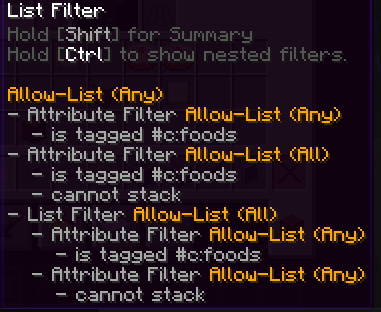
In addition to this compatablity, this mod also adds some nifty QOL features to Create's filters, such as the ability to view details on the filters inside of List Filters by using the CTRL key while hovering the filter.
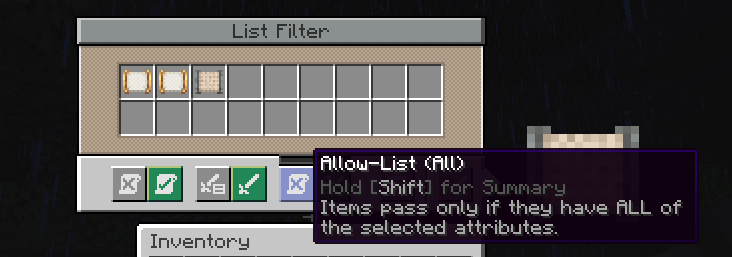
There is also the super useful addition of "Match All" to the List Filter, which when set, requires all of the filters to match inside of a List Filter instead of any of them for it to pass the filter.
Thank you to the incredible developers: Joseph Franci, rizek (radimous), and JustAHuman. As this is a port of the incredible original project, [Vault Filters](https://www.curseforge.com/minecraft/mc-mods/vault-filters)!
New features coming soon when I have time!
Available Versions
How to Install Create: Filters Anywhere on Your Server
Order Server
Order a Minecraft Java server with at least 4 GB RAM (6 GB recommended).
Set forge Loader
In the panel under "Egg", select the forge loader and matching Minecraft version (1.21.1).
Install Mod
Open the mod browser in the dashboard and search for "Create: Filters Anywhere". Click "Install" – done! Alternatively, upload the .jar via SFTP to the /mods folder.
Compatibility
Mod Loaders
Minecraft Versions
1.21.1, 1.21, 1.20.6 (+5 more)
Server-side
✓ RequiredRecommended RAM
6 GB(min. 4 GB)Frequently Asked Questions
Create: Filters Anywhere server crashes on startup – what to do?
Most common cause: wrong forge version or insufficient RAM. Check the server log (latest.log) for "OutOfMemoryError" or "Mixin" errors. With Mado Hosting: ensure at least 4 GB RAM is allocated and the loader matches the mod version (1.21.1). You can switch loaders with one click in the panel.
Is Create: Filters Anywhere compatible with forge and neoforge?
Create: Filters Anywhere officially supports forge, neoforge for Minecraft 1.21.1, 1.21, 1.20.6. The Mado dashboard automatically detects incompatible loader combinations.
Server lagging with Create: Filters Anywhere – how to optimize performance?
Recommended RAM: 6 GB (per 5 players). Use /spark profiler to check if Create: Filters Anywhere consumes the most tick time. Common fixes: reduce server view-distance to 8-10, install "performant" or "starlight" as supplementary mods on Forge. With Mado Hosting, your server runs on NVMe SSDs with dedicated CPU cores for minimal latency.
Rent Modded Server
Install Create: Filters Anywhere with just one click on your server.