
Create : Gravity
🌌 Turns the Ender into the Moon
Screenshots
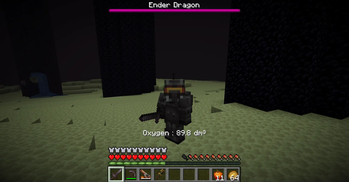
About this Mod

Create : Gravity is a simple Create addon, turning the End Dimension into something more Moon-themed with 2 simple tweaks

Functionality
This mod allows you to make certain biomes (and therefor dimensions):
- Not have oxygen (if you run out of air, you will take damage)
- Have low gravity
By default these two functionalities will be applied to biomes of the end dimension
Configuration
Biomes can be configured as low oxygen and / or low gravity biome, for example:
minecraft:plains;75;-0.3- or
#forge:is_hot;;-0.8(uses the default oxygen factor of100) - or
terralith:alpha_islands;100;(uses the default gravity factor of-0.8)
The Oxygen factor has to be above or equal to 0 (a value of 0 will disable the logic for said biome)
- Higher values will cause the oxygen to deplete at a lower rate
The Gravity factor has to be between -1 (will disable gravity entirely) or 0 (disables gravity logic for said biome)
In addition, the following things can be configured as well:
- Amount of damage and the rate at which the player does get damaged
- Whether wearing a diving helmet is required to make the backtank functional (i.e. use the air supply)
- The rate at which the player loses oxygen (this will always be slower if a player is wearing a diving helmet)
- The rate at which the backtank air supply gets depleted
Datapack
Item tags
create_gravity:anti_low_gravity_boots: Will disable the gravity effect of said biome (when worn in the boots equipment slot)- Contains
create:copper_diving_bootsandcreate:netherite_diving_bootsby default
- Contains
create_gravity:diving_helmets: Will decrease the rate at which oxygen drains (when worn in the helmet slot)- Contains
create:copper_diving_helmetandcreate:netherite_diving_helmetby default
- Contains
create_gravity:backtanks: The logic will look for an NBT entry ofAir(when worn in the chest slot)- Contains
create:copper_backtankandcreate:netherite_backtankby default - If present and the value is above
1it will be decreased by1, supply oxygen and the oxygen damage ticks will reset - If no backtank is equipped the oxygen damage ticks will increase and once they reach the configured value (default is
60) then the player will take damage - By default, the
Createbacktanks will have this tag - though you can add other items and handle the addition of this tag yourself
- Contains
Entity Type tags
create_gravity:low_gravity_blacklist: Will cause the entity to not be affected by the gravity change (contains#forge:bossesby default)
Compatibility
The mod should be compatible with some other space suits mods (Futurepack and Space Dimensions suits seems to be working)
No explicit compatibility has been made so far (might be the case in the future)
Social

Available Versions
How to Install Create : Gravity on Your Server
Order Server
Order a Minecraft Java server with at least 4 GB RAM (6 GB recommended).
Set forge Loader
In the panel under "Egg", select the forge loader and matching Minecraft version (1.20.5).
Install Mod
Open the mod browser in the dashboard and search for "Create : Gravity". Click "Install" – done! Alternatively, upload the .jar via SFTP to the /mods folder.
Compatibility
Mod Loaders
Minecraft Versions
1.20.5, 1.20.4, 1.20.3 (+5 more)
Server-side
✓ RequiredRecommended RAM
6 GB(min. 4 GB)Frequently Asked Questions
Create : Gravity server crashes on startup – what to do?
Most common cause: wrong forge version or insufficient RAM. Check the server log (latest.log) for "OutOfMemoryError" or "Mixin" errors. With Mado Hosting: ensure at least 4 GB RAM is allocated and the loader matches the mod version (1.20.5). You can switch loaders with one click in the panel.
Is Create : Gravity compatible with forge?
Create : Gravity officially supports forge for Minecraft 1.20.5, 1.20.4, 1.20.3. The Mado dashboard automatically detects incompatible loader combinations.
Server lagging with Create : Gravity – how to optimize performance?
Recommended RAM: 6 GB (per 5 players). Use /spark profiler to check if Create : Gravity consumes the most tick time. Common fixes: reduce server view-distance to 8-10, install "performant" or "starlight" as supplementary mods on Forge. With Mado Hosting, your server runs on NVMe SSDs with dedicated CPU cores for minimal latency.
Similar Mods




Rent Modded Server
Install Create : Gravity with just one click on your server.