
Create:Heat
A mod provide ways to heat create machine up
Screenshots
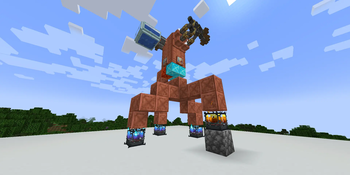

About this Mod
Overview
This mod primarily adds two blocks for transferring and storing Create's heat energy in the game.
Blocks
Thermal Block series, etc.
Mined with a stone pickaxe or higher. Can be quickly dismantled with a wrench. Has 4 block states, consistent with the block states of a Blaze Burner.
Transmits heat, similar to pipes. Automatically connects adjacent Thermal Block into a single network (maximum connection distance can be modified in the config file).
For a group of connected Thermal Block, there is an internal shared heat storage system.
Absorbing Heat
Heat can be added to the shared storage by heating any block in the network from below.
Releasing Heat
- When a machine is found above a block (either one in the
createheat:should_heatblock tag, or a Boiler), the block will change its state to a heating state (depending on the stored heat. Heat consumption per state is configurable; it will provide the highest possible heat level). - When a block adjacent to the network meets the input conditions for a recipe with type
createheat:heat, the block will change its state to a heating state (conditions as above).
Tight compressed_stone
Mined with a wooden pickaxe or higher. Can store heat. Has 3 block states, corresponding to: No Heat, Regular Heat, and Super Heat.
When in the Normal Heating Heat or Super Heating Heat state, it damages entities standing on it, similar to a Magma Block.
When connected to a Thermal Block network, it is automatically integrated into the network's heat storage system. It changes its own block based on the amount of heat stored in the network, and will turn into corresponding blockstate if the heat is sufficiently high.
Recipes
Adds one recipe type.
Heat
Consumes heat to transform a block from one state to another.
Data Support
Supports adding custom state-based heaters via data packs.
Cross-Mod Compatibility
Content (like blocks, items) only appears if the corresponding mod is installed.
Ice And Fire Community Edition
Adds one block.
Block
Dragon Fire Input: Used to convert Dragon Breath into heat.
Data Support
Data packs can be used to customize the amount of heat provided by the breath of different dragon types and different growth stages.
Available Versions
How to Install Create:Heat on Your Server
Order Server
Order a Minecraft Java server with at least 4 GB RAM (6 GB recommended).
Set neoforge Loader
In the panel under "Egg", select the neoforge loader and matching Minecraft version (1.21.1).
Install Mod
Open the mod browser in the dashboard and search for "Create:Heat". Click "Install" – done! Alternatively, upload the .jar via SFTP to the /mods folder.
Compatibility
Mod Loaders
Minecraft Versions
1.21.1
Server-side
✓ RequiredRecommended RAM
6 GB(min. 4 GB)Frequently Asked Questions
Create:Heat server crashes on startup – what to do?
Most common cause: wrong neoforge version or insufficient RAM. Check the server log (latest.log) for "OutOfMemoryError" or "Mixin" errors. With Mado Hosting: ensure at least 4 GB RAM is allocated and the loader matches the mod version (1.21.1). You can switch loaders with one click in the panel.
Is Create:Heat compatible with neoforge?
Create:Heat officially supports neoforge for Minecraft 1.21.1. The Mado dashboard automatically detects incompatible loader combinations.
Server lagging with Create:Heat – how to optimize performance?
Recommended RAM: 6 GB (per 5 players). Use /spark profiler to check if Create:Heat consumes the most tick time. Common fixes: reduce server view-distance to 8-10, install "performant" or "starlight" as supplementary mods on Forge. With Mado Hosting, your server runs on NVMe SSDs with dedicated CPU cores for minimal latency.
Similar Mods





Rent Modded Server
Install Create:Heat with just one click on your server.