
Create: Item Drawers
Drawer storage addon for Create
Screenshots


About this Mod
Create: Item Drawers


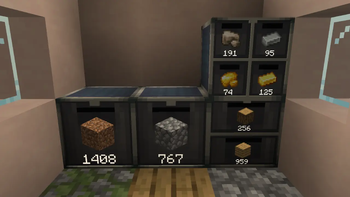
Create: Item Drawers is a Create addon which adds the usual drawers for storage, but with a Create flair.
Features
Usage
Right-Click on a slot while holding an item to insert it.
Sneak + Right-Click to insert all matching items from your inventory into the slot.
Left-Click a slot to take out a single item stored.
Sneak + Left-Click to take our a stack at a time.
Settings
Right-Click the front of a drawer with a Wrench to open the settings for said drawer.
Here you can insert upgrades to increase the capacity, as well as toggle lock and void modes for each individual slot. You can also hide items, the amount, or upgrade icons etc., if you wish.
No need for an additional item to lock/void your drawers!
Lock mode:
When enabled, keeps the stored item as a template even when the slot is emptied out. Prevents other items from being inserted into the slot.
Void mode:
When enabled, deletes excess items inserted into the drawer. Helpful to prevent overflow.
Upgrades
Upgrades allow you to increase the total capacity of a drawer. The upgrade affects all slots in the drawer.
If you remove an upgrade and max capacity ends up being less than what is currently stored in a slot, then said slot is "frozen" until an upgrade of high enough tier is inserted again.
Comes with 5 tiers of upgrades.
Networks
By using a wrench on two drawers next to each other, you can connect them (similar to Mechanical Crafters from base Create). This lets you create Drawer networks where components that can insert/extract items can do so from a single point.
Configuration
Client Side:
- Settings to configure the distance at which items, counts, and icons (lock/void/upgrade) are shown.
Also able to disable the rendering of these globally if you wish to for some reason. - Setting to enable Engineer's Goggles overlay to see details such as stored items, lock/void modes etc. while wearing the goggles. Can additionally set it to require holding a Wrench as well if you wish. Both are disabled by default to not clutter the HUD too much.
Server Side:
- Settings to adjust the base capacity of each of the three drawer types. The capacity is measured in stacks - eg. a base capacity of 32 means it can store 32 stacks (A stack of Cobblestone is 64, so 32*64=2048, while a stack of Ender Pearls is 16, so 32*16=512)
- Settings to adjust the upgrade multipliers. Pretty straightforward, they multiply the base capacity.
- Settings to adjust slowness debuff when having Drawers with items stored in the player inventory.
Other Info
Modpack permission
You're more than welcome to include it in your modpack.
Porting and Forking
This was mainly made for myself and some friends, and as such I have no plans to port to other modloaders, or port to previous versions.
I will try and see if I can at least keep it updated for the latest Create version on the most recent Minecraft version (At the moment, 1.21.1).
Otherwise, feel free to fork it and port yourself.
New features / Suggestions
You're welcome to suggest things, but as mentioned above this was mainly made for myself and some friends, so I can't promise I'll dedicate a lot of effort to add suggested features.
Credits
A general huge thanks to the modding community for all the open source tools to use and projects to learn from!
- Create
For the main mod of course. - Storage Drawers, Functional Storage, Create: Storage [Neo/Forge]
Some of the relevant mods I learned from and was inspired by.
Available Versions
How to Install Create: Item Drawers on Your Server
Order Server
Order a Minecraft Java server with at least 4 GB RAM (6 GB recommended).
Set neoforge Loader
In the panel under "Egg", select the neoforge loader and matching Minecraft version (1.21.1).
Install Mod
Open the mod browser in the dashboard and search for "Create: Item Drawers". Click "Install" – done! Alternatively, upload the .jar via SFTP to the /mods folder.
Compatibility
Mod Loaders
Minecraft Versions
1.21.1
Server-side
✓ RequiredRecommended RAM
6 GB(min. 4 GB)Frequently Asked Questions
Create: Item Drawers server crashes on startup – what to do?
Most common cause: wrong neoforge version or insufficient RAM. Check the server log (latest.log) for "OutOfMemoryError" or "Mixin" errors. With Mado Hosting: ensure at least 4 GB RAM is allocated and the loader matches the mod version (1.21.1). You can switch loaders with one click in the panel.
Is Create: Item Drawers compatible with neoforge?
Create: Item Drawers officially supports neoforge for Minecraft 1.21.1. The Mado dashboard automatically detects incompatible loader combinations.
Server lagging with Create: Item Drawers – how to optimize performance?
Recommended RAM: 6 GB (per 5 players). Use /spark profiler to check if Create: Item Drawers consumes the most tick time. Common fixes: reduce server view-distance to 8-10, install "performant" or "starlight" as supplementary mods on Forge. With Mado Hosting, your server runs on NVMe SSDs with dedicated CPU cores for minimal latency.
Similar Mods


Rent Modded Server
Install Create: Item Drawers with just one click on your server.