
Create : Linear Motion Simulated
An addon for Create : Simulated (Create Aeronautics). It adds blocks for linear movement on sub levels.
Screenshots
About this Mod
Will no longer be updated after the last version
I wanted to make the mod cause i realy liked the original concept and thought the block could have some use for peoples, but I won't have time to fix/update more.






Create: Linear Motion Simulated
Create: Linear Motion Simulated is an addon for Create and Create: Simulated that introduces a new linear motion component: the Pneumatic Cylinder.
The goal of this mod is to bring a compact, Create-style piston system designed around rotational power, redstone control, multiblock length, and simulated contraption movement.
Build longer. Push farther. Move structures with Create-style linear motion.
Pneumatic Cylinder
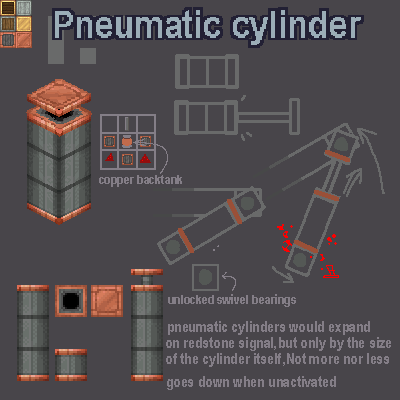
The Pneumatic Cylinder is a directional multiblock component that converts Create rotational power into linear extension.
A cylinder can be extended by placing multiple cylinder blocks in a straight line. The longer the cylinder body is, the farther its piston head can travel.
Main behavior
- Forms a 1x1xN multiblock cylinder body.
- Can face in any direction.
- Receives Create rotational power from the rear side.
- Activates with redstone.
- Extends and retracts a piston head.
- Maximum extension distance depends on the cylinder length.
- Designed to interact with simulated moving structures.
How it works
The cylinder has two important sides:
Rear side
The rear side is where rotational power is accepted.
For small 1x1 cylinders, the input shaft is placed on the back of the multiblock.
Front side
The front side is the piston head side.
When activated, the cylinder assembles its moving head and extends it forward. Blocks attached to the head can be moved as part of a simulated structure.
Usage overview
- Place a Pneumatic Cylinder block.
- Extend it by placing more cylinder blocks in the same line.
- Power the rear side with Create rotational force.
- Apply a redstone signal.
- The piston head assembles and extends.
- Remove the signal to retract.
The extension speed scales with rotational speed.
Create integration
Create: Linear Motion Simulated is designed to feel like a natural extension of Create’s kinetic system.
The Pneumatic Cylinder uses rotational input and redstone control, making it suitable for compact mechanical builds, moving assemblies, doors, platforms, machines, and experimental simulated contraptions.
Ponder support
The mod includes in-game Ponder tutorials to explain:
- how to place the Pneumatic Cylinder,
- how to extend the multiblock body,
- where to provide rotational input,
- how redstone activation works,
- and how the piston head behaves.
Hold the Ponder key on the Pneumatic Cylinder item to view the tutorial in-game.
Dependencies
This mod requires:
- Minecraft 1.21.1
- NeoForge
- Sable
- Create
- Create: Simulated / Create Aeronautics bundle
Make sure all required dependencies match the version listed for the mod release.
Current content
- Pneumatic Cylinder block
- In-game Ponder tutorials
More linear motion components may be added in the future.
Planned content
- An unlocked mode for the Pneumatic Cylinder : By default it will be in unlocked and using the wrench on it will make it switch to the current behavior. The unlocked variant will be free to move via external forces (gravity, properler...). This will be done once Sable update the constraint system.
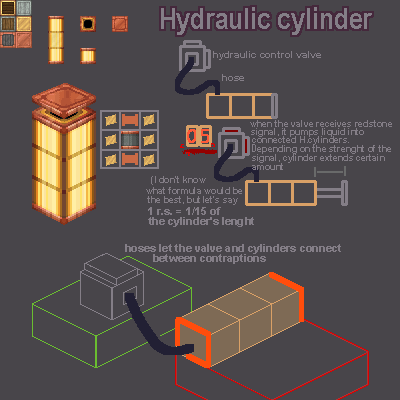
- A Hydraulic Cylinder block : works the same as the Pneumatic cylinder block but with an external controller (not binded to the same sub level) with length controle using redstone power strengh.
- A springloaded piston Block : A variant of the Hydraulic Cylinder block that would be in a uncompressed state when placed and can be compressed with rotation (and a lot of Stress Unit) and released in an instant (because it's a spring).
Notes
This project is still evolving. Some behavior may change as Create: Simulated, Sable, and the physics systems around them continue to develop.
If you encounter issues, please report them with:
- Minecraft version
- NeoForge version
- Create version
- Create: Simulated / Aeronautics version
- Sable version
- crash log or latest.log
- steps to reproduce the issue
Credits
Code and project by CookieG77.
Textures are the exclusive property of jimmy421x67.
This mod depends on and is inspired by the Create ecosystem, including Create, Create: Simulated, Create: Aeronautics, and Sable.
License
This project is distributed under a source-available non-commercial license. (more info here)
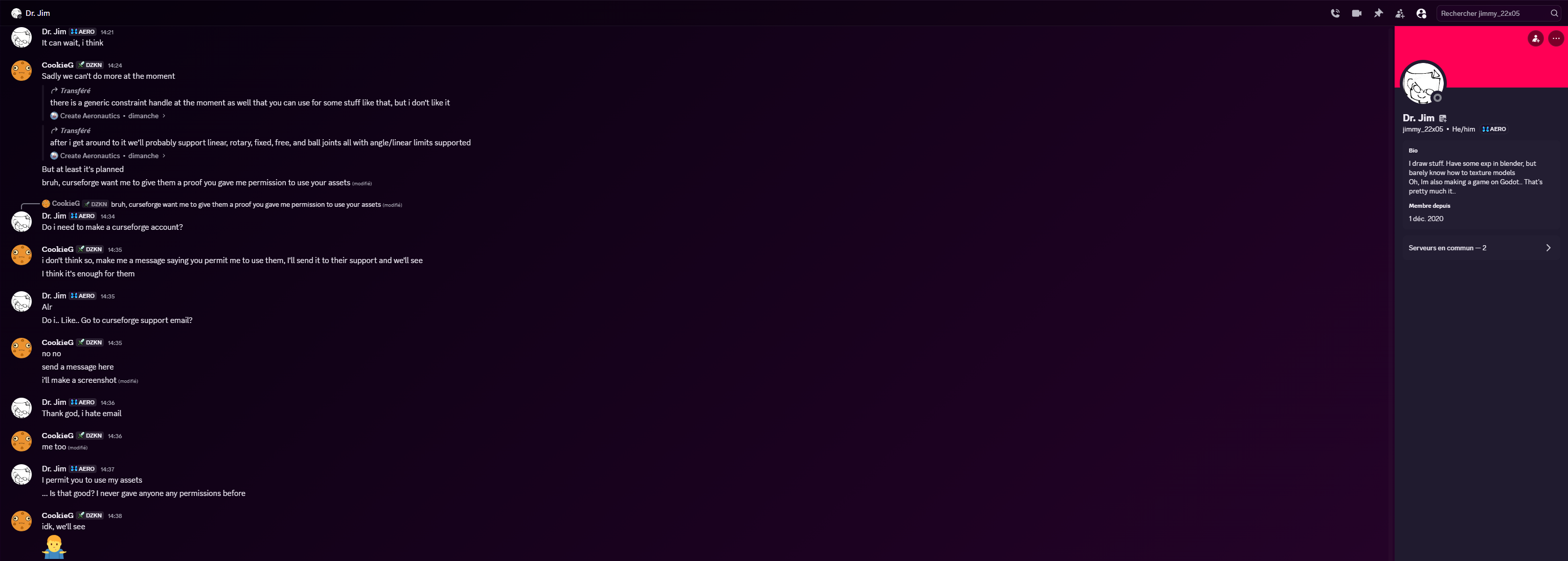
Textures and visual assets credited to jimmy421x67 / jimmy_22x05 may not be extracted, reused, modified, or redistributed separately without permission (See permission here).
Available Versions
How to Install Create : Linear Motion Simulated on Your Server
Order Server
Order a Minecraft Java server with at least 4 GB RAM (6 GB recommended).
Set neoforge Loader
In the panel under "Egg", select the neoforge loader and matching Minecraft version (1.21.1).
Install Mod
Open the mod browser in the dashboard and search for "Create : Linear Motion Simulated". Click "Install" – done! Alternatively, upload the .jar via SFTP to the /mods folder.
Compatibility
Mod Loaders
Minecraft Versions
1.21.1
Server-side
✓ RequiredRecommended RAM
6 GB(min. 4 GB)Frequently Asked Questions
Create : Linear Motion Simulated server crashes on startup – what to do?
Most common cause: wrong neoforge version or insufficient RAM. Check the server log (latest.log) for "OutOfMemoryError" or "Mixin" errors. With Mado Hosting: ensure at least 4 GB RAM is allocated and the loader matches the mod version (1.21.1). You can switch loaders with one click in the panel.
Is Create : Linear Motion Simulated compatible with neoforge?
Create : Linear Motion Simulated officially supports neoforge for Minecraft 1.21.1. The Mado dashboard automatically detects incompatible loader combinations.
Server lagging with Create : Linear Motion Simulated – how to optimize performance?
Recommended RAM: 6 GB (per 5 players). Use /spark profiler to check if Create : Linear Motion Simulated consumes the most tick time. Common fixes: reduce server view-distance to 8-10, install "performant" or "starlight" as supplementary mods on Forge. With Mado Hosting, your server runs on NVMe SSDs with dedicated CPU cores for minimal latency.
Rent Modded Server
Install Create : Linear Motion Simulated with just one click on your server.