
Create: Marketplace
A global market board for Create: Numismatics. Register your shops, browse server-wide offers, and navigate to them using Xaero's Minimap.
Screenshots
About this Mod
🏪 Create: Marketplace
Create: Marketplace is a powerful expansion for the Create mod ecosystem, designed specifically for multiplayer servers. This mod bridges the gap between Create industrial automation and the Create: Numismatics currency system, establishing a unified global advertising board for all player-owned shops.
✨ Features
🛒 Global Market Board
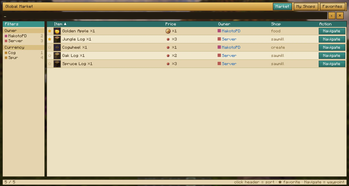
No more wandering aimlessly looking for a specific item! Open the market with the default M key (or by using a Registration Card) to access a sleek interface where you can:
- Live Search: Instantly find items, shops, or owners using the integrated search bar.
- Favorites System: Star (★) your favorite shops to keep them at the very top of your list.
- Compare Prices: See exactly what others are selling and for how much, all from one synchronized menu.
📍 Seamless Navigation
Thanks to built-in Xaero's Minimap integration, finding a shop in the world is a breeze:
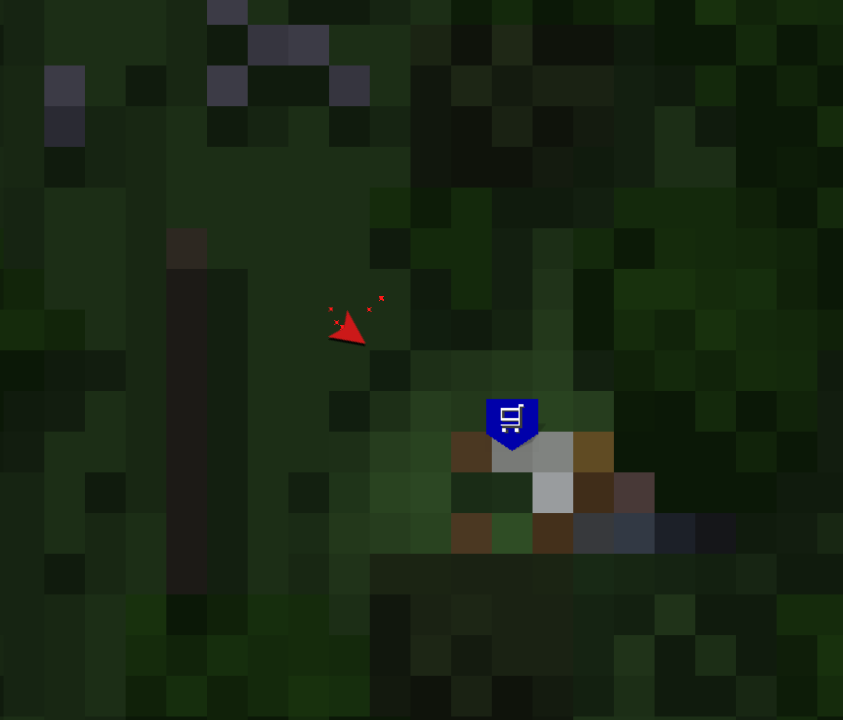
- Click "Navigate" on any offer, and the mod will automatically send a waypoint directly to your minimap.
- Customize how shop waypoints appear (Basket icon, first letter, or custom symbol) via the config file.
💳 Easy Shop Registration
All you need is a Registration Card!
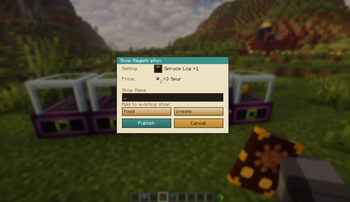
- Set up your Vendor or Trade Station from Create: Numismatics.
- Right-click the block with the Registration Card.
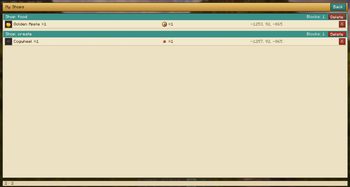
- Name your shop, and you're live! Your listing is now visible to everyone on the server.
🌐 Localization Support
The mod is fully localized and supports the following languages:
- 🇺🇸 English
- 🇵🇱 Polish
- 🇩🇪 German
- 🇪🇸 Spanish
- 🇫🇷 French
🛠 Requirements
To ensure everything works correctly, you will need:
- Minecraft: 1.21.1
- NeoForge: 21.1.228+
- Create
- Create: Numismatics
Optional (Highly Recommended):
Optional:
⚙️ Configuration
Fine-tune the mod in config/create_marketplace-common.toml:
waypointSymbolMode: Change the map icon style (Icon / First Letter / Custom char).useCardDurability: Toggle whether Registration Cards are consumed upon use.
Available Versions
How to Install Create: Marketplace on Your Server
Order Server
Order a Minecraft Java server with at least 4 GB RAM (6 GB recommended).
Set neoforge Loader
In the panel under "Egg", select the neoforge loader and matching Minecraft version (1.21.11).
Install Mod
Open the mod browser in the dashboard and search for "Create: Marketplace". Click "Install" – done! Alternatively, upload the .jar via SFTP to the /mods folder.
Compatibility
Mod Loaders
Minecraft Versions
1.21.11, 1.21.10, 1.21.9 (+8 more)
Server-side
✓ RequiredRecommended RAM
6 GB(min. 4 GB)Frequently Asked Questions
Create: Marketplace server crashes on startup – what to do?
Most common cause: wrong neoforge version or insufficient RAM. Check the server log (latest.log) for "OutOfMemoryError" or "Mixin" errors. With Mado Hosting: ensure at least 4 GB RAM is allocated and the loader matches the mod version (1.21.11). You can switch loaders with one click in the panel.
Is Create: Marketplace compatible with neoforge?
Create: Marketplace officially supports neoforge for Minecraft 1.21.11, 1.21.10, 1.21.9. The Mado dashboard automatically detects incompatible loader combinations.
Server lagging with Create: Marketplace – how to optimize performance?
Recommended RAM: 6 GB (per 5 players). Use /spark profiler to check if Create: Marketplace consumes the most tick time. Common fixes: reduce server view-distance to 8-10, install "performant" or "starlight" as supplementary mods on Forge. With Mado Hosting, your server runs on NVMe SSDs with dedicated CPU cores for minimal latency.
Similar Mods




![CobbleDollars [Cobblemon Addon]](https://cdn.modrinth.com/data/s7N7AsqL/684040a264fc1d7f9b856ec5d2da39767398c7ad.png)
Rent Modded Server
Install Create: Marketplace with just one click on your server.