
Create: Northstar-Aeronautics Compatibility
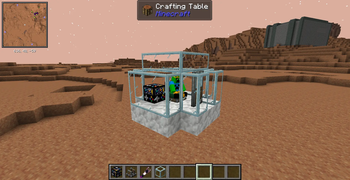
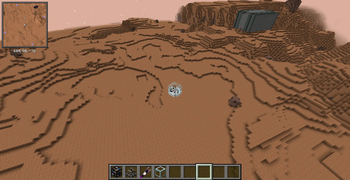
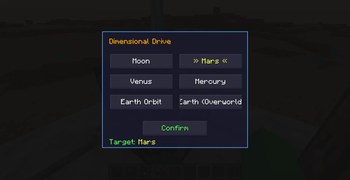
This mod adds a block named Dimensional Drive which, when attached on a physics object, has a GUI to select a destination planet form Create: Northstar. It teleports the physics contraption and the player on the selected planet. No crafting recipie yet.
Screenshots
About this Mod
Create: Northstar–Aeronautics Compatibility is a lightweight addon that bridges Create Aeronautics physics vehicles with Create Northstar’s planetary travel system, making Aeronautics crafts far more exciting and capable.
This addon introduces a new functional block — the Dimensional Drive — which allows physics entities to travel between planets in a seamless, immersive way.
Dimensional Drive
Interplanetary Travel for Physics Crafts
- it is a custom block, featuring a GUI where you select your destination planet (as seen in screenshot 3).
- When your physics entity reaches Y = 1750 at low vertical speed, the Drive automatically transfers the craft to the chosen planet.
- Designed to feel natural within Create’s engineering style while enabling true spaceflight gameplay.
Note:
The Dimensional Drive does not include a crafting recipe, giving modpack creators and server owners the freedom to add their own recipe via datapack.
Admin Tools
For testing, debugging, or creative setups, the mod includes:
- /drivetransfer {planet}
Instantly teleports you to the specified planet as long as you are seated on a physics entity.
Purpose of the Mod
The goal of this addon is simple:
Make Create Aeronautics physics objects more fun, more interactive, and more powerful by enabling interplanetary travel.
Whether you're building rockets, shuttles, or chaotic flying machines, this mod turns them into true spacefaring vehicles.
Available Versions
How to Install Create: Northstar-Aeronautics Compatibility on Your Server
Order Server
Order a Minecraft Java server with at least 4 GB RAM (6 GB recommended).
Set neoforge Loader
In the panel under "Egg", select the neoforge loader and matching Minecraft version (1.21.1).
Install Mod
Open the mod browser in the dashboard and search for "Create: Northstar-Aeronautics Compatibility". Click "Install" – done! Alternatively, upload the .jar via SFTP to the /mods folder.
Compatibility
Mod Loaders
Minecraft Versions
1.21.1
Server-side
✓ RequiredRecommended RAM
6 GB(min. 4 GB)Frequently Asked Questions
Create: Northstar-Aeronautics Compatibility server crashes on startup – what to do?
Most common cause: wrong neoforge version or insufficient RAM. Check the server log (latest.log) for "OutOfMemoryError" or "Mixin" errors. With Mado Hosting: ensure at least 4 GB RAM is allocated and the loader matches the mod version (1.21.1). You can switch loaders with one click in the panel.
Is Create: Northstar-Aeronautics Compatibility compatible with neoforge?
Create: Northstar-Aeronautics Compatibility officially supports neoforge for Minecraft 1.21.1. The Mado dashboard automatically detects incompatible loader combinations.
Server lagging with Create: Northstar-Aeronautics Compatibility – how to optimize performance?
Recommended RAM: 6 GB (per 5 players). Use /spark profiler to check if Create: Northstar-Aeronautics Compatibility consumes the most tick time. Common fixes: reduce server view-distance to 8-10, install "performant" or "starlight" as supplementary mods on Forge. With Mado Hosting, your server runs on NVMe SSDs with dedicated CPU cores for minimal latency.
Similar Mods




Rent Modded Server
Install Create: Northstar-Aeronautics Compatibility with just one click on your server.