
Create Optical
Create addon all about a creative way to transport rotational energy
Screenshots

About this Mod


This addon adds new blocks, items and mechanics to the mod Create.
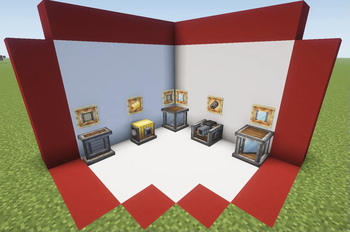
Included mechanics
- Optical Source: emit different types of beams based on the rotational force applied
- Optical Receptor: transform the received beam into rotational force based on its properties
- Optical Sensor: emit redstone signal based on the incident beam properties
- Mirror: reflect the beam perpendicularly
- Polarizing Filter: polarize the beam (duh)
- Beam Splitter Cube: split the beam in two and polarize the resultant beams perpendicularly
- Beam Condenser: condense up to three beams into one combining its properties
- Beam Focuser: new type of recipe based on beam characteristics
- Thermal Optical Source: similar to a normal source but with high su usage based on fluid aplications
- Hologram Display: display text or items in a hologram style
- Beam Reader: display the properties of the incident beam
* Beam Modulator: use it to comunicate through light
Different ways to generate light
Produce eletromagnetic waves with rotational force

New Receptor States
Transform eletromagnetic waves back to rotational force

Retextured Optical Sensor
A way to light ambients with style

New Components
Explore some of the other components of the mod (only stable on version 0.4)

All the crafts can be found with the JEI mod, and most additional mechanics can be explored with the Ponder Mod system.
Some things may break on changing versions. This mod is developed by one person and occasionally receives contributions via GitHub. Please understand that this project is treated as a hobby and not a full-time job.
Many thanks to those who translated the mod:
Russian: Mark2200 (0.2.2 or above)
Chinese Translation: CHN-YunRu (0.2.2 or above)
Brazilian Portuguese: lpcamors (0.2.2 or above)
Spanish: albertosaurio65 (0.2.2 or above)
Available Versions
How to Install Create Optical on Your Server
Order Server
Order a Minecraft Java server with at least 4 GB RAM (6 GB recommended).
Set forge Loader
In the panel under "Egg", select the forge loader and matching Minecraft version (26.1.2).
Install Mod
Open the mod browser in the dashboard and search for "Create Optical". Click "Install" – done! Alternatively, upload the .jar via SFTP to the /mods folder.
Compatibility
Mod Loaders
Minecraft Versions
26.1.2, 26.1.1, 26.1 (+17 more)
Server-side
✓ RequiredRecommended RAM
6 GB(min. 4 GB)Frequently Asked Questions
Create Optical server crashes on startup – what to do?
Most common cause: wrong forge version or insufficient RAM. Check the server log (latest.log) for "OutOfMemoryError" or "Mixin" errors. With Mado Hosting: ensure at least 4 GB RAM is allocated and the loader matches the mod version (26.1.2). You can switch loaders with one click in the panel.
Is Create Optical compatible with forge and neoforge?
Create Optical officially supports forge, neoforge for Minecraft 26.1.2, 26.1.1, 26.1. The Mado dashboard automatically detects incompatible loader combinations.
Server lagging with Create Optical – how to optimize performance?
Recommended RAM: 6 GB (per 5 players). Use /spark profiler to check if Create Optical consumes the most tick time. Common fixes: reduce server view-distance to 8-10, install "performant" or "starlight" as supplementary mods on Forge. With Mado Hosting, your server runs on NVMe SSDs with dedicated CPU cores for minimal latency.
Rent Modded Server
Install Create Optical with just one click on your server.