
Create Picky Wheels
Makes Create's Waterwheels and Windmills have requirements [biome, space, position].
Screenshots

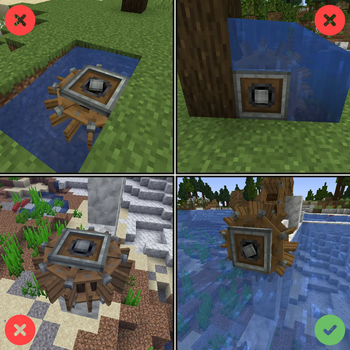


About this Mod
Create Picky Waterwheels modifies Create's Waterwheels default behavior. It makes it so they work similarly to Hose Pulleys, where the wheels require to be in contact with a large body of water, but in addition to that, they also require to be inside a River Biome to function. Otherwise, there is no power generation. This change is applied to both small and large waterwheels.
The mod also modifies Create's Windmill default behavior. It makes it so they check the surrounding area to see if there is enough open space for "air to circulate." It also checks the biome of placement, and by default only allows the Windmills to work inside the Overworld.
This mod adds no new blocks.
For the warning tooltips, like shown below for that windmill, use Create's Google.
Configuration is available for the threshold like for the Hose Pulley in Create. For the biome requirements, it can be tweaked via a biome tag.
This project was designed to work in tandem with Crete Low-Heated [plus, the intent is to pair it with capacity nerfed windmills and waterwheels].
Compat notes:
- TFC: set waterwheelsSourceRequiresFlow to true, and rivers will turn the wheel correctly.
- FlowingFluids: set waterwheelsAcceptsFlowing to true, and wheels will consider non-full water blocks. Change waterwheelsMinimumShallowness, if you want even shallower water to be included. For this to actually work, you must first set water_wheel_requirements in the config of flowing fluids mod to FLOW, so that this mod does the biome check and all instead of FF.
- By default, for structures that use wheels, waterwheelsPickyOnPlacement is set to true, so that requirements are only for player placed wheels.

Available Versions
How to Install Create Picky Wheels on Your Server
Order Server
Order a Minecraft Java server with at least 4 GB RAM (6 GB recommended).
Set forge Loader
In the panel under "Egg", select the forge loader and matching Minecraft version (1.21.1).
Install Mod
Open the mod browser in the dashboard and search for "Create Picky Wheels". Click "Install" – done! Alternatively, upload the .jar via SFTP to the /mods folder.
Compatibility
Mod Loaders
Minecraft Versions
1.21.1, 1.20.1, 1.19.2 (+1 more)
Server-side
✓ RequiredRecommended RAM
6 GB(min. 4 GB)Frequently Asked Questions
Create Picky Wheels server crashes on startup – what to do?
Most common cause: wrong forge version or insufficient RAM. Check the server log (latest.log) for "OutOfMemoryError" or "Mixin" errors. With Mado Hosting: ensure at least 4 GB RAM is allocated and the loader matches the mod version (1.21.1). You can switch loaders with one click in the panel.
Is Create Picky Wheels compatible with forge and neoforge?
Create Picky Wheels officially supports forge, neoforge for Minecraft 1.21.1, 1.20.1, 1.19.2. The Mado dashboard automatically detects incompatible loader combinations.
Server lagging with Create Picky Wheels – how to optimize performance?
Recommended RAM: 6 GB (per 5 players). Use /spark profiler to check if Create Picky Wheels consumes the most tick time. Common fixes: reduce server view-distance to 8-10, install "performant" or "starlight" as supplementary mods on Forge. With Mado Hosting, your server runs on NVMe SSDs with dedicated CPU cores for minimal latency.
Similar Mods





Rent Modded Server
Install Create Picky Wheels with just one click on your server.