
Create: Pop
Brew custom sodas and become the most pop-ular distributor around
Screenshots
About this Mod
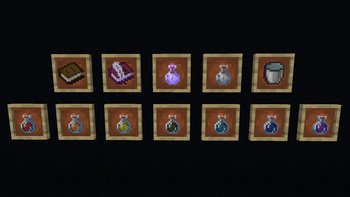
Create: Pop is a NeoForge addon for Create that brings procedural soda brewing to your factory. Carbonate water, mix in potions, and route the results through your Create contraptions to bottle custom drinks with functional effects.
Every world seed generates its own unique reaction chains. Mixing different sodas together can fuse, split, or mutate their effects into entirely new combinations. You will need to experiment to find the best recipes, but be careful: reckless mixing increases the batch's instability. If you push the chemistry too far without adding the right stabilizers, the mixture will backfire and ruin your drink.
Key Features
- Automated Brewing: Use standard Create mixers, basins, and fluid pipes to mass-produce your custom sodas.
- Procedural Reactions: Discover world-specific effect combinations by remixing different bases.
- Volatile Chemistry: Manage instability using stabilizers like acacia or magma cream to keep your production lines clean.
- Persistent Discovery: Name your newly discovered recipes and log them in the Brewer's Notebook to share your findings with the server.
- JEI Integration: Reaction hints unlock dynamically as you successfully discover them in-game.
Available Versions
How to Install Create: Pop on Your Server
Order Server
Order a Minecraft Java server with at least 4 GB RAM (6 GB recommended).
Set neoforge Loader
In the panel under "Egg", select the neoforge loader and matching Minecraft version (26.1.2).
Install Mod
Open the mod browser in the dashboard and search for "Create: Pop". Click "Install" – done! Alternatively, upload the .jar via SFTP to the /mods folder.
Compatibility
Mod Loaders
Minecraft Versions
26.1.2, 26.1.1, 26.1 (+12 more)
Server-side
✓ RequiredRecommended RAM
6 GB(min. 4 GB)Frequently Asked Questions
Create: Pop server crashes on startup – what to do?
Most common cause: wrong neoforge version or insufficient RAM. Check the server log (latest.log) for "OutOfMemoryError" or "Mixin" errors. With Mado Hosting: ensure at least 4 GB RAM is allocated and the loader matches the mod version (26.1.2). You can switch loaders with one click in the panel.
Is Create: Pop compatible with neoforge?
Create: Pop officially supports neoforge for Minecraft 26.1.2, 26.1.1, 26.1. The Mado dashboard automatically detects incompatible loader combinations.
Server lagging with Create: Pop – how to optimize performance?
Recommended RAM: 6 GB (per 5 players). Use /spark profiler to check if Create: Pop consumes the most tick time. Common fixes: reduce server view-distance to 8-10, install "performant" or "starlight" as supplementary mods on Forge. With Mado Hosting, your server runs on NVMe SSDs with dedicated CPU cores for minimal latency.
Similar Mods



Rent Modded Server
Install Create: Pop with just one click on your server.