
Create ReAutomated
Create ReAutomated adds nodes to extract resources from
About this Mod
Create ReAutomated
Port and rework of the original "Create Automated" mod by kotakotik22, updated to Minecraft 1.21.1 with NeoForge.
Create ReAutomated adds an alternative resource extraction system to traditional mining, designed to fit right into Create's automation workflow. What started years ago as a simple update, with kotakotik22's permission, has slowly turned into something fairly different from the original, while still keeping its spirit.

⚠️ Note: This is an initial release. Further balancing will likely be required, and some bugs may still occur.
What it adds
- Ore Nodes that spawn naturally inside ore veins across the world. You can't break them by hand: to get their resources you need an Extractor, and if you want to move a node somewhere else you'll first have to stabilize it.
- Ore Extractor, a machine powered by Create's rotational energy. Stick a drill in, place it on top of a node, and let it do the hard work.
- Three drill tiers with increasing durability and yield:
- Tier 1 works on common nodes: Iron, Copper and Zinc. Any drill will do the job.
- Tier 2 requires a Diamond drill and unlocks Diamond, Gold and Nether Gold nodes.
- Tier 3, the Netherite drill, this drill isn't currently required for any specific node, but when used on a Diamond Node, it allows you to mine more resources in less time (You can also use it for your custom end game nodes).
- Ore Bits, raw resources obtained from extraction, to be compacted into usable materials through Create's recipes.
- Node Fragments, a rare bonus drop from any extraction. Collect enough of them and you can craft a Stabilizer, which stabilize a node so you can mine it normally and move it wherever you want. Once relocated, you'll still need an Extractor to pull resources out of it.
- Infinite Nodes, endgame versions of nodes that never deplete, craftable with rare materials.
Gameplay Mechanics
Progression:
The general loop is straightforward: find a node, set up an Extractor with the right drill, feed it kinetic energy and collect Ore Bits until the node runs dry. Along the way you'll occasionally pick up Node Fragments, which open the door to stabilizing nodes, relocating them into dedicated extraction rooms, and eventually crafting Infinite Nodes for endgame setups.
Ponder:
You can learn how to use the Ore Extractor directly in-game through the ponder mechanic by holding W on it in JEI.

Node States:
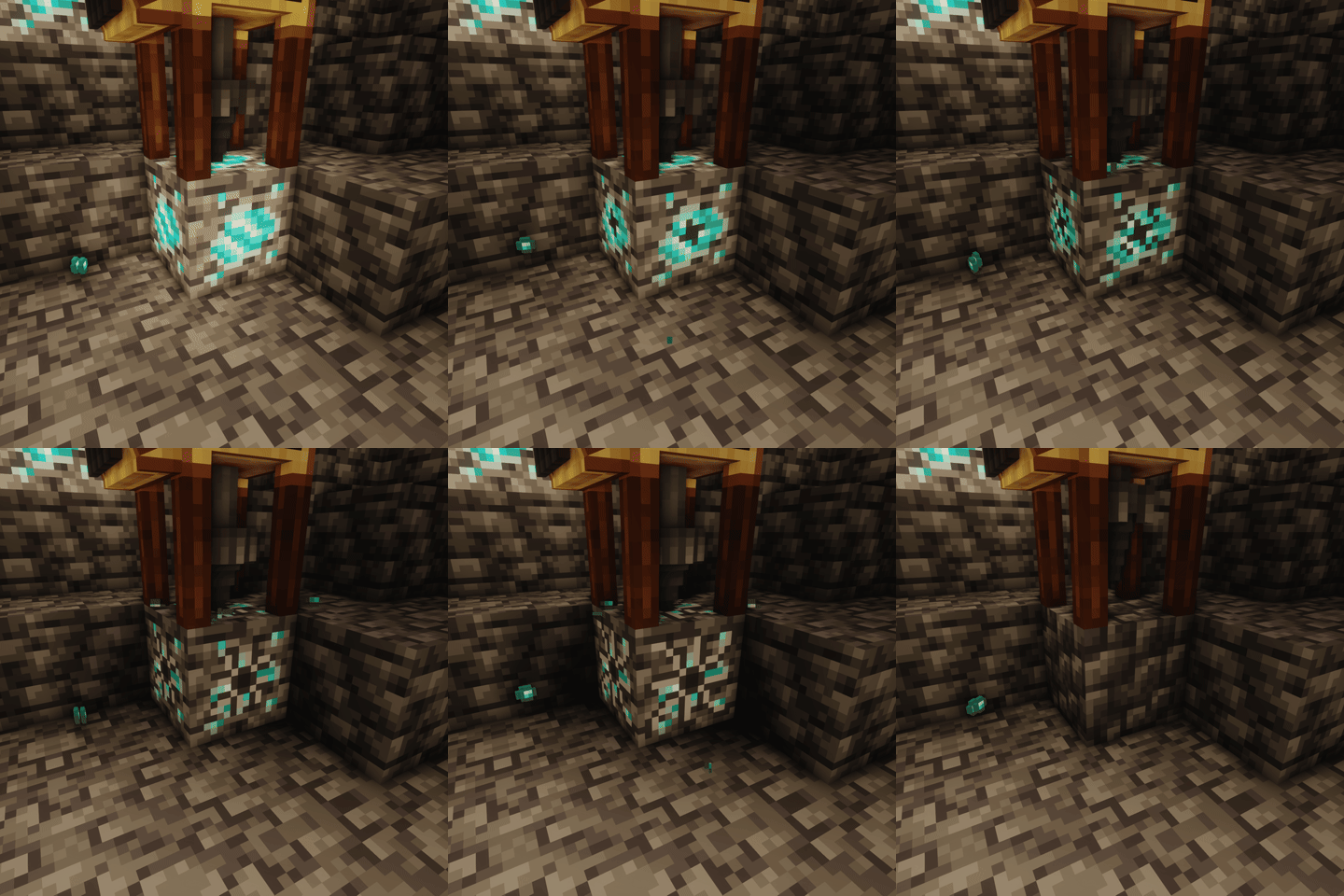
Nodes have a visual representation of the percentage of remaining resources.
In addition to the visual indicator, the light level emitted by the node also changes, the lower the emitted light, the fewer resources remain.
Compatibility
Supports JEI for recipe viewing.
KubeJS Integration
Requires the kubejs_create addon. You can:
- Add custom extracting recipes (in
server_scripts):
ServerEvents.recipes(event => {
    //                                            output         drill           nodes
    event.recipes.createreautomated.extracting("5x diamond", "kubejs:drill", "kubejs:node")
                                   .processingTime(25600)
                                   .extractionQuantity(2)
                                   .durabilityCost(5)
})
- Register custom ore nodes (in
startup_scripts):
StartupEvents.registry("block", event => {
    event.create("test_node", "createreautomated:ore_node")
         .copyPropertiesFrom("createreautomated:diamond_node") // (optional) copy properties from another node
         .withCommonLoot() // uses the default ore node loot table
         .yield(100) // max extractions before depletion
         .baseStone("minecraft:cobblestone") // block left after depletion
})
- Register custom drills (in
startup_scripts):
StartupEvents.registry("item", event => {
    event.create("drill", "createreautomated:drill")
         .withPartial("createreautomated:partial/diamond_drill") // render model
})
Credits
This mod is a port of Create Automated, originally developed by kotakotik22.
All credit for the original concept, design, and implementation goes to him.
If you're interested in the original project or want to learn more, you can check it out here
Thanks
Special thanks to Facu for updating the mod icon ❤️
Support us
!
Available Versions
How to Install Create ReAutomated on Your Server
Order Server
Order a Minecraft Java server with at least 4 GB RAM (6 GB recommended).
Set neoforge Loader
In the panel under "Egg", select the neoforge loader and matching Minecraft version (1.21.1).
Install Mod
Open the mod browser in the dashboard and search for "Create ReAutomated". Click "Install" – done! Alternatively, upload the .jar via SFTP to the /mods folder.
Compatibility
Mod Loaders
Minecraft Versions
1.21.1
Server-side
✓ RequiredRecommended RAM
6 GB(min. 4 GB)Frequently Asked Questions
Create ReAutomated server crashes on startup – what to do?
Most common cause: wrong neoforge version or insufficient RAM. Check the server log (latest.log) for "OutOfMemoryError" or "Mixin" errors. With Mado Hosting: ensure at least 4 GB RAM is allocated and the loader matches the mod version (1.21.1). You can switch loaders with one click in the panel.
Is Create ReAutomated compatible with neoforge?
Create ReAutomated officially supports neoforge for Minecraft 1.21.1. The Mado dashboard automatically detects incompatible loader combinations.
Server lagging with Create ReAutomated – how to optimize performance?
Recommended RAM: 6 GB (per 5 players). Use /spark profiler to check if Create ReAutomated consumes the most tick time. Common fixes: reduce server view-distance to 8-10, install "performant" or "starlight" as supplementary mods on Forge. With Mado Hosting, your server runs on NVMe SSDs with dedicated CPU cores for minimal latency.
Similar Mods





Rent Modded Server
Install Create ReAutomated with just one click on your server.