
Create: Rock & Stone
Create: Rock & Stone aims to close the gap between Create and traditional factory game experience by bringing infinite mineable resource deposits into the world. Make your own massive drill and cash in on the bounties of nature!
Screenshots


About this Mod
Create: Rock & Stone
Create: Rock & Stone aims to close the gap between Create and traditional factory game experience by bringing infinite mineable resource deposits into the world.
Make your own massive drill and cash in on the bounties of nature!
If you find issues or have suggestions, please let me know by opening an issue here.
Features

Miner Bearing 
A replacement for old miners that lets you build massive miner contraptions and augment them with attachments!
Mine Head 
The core component of every miner. A single block by default, but can be upgraded to a 3x3 when placed in a special formation!
Deposit Scanner 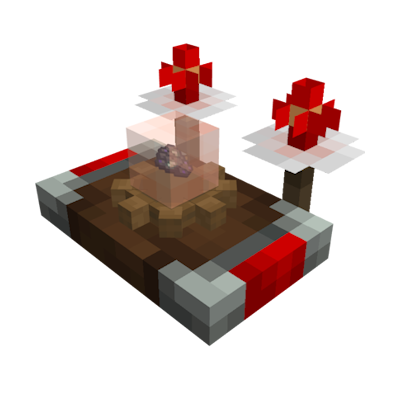
Used to scan for underground ore deposits. Once tuned onto a deposit, its antennas will periodically flash. If both antennas flash together, you are looking in the right direction. The faster they flash, the closer you are!
Modded Deposits

Vanilla Deposits
Compatibility
- JEI - Mining recipes and catalyst info
- Jade - Shows remaining resources if finite deposits are enabled (1.21.1 only).
- Xaero's World Map or Journey Map - Shows found deposits as icons on the map.
Deposits are too rare or too abundant?
Create: Rock & Stone provides 4 datapack flavors that let you control how often the deposits spawn in
the world. There are two ways to enable them:
- When starting a new world, go to the
Datapackssection and select the deisred flavor. - In existing worlds, use command:
/datapack enable "create_rns:<flavor>"and restart the world.
Many other aspects of this mod can be overridden with datapacks as well. Click here to learn what's possible.
Credits
Some models and textures in this mod make partial use of Create assets. All used Create assets are licensed under the MIT license.
Available Versions
How to Install Create: Rock & Stone on Your Server
Order Server
Order a Minecraft Java server with at least 4 GB RAM (6 GB recommended).
Set forge Loader
In the panel under "Egg", select the forge loader and matching Minecraft version (1.21.1).
Install Mod
Open the mod browser in the dashboard and search for "Create: Rock & Stone". Click "Install" – done! Alternatively, upload the .jar via SFTP to the /mods folder.
Compatibility
Mod Loaders
Minecraft Versions
1.21.1, 1.20.1
Server-side
✓ RequiredRecommended RAM
6 GB(min. 4 GB)Frequently Asked Questions
Create: Rock & Stone server crashes on startup – what to do?
Most common cause: wrong forge version or insufficient RAM. Check the server log (latest.log) for "OutOfMemoryError" or "Mixin" errors. With Mado Hosting: ensure at least 4 GB RAM is allocated and the loader matches the mod version (1.21.1). You can switch loaders with one click in the panel.
Is Create: Rock & Stone compatible with forge and neoforge?
Create: Rock & Stone officially supports forge, neoforge for Minecraft 1.21.1, 1.20.1. The Mado dashboard automatically detects incompatible loader combinations.
Server lagging with Create: Rock & Stone – how to optimize performance?
Recommended RAM: 6 GB (per 5 players). Use /spark profiler to check if Create: Rock & Stone consumes the most tick time. Common fixes: reduce server view-distance to 8-10, install "performant" or "starlight" as supplementary mods on Forge. With Mado Hosting, your server runs on NVMe SSDs with dedicated CPU cores for minimal latency.
Similar Mods





Rent Modded Server
Install Create: Rock & Stone with just one click on your server.