
create-schematic-compute
Create: Schematic Compute brings a graph-based visual programming interface to the Create ecosystem, allowing you to build complex computational blueprints without messy redstone dust.
Screenshots

About this Mod
Create: Schematic Compute — Visual Node-Based Programming for Create






🎮 Six Programmable Blocks with a Visual Node-Based Programming System
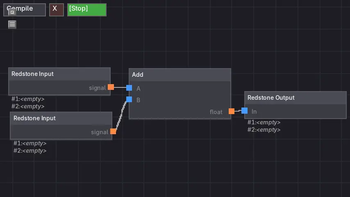
Drag, connect, and build logic — just like Unreal Engine Blueprints or Blender Geometry Nodes!
Created by StarryNight_Luo (y15173334444)
📖 Overview / 概述
🇬🇧 Create: Schematic Compute is a Create mod addon that introduces six programmable blocks with a visual node-based programming system. Instead of writing complex redstone circuits or struggling with command blocks, you simply drag and connect nodes to build logic — just like in Unreal Engine's Blueprint system or Blender's Geometry Nodes.
Each computer has its own internal node graph that runs at 20Hz (every game tick), making it suitable for real-time control applications.
🇨🇳 Create: Schematic Compute(机械动力:蓝图计算机) 是一个机械动力附属模组,添加了 六种可编程方块,采用 可视化节点图编程系统。无需编写代码或搭建复杂的红石电路,只需拖拽连接节点即可构建逻辑——就像虚幻引擎的蓝图系统或 Blender 的几何节点一样直观。
每台设备拥有独立的节点图,以 20Hz(每游戏刻) 的频率运行,适合实时控制应用。
🖥️ Blocks / 方块
🖥️ Holographic Monitor / 全息显示器
🇬🇧 A 3D floating display block that renders node graph output as a virtual screen in the world.
| Feature | Description |
|---|---|
| 🖼️ Display Nodes | TEXT, DATA, IMAGE, IMAGE_SEQUENCE for visual output |
| 🎨 16×16 Pixel Editor | Built-in pixel art editor with multi-frame animation support |
| 🎯 3D Positioning | Freely position and rotate the floating screen (X/Y/Z + Roll/Pitch/Yaw) |
| 📡 Signal-Driven Movement | Drive IMAGE position via X/Y input signals with configurable move scale |
| 📡 Redstone Input | Read signals from Create's Redstone Link network (shared frequency) |
| 👁️ Real-time Preview | Display mode with WYSIWYG editing of layout, scale, and rotation |
🇨🇳 一种3D悬浮显示方块,将节点图输出渲染为世界中的虚拟屏幕。
| 功能 | 说明 |
|---|---|
| 🖼️ 显示节点 | TEXT、DATA、IMAGE、IMAGE_SEQUENCE 用于视觉输出 |
| 🎨 16×16 像素编辑器 | 内置像素画编辑器,支持多帧动画 |
| 🎯 3D 自由定位 | 在世界空间中自由定位和旋转屏幕(X/Y/Z + 滚转/俯仰/偏航) |
| 📡 信号驱动移动 | IMAGE 通过 X/Y 输入信号驱动移动,比例可配置 |
| 📡 红石输入 | 从红石链接网络读取信号(共享频率) |
| 👁️ 实时预览 | 所见即所得的显示编辑模式 |
🖥️ Blueprint Computer / 蓝图计算机
🇬🇧 Control Create's Redstone Link network through visual programming.
| Feature | Description |
|---|---|
| 📡 Redstone Input | Reads signals from Create's Redstone Link network using frequency items |
| 📡 Redstone Output | Writes computed signals back to the Redstone Link network |
| 🔗 Private Signal Output | Transmits float values across named channels to other computers |
| 🔗 Private Signal Input | Reads float values from named channels |
🇨🇳 通过可视化编程控制机械动力的红石链接网络。
| 功能 | 说明 |
|---|---|
| 📡 红石输入 | 使用频率物品从红石链接网络读取信号 |
| 📡 红石输出 | 将计算后的信号写回红石链接网络 |
| 🔗 私有信号输出 | 通过命名通道将浮点数传输到其他计算机 |
| 🔗 私有信号输入 | 从命名通道读取浮点数 |
⚡ Speed Proxy Controller / 转速代理控制器
🇬🇧 Directly control the target RPM of Create's Speed Controller blocks on adjacent faces.
| Feature | Description |
|---|---|
| 🔄 Speed Control | Sets the RPM of nearby Speed Controllers (-256 ~ 256 RPM) |
| 🔗 Private Signal Input | Reads float values from named channels for cross-computer coordination |
🇨🇳 直接控制相邻 6 个面上机械动力转速控制器的目标 RPM。
| 功能 | 说明 |
|---|---|
| 🔄 转速控制 | 设置相邻转速控制器的目标转速(-256 ~ 256 RPM) |
| 🔗 私有信号输入 | 从命名通道读取浮点数,实现跨计算机联动 |
🔌 Program Computer / 编程计算机
🇬🇧 A sequential logic computer for timing, counting, and pulse control applications.
| Feature | Description |
|---|---|
| 📡 Redstone I/O | Communicates through Create's Redstone Link network |
| ⏱️ Sequential Nodes | Delay, Latch, T Flip-Flop (configurable default), Pulse Extender, Loop, Fuse, Accumulator, Continuous Integrator |
🇨🇳 专为时序逻辑设计的计算机,适用于延时、计数和脉冲控制。
| 功能 | 说明 |
|---|---|
| 📡 红石 I/O | 通过红石链接网络通信 |
| ⏱️ 时序节点 | 延时、锁存器、T 触发器(可配置默认)、脉冲延长、循环、保险、累计器、连续积分器 |
🪑 Control Seat / 控制座椅
🇬🇧 A sit-able controller seat with real-time keyboard, mouse, and gamepad input capture.
| Feature | Description |
|---|---|
| ⌨️ 58 assignable keys | Bind any key via click-to-bind UI |
| 🖱️ Two input modes | Joystick (mouse delta) and View Angle (player rotation difference) |
| 🎮 Gamepad support | Dual-stick, 15 buttons, analog triggers (LT/RT) via GLFW gamepad API |
| 🔄 Sable physics compatible | Entity yaw syncs with sable sublevel rotation |
| 🔄 Smooth mode switching | No view jump when transitioning between Joystick and View Angle modes |
🚪 Press ~ to dismount |
TAB to switch input mode, ESC for pause menu |
🇨🇳 一个可乘坐的控制座椅,支持实时键盘、鼠标和手柄输入捕获。
| 功能 | 说明 |
|---|---|
| ⌨️ 58 个可绑定按键 | 通过点击绑定 UI 分配按键 |
| 🖱️ 两种输入模式 | 摇杆(鼠标增量)和视角差(玩家旋转差) |
| 🎮 手柄支持 | 双摇杆、15 个按钮、模拟扳机 LT/RT(GLFW 手柄 API) |
| 🔄 Sable 物理兼容 | 实体 yaw 与子世界旋转同步 |
🚪 按 ~ 下马 |
TAB 切换模式,ESC 释放鼠标 |
📐 Attitude Sensor / 姿态传感器
🇬🇧 Reads the orientation of sable physics structures through a node-based graph.
| Feature | Description |
|---|---|
| 📐 ATTITUDE node | Outputs pitch and roll from the sublevel's logical pose |
| 🧭 FORWARD node | Outputs the world-space forward yaw/pitch of the structure |
| ⚡ ACCELERATION node | Outputs structure-local acceleration (X/Y/Z) |
| 👁️ WORLD_VIEW node | Reads the player's absolute view direction when seated |
| 🔄 POSE_CONVERT | Converts pitch/yaw/roll between coordinate conventions |
| ✂️ SPLIT | Splits positive/negative signal into two outputs |
🇨🇳 通过节点图读取 sable 物理结构的姿态。
| 功能 | 说明 |
|---|---|
| 📐 ATTITUDE 节点 | 输出子世界的俯仰和横滚 |
| 🧭 FORWARD 节点 | 输出结构的全局朝向偏航/俯仰 |
| ⚡ ACCELERATION 节点 | 输出结构本地加速度(X/Y/Z) |
| 👁️ WORLD_VIEW 节点 | 读取玩家在座椅上的绝对视角方向 |
| 🔄 POSE_CONVERT | 在不同坐标系间转换 pitch/yaw/roll |
| ✂️ SPLIT | 将正负信号分离到两个输出 |
🧩 Node Reference / 节点参考(56 Types)
Values / 数值
| Node | Inputs | Output | Description |
|---|---|---|---|
| CONST | - | float | Outputs a constant value / 输出常量值 |
| REDSTONE_IN | - | signal | Reads from Redstone Link network (frequency items ×2) / 从红石链接网络读取信号(频率物品 ×2) |
| PRIVATE_IN | - | val | Reads float from named channel / 从命名通道读取浮点数 |
Math / 运算
| Node | Inputs | Output | Description |
|---|---|---|---|
| ADD | A, B | float | A + B / A 加 B |
| SUB | A, B | float | A - B / A 减 B |
| MUL | A, B | float | A × B / A 乘 B |
| DIV | A, B | float | A ÷ B (returns 0 if B=0) / A 除 B(B 为 0 时返回 0) |
| MOD | A, B | float | A % B / A 模 B |
| POW | A, B | float | A ^ B (A to the power of B) / A 的 B 次幂 |
| ROOT | A, B | float | B-th root of A (returns 0 if B=0) / A 的 B 次方根(B 为 0 时返回 0) |
| ABS | in | float | Absolute value of input / 输入绝对值 |
| ROUND | in | float | Round to N decimal places (default 2) / 保留N位小数(默认2位) |
| Comparison Router | A, B | A, B | A≥B → A port outputs A-B, else B port outputs |B-A| / A≥B 时 A 口输出 A-B,否则 B 口输出 |B-A| |
| CEIL | in | int | Round up to nearest integer / 向上取整 |
| FLOOR | in | int | Round down to nearest integer / 向下取整 |
| FORMULA | var(A-Z) | float | Custom math expression, auto-creates input pins per variable / 自定义数学公式,自动根据变量名创建输入引脚 |
Logic / 逻辑
| Node | Inputs | Output | Description |
|---|---|---|---|
| GT | A, B | bool | A > B → 1 / A 大于 B 时输出 1 |
| LT | A, B | bool | A < B → 1 / A 小于 B 时输出 1 |
| GE | A, B | bool | A >= B → 1 / A 大于等于 B 时输出 1 |
| LE | A, B | bool | A <= B → 1 / A 小于等于 B 时输出 1 |
| EQ | A, B | bool | A = B → 1 / A 等于 B 时输出 1 |
| OR | A, B | bool | A > 0.5 or B > 0.5 → 1 / A 或 B 任意为真时输出 1 |
| BOOL | in | bool | in > 0 → 1, ≤ 0 → 0; inverted=1 flips output / 输入 > 0 输出 1,≤ 0 输出 0;inverted=1 时反转 |
| GATE | val, Open, Close, Tog | out | Signal gate with configurable default state / 信号门,可配置默认开/关 |
Control / 控制
| Node | Inputs | Output | Description |
|---|---|---|---|
| PID | SP | ctrl | Classic PID controller, output 0 |
| PID_POWER | SP, base | power | PID with base power input / 带基础动力的 PID |
| CLAMP | In, Min, Max | float | Clamp input between Min and Max / 将输入限幅在 Min 和 Max 之间 |
| MAP | In, InMin, InMax, OutMin, OutMax | float | Map input range to output range / 将输入范围映射到输出范围 |
Output / 输出
| Node | Inputs | Output | Description |
|---|---|---|---|
| REDSTONE_OUT | In | - | Writes signal to Redstone Link network (clamped 0 |
| PRIVATE_OUT | val | - | Writes float to named channel / 将浮点数写入命名通道 |
| SPEED_CTRL | speed, dir | rpm | Sets Speed Controller RPM; dir>0.5 reverses / 设置转速控制器 RPM;dir>0.5 时反转方向 |
Sequential / 时序(Program Computer only)
| Node | Inputs | Output | Description |
|---|---|---|---|
| ACCUMULATOR | +, - | val | Rising-edge counter: + adds step, - subtracts step / 上升沿计数器:+ 加步进,- 减步进 |
| DELAY | in | out | Delays output by N ticks / 将输出延时 N tick |
| LATCH | S, R | q | S≥1 sets, R≥1 resets, holds value / S≥1 置位,R≥1 复位,保持值 |
| T_FLIPFLOP | in | tog | Toggles output on rising edge / 上升沿翻转输出 |
| PULSE_EXTEND | in | pulse | Extends input pulse by N ticks / 输入高电平时将脉冲延长 N tick |
| LOOP | in | clk | Fires pulse every interval tick, repeats count times / 每 interval tick 输出一次脉冲,重复 count 次 |
| FUSE | in | pulse | Trigger → 2-tick pulse → cooldown N ticks / 收到信号后输出 2 tick 脉冲,然后冷却 N tick |
| INTEGRATOR | +, -, clear | val | Continuous integrator: every N ticks, + adds step, - subtracts step; both + and - active → hold; clear resets to 0; clamped [0, limit] / 连续积分器:每N tick积分一次,+和-同时激活则保持,清零重置为0,限幅[0, limit] |
Input Ctrl / 操作输入(Control Seat only)
| Node | Inputs | Output | Description |
|---|---|---|---|
| KEYBOARD | - | 1/0 | Bindable keyboard key (58 keys), outputs 1 when pressed / 绑定键盘按键(58键),按下输出 1 |
| MOUSE_JOYSTICK | - | X, Y | Mouse delta output -1 |
| VIEW_ANGLE | - | pitch, yaw | Player view angle delta (view angle mode) / 玩家视角差(视角差模式) |
| MOUSE_BUTTON | - | L, R | Left/right mouse button state / 鼠标左/右键状态 |
| GAMEPAD_JOYSTICK | - | LX, LY, RX, RY | Dual-stick gamepad axes -1 |
| GAMEPAD_BUTTON | - | 1/0 | Gamepad button (15 buttons), click-to-bind via frame-polling / 手柄按键(15键),帧轮询点击绑定 |
| GAMEPAD_TRIGGER | - | LT, RT | Gamepad analog triggers (0.0 ~ 1.0) / 手柄模拟扳机(0.0 ~ 1.0) |
Sensor / 传感器(Attitude Sensor only)
| Node | Inputs | Output | Description |
|---|---|---|---|
| WORLD_VIEW | - | yaw, pitch | Player absolute world view direction / 玩家绝对世界视角方向 |
| ATTITUDE | - | pitch, roll | Sublevel attitude (pitch/roll) / 子世界姿态(俯仰/横滚) |
| FORWARD | - | yaw, pitch | Sublevel forward direction in world space / 子世界在世界空间中的前方朝向 |
| ACCELERATION | - | X, Y, Z | Structure-local acceleration (fwd/back, up/down, left/right) / 结构本地加速度(前/后、上/下、左/右),20Hz 差速计算 |
| POSE_CONVERT | pitch_a, yaw_a, roll | pitch_b, yaw_b | Pose conversion (3-in 2-out) / 姿态换算(3 输入 2 输出) |
| SPLIT | in | +out, -out | Split positive/negative: positive → +out, negative → |-out| / 正负分离:正数 → +out,负数绝对值 → -out |
Display / 显示(Monitor only)
| Node | Inputs | Output | Description |
|---|---|---|---|
| TEXT | - | - | Displays text content / 显示文字内容 |
| DATA | val | - | Displays input float value / 显示输入浮点数值 |
| IMAGE | X, Y, rotation | - | 16×16 pixel image, signal-driven position + rotation, per-axis move scale + invert toggles / 16×16 像素图片,信号驱动位置+旋转,分轴移动倍率+反转切换 |
| IMAGE_SEQUENCE | X, Y, frame, rotation | - | Multi-frame animation, signal-driven position + rotation + frame select / 多帧动画,信号驱动位置+旋转+帧选择 |
Featured Algorithm Nodes / 特色算法节点
| Node | 🇬🇧 Description | 🇨🇳 说明 |
|---|---|---|
| PID Controller | Classic PID algorithm, output 0~16, I-term resets on zero error (anti-windup) | 经典 PID 算法,输出 0~16,误差归零时 I 项自动复位(防积分饱和) |
| Power PID | PID with base power input, ideal for maintaining minimum output | 带基础动力的 PID,适合需要保持最小输出功率的场景 |
| Formula | Custom math expressions with multi-letter variable names, auto-creates input pins | 自定义数学公式,支持多字母变量名,自动创建输入引脚 |
| Accumulator | Dual-input (+/-) rising-edge counter with configurable step value | +/-双输入上升沿累计器,可配置步进值 |
| Comparison Router | A≥B → A port outputs A-B, else B port outputs |B-A|. Smart signal routing | A≥B 时 A 口输出 A-B,否则 B 口输出 |B-A|,智能信号分流 |
| Pulse Extender | Extends input pulse by N ticks | 输入高电平时将脉冲延长 N tick |
| Loop | Fires pulses every interval ticks, repeat count times | 收到触发后每 interval tick 输出一次脉冲,重复 count 次 |
| Fuse | 2-tick pulse on trigger, then cooldown for N ticks | 收到信号后输出 2 tick 脉冲,然后冷却 N tick,防误触 |
| Pose Convert | Converts pitch/yaw/roll between coordinate conventions (3 inputs → 2 outputs) | 在不同坐标系间转换姿态角(3 输入 → 2 输出) |
🎮 How to Use / 使用方法
🇬🇧
- Place one of the six blocks
- Right-click to open the node editor
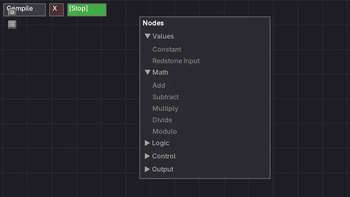
- Right-click empty space to open the add-node menu (categorized & collapsible)
- Left-click a node to edit its parameters
- Drag from output pins to input pins to connect nodes
- Press Compile, then Run
🇨🇳
- 放置任意一个方块
- 右键打开节点编辑器
- 右键空白处打开添加节点菜单(支持分类折叠)
- 左键节点编辑参数
- 从输出端口拖拽到输入端口连接节点
- 点击 Compile 编译,然后点击 Run 运行
Controls / 操作指南
| Action / 操作 | Input / 按键 |
|---|---|
| Open add-node menu / 打开节点菜单 | Right-click on empty space / 右键空白处 |
| Edit node parameters / 编辑参数 | Left-click node, then click ▶ / 左键节点,点击 ▶ |
| Connect nodes / 连接节点 | Drag from output pin to input pin / 从输出端口拖到输入端口 |
| Delete node / 删除节点 | Press X while hovering over it / 悬停节点按 X |
| Delete connection / 删除连线 | TAB + Left-click on connection / TAB + 左键连线 |
| Delete selected node(s) / 删除选中节点 | Delete / Backspace |
| Box select nodes / 框选节点 | TAB + Left-click drag / TAB + 左键拖拽 |
| Toggle node selection / 切换选中 | TAB + Left-click on node / TAB + 左键点击 |
| Move selected nodes / 移动选中节点 | TAB + Left-click drag on selected / TAB + 左键拖拽已选中 |
| Duplicate node(s) / 复制节点 | Ctrl + D |
| Zoom / 缩放 | Scroll wheel / 滚轮 |
| Pan canvas / 平移画布 | Right-click drag / 右键拖拽 |
| Control Seat — Sit down / 乘坐 | Right-click on seat (empty hand) / 右键座椅(空手) |
| Control Seat — Open editor / 打开编辑器 | Shift + Right-click on seat / Shift + 右键座椅 |
| Control Seat — Dismount / 下马 | Press ~ / 按 ~ |
| Control Seat — Switch mode / 切换模式 | Press TAB / 按 TAB |
| Control Seat — Pause / release mouse / 暂停释放鼠标 | Press ESC / 按 ESC |
🔄 Sable Physics Integration / Sable 物理引擎集成
🇬🇧 This mod has deep integration with the Sable physics engine. The Control Seat and Attitude Sensor are designed to work on rotating physics structures.
- Control Seat + Sable: Entity yaw automatically tracks sublevel rotation — your camera follows the structure as it rotates
- Attitude Sensor + Sable: Reads sublevel pose directly from
logicalPose()via JOML quaternion → Euler angle conversion - Thread safety: Shared fields between physics thread and server thread are marked
volatile - Without Sable: Both blocks are fully functional — the Control Seat works as normal, and the Sensor's ATTITUDE/FORWARD/WORLD_VIEW nodes output 0
🇨🇳 本模组与 Sable 物理引擎深度集成。控制座椅和姿态传感器专为在旋转的物理结构上工作而设计。
- 控制座椅 + Sable:实体 yaw 自动追踪子世界旋转——你的视角随结构转动
- 姿态传感器 + Sable:通过 JOML 四元数→欧拉角转换,直接从
logicalPose()读取子世界姿态 - 线程安全:物理线程和服务端线程间的共享字段均标记为
volatile - 无 Sable 时:两个方块完全可用——控制座椅正常工作,传感器的姿态节点输出 0
💾 Schematic Support / 蓝图兼容
🇬🇧 All six blocks fully support Create's Schematicannon. Your node graphs, parameters, and running state are preserved when saving and loading schematics — no data loss.
This means you can:
- 🏗️ Build complex logic in creative mode, then print it in survival with the Schematicannon
- 📋 Copy and paste computer configurations across your world
- 🌍 Share your creations as schematic files with other players
Uses Create's official
IMergeableBEinterface andSafeNbtWriterregistration for reliable data preservation.
🇨🇳 全部六种方块完全支持机械动力的蓝图大炮(Schematicannon)。节点图、参数和运行状态在保存和放置蓝图时都会完整保留,不会丢失数据。
这意味着你可以:
- 🏗️ 在创造模式搭建复杂逻辑,然后在生存模式用蓝图大炮打印出来
- 📋 复制粘贴计算机配置到世界各处
- 🌍 分享你的创作为蓝图文件给其他玩家
采用 Create 官方
IMergeableBE接口和SafeNbtWriter注册,确保蓝图数据的可靠保存与恢复。
⚙️ Block Properties / 方块属性
🇬🇧 All six blocks share consistent properties:
| Property | Value |
|---|---|
| Hardness | 1.0 (breakable by hand, no tool required) |
| Hand break | Drops block item without NBT (fresh block) |
| Wrench (right-click) | Rotates block (cycles FACING direction) |
| Wrench (shift + right-click) | Picks up block with full NBT preservation (graph, running state, PID values) |
🇨🇳 所有六种方块共享一致的属性:
| 属性 | 值 |
|---|---|
| 硬度 | 1.0(空手可破坏,无需工具) |
| 空手破坏 | 掉落方块物品不含 NBT(全新方块) |
| 扳手(右键) | 旋转方块(循环 FACING 方向) |
| 扳手(Shift + 右键) | 收回方块保留完整 NBT(节点图、运行状态、PID 参数) |
🔧 Technical Highlights / 技术亮点
| 🇬🇧 | 🇨🇳 |
|---|---|
| ⚡ Topological sort evaluation — Nodes evaluated in dependency order, O(1) input query cache | ⚡ 拓扑排序求值 — 节点图按拓扑顺序求值,O(1) 输入查询缓存 |
🚀 GC-friendly — GraphEvaluator instances reused across ticks, reducing GC pressure |
🚀 GC 友好 — 重用 GraphEvaluator 实例,减少每 tick 垃圾回收压力 |
| 🔄 Private Signal Bus — Global named-channel float communication across computers | 🔄 私有信号总线 — 全局命名通道通信,跨计算机联动 |
🎯 Reflection-based speed control — Directly sets SpeedControllerBlockEntity.targetSpeed field |
🎯 精准反射 — 通过反射直接设置转速控制器的内部字段 |
| 🧹 PID anti-windup — I-term auto-resets when error reaches zero | 🧹 积分防饱和 — PID 控制器误差归零时自动复位积分项 |
| 🛡️ Cycle detection — Blocks execution if circular dependencies are detected | 🛡️ 环检测 — 编译时自动检测循环引用并阻止运行 |
| 🎮 GLFW raw input — Control Seat reads keyboard/mouse/gamepad at the GLFW level | 🎮 GLFW 原始输入 — 控制座椅通过 GLFW 直接读取输入,绕过 Minecraft 键位系统 |
🔄 Sable physics integration — Control Seat and Attitude Sensor implement BlockEntitySubLevelActor |
🔄 Sable 物理集成 — 控制座椅和姿态传感器实现 BlockEntitySubLevelActor |
| 🎨 16-color theming — Customizable node colors with per-category borders | 🎨 16 色调色板 — 可自定义节点颜色,支持分类边框 |
🧪 Creative Ideas / 创意用法
| 🇬🇧 | 🇨🇳 |
|---|---|
| 🏭 Smart factory control — Use PID nodes for automatic RPM regulation | 🏭 智能工厂控制 — 使用 PID 节点实现转速自动调节 |
| 🔄 Automated sequences — Build complex automation with Delay and Loop nodes | 🔄 自动化时序 — 构建复杂的自动化序列 |
| 🎛️ Multi-computer coordination — Link computers via Private Signal Bus | 🎛️ 多级联动 — 多台计算机通过私有信号总线协同工作 |
| 🎯 Wireless remote control — Combine with Redstone Link network | 🎯 无线远程控制 — 结合红石链接网络实现远程控制 |
| ⚙️ Precision speed matching — Speed Proxy Controller for exact RPM matching | ⚙️ 速度匹配 — 转速代理控制器让转速精确匹配 |
| 🕹️ Vehicle control — Use Control Seat + gamepad to pilot flying machines | 🕹️ 载具操控 — 用控制座椅+手柄驾驶飞行器 |
| 📺 Live dashboards — Use Holographic Monitor to display factory stats | 📺 实时仪表盘 — 用全息显示器展示工厂数据 |
📦 Recipes / 合成配方
| Block / 方块 | Materials / 材料 |
|---|---|
| 🖥️ Holographic Monitor / 全息显示器 | 2× Redstone Link, 1× Precision Mechanism, 2× Glass Pane, 1× Brass Casing, 2× Glowstone Dust |
| 🖥️ Blueprint Computer / 蓝图计算机 | 2× Redstone Link, 1× Precision Mechanism, 2× Glass Pane, 1× Repeater, 1× Comparator, 2× Brass Casing |
| ⚡ Speed Proxy Controller / 转速代理控制器 | 4× Brass Ingot, 1× Cogwheel, 2× Glass Pane, 1× Comparator, 1× Andesite Casing |
| 🔌 Program Computer / 编程计算机 | 4× Andesite Casing, 1× Repeater, 2× Glass Pane, 1× Comparator, 1× Andesite Alloy |
| 🪑 Control Seat / 控制座椅 | 1× Heavy Weighted Pressure Plate, 2× Iron Ingot, 1× Brass Casing, 1× Redstone, 4× Redstone Link |
| 📐 Attitude Sensor / 姿态传感器 | 6× Iron Ingot, 1× Repeater, 1× Comparator, 2× Brass Casing |
(Requires JEI to view in-game / 需要 JEI 模组在游戏中查看)
📋 Dependencies / 依赖
| Dependency / 依赖 | Version / 版本 |
|---|---|
| Minecraft | 1.21.1 |
| NeoForge | 21.1.233+ |
| Create | 6.0.10+ |
Sable physics engine is optional / Sable 物理引擎为可选依赖
❓ FAQ / 常见问题
🇬🇧 Q: The node editor feels laggy?
🇨🇳 Q: 节点编辑器响应迟缓?
A: Check if you have too many nodes or complex PID operations. Keep the number of continuously running PIDs reasonable.
🇨🇳 A: 检查是否节点过多或 PID 运算复杂,建议控制持续运行的 PID 数量。单个计算机中 PID 节点不宜超过 5-6 个。
🇬🇧 Q: Speed Proxy Controller not working?
🇨🇳 Q: 转速代理控制器不工作?
A: Make sure the Speed Proxy Controller is placed directly adjacent (one of 6 faces) to a Speed Controller.
🇨🇳 A: 确保转速代理控制器放置在转速控制器的相邻 6 个面之一(直接贴在一起),并且转速控制器的转速模式设为"已锁定"。
🇬🇧 Q: Computer state lost after schematic placement?
🇨🇳 Q: 蓝图放置后计算机状态丢失?
A: Make sure you're using Create 6.0.10+. This mod registers complete NBT save/load interfaces.
🇨🇳 A: 确保使用 Create 6.0.10+ 版本。本模组已为所有方块注册了完整的 NBT 保存/加载接口(IMergeableBE + SafeNbtWriter),低版本 Create 不兼容。
🇬🇧 Q: Can computers communicate with each other?
🇨🇳 Q: 计算机之间可以通信吗?
A: Yes! Use Private Signal Input/Output nodes with named channels. Multiple computers can exchange float values across distances.
🇨🇳 A: 可以!使用私有信号输入/输出节点配合命名通道,蓝图计算机和编程计算机可以跨距离交换浮点数值。即使在不同区块,只要通道名称相同即可通信。
🇬🇧 Q: Control Seat/Attitude Sensor not working?
🇨🇳 Q: 控制座椅/姿态传感器不工作?
A: These blocks have full functionality without Sable. If you need sublevel rotation data, install Sable. Otherwise, the sensor nodes output 0 and the Control Seat works normally.
🇨🇳 A: 这两个方块在不安装 Sable 时完全可用。如果需要读取子世界旋转数据(ATTITUDE/FORWARD 节点),请安装 Sable 物理引擎。未安装时传感器节点输出 0,控制座椅功能不受影响。
🇬🇧 Q: Holographic Monitor border invisible from some angles?
🇨🇳 Q: 全息显示器边框从某些角度看不可见?
A: This was fixed in v1.1.1. The border now renders from both sides.
🇨🇳 A: 此问题已在 v1.1.1 修复。边框现已双面渲染,从任何角度都可见。请更新至最新版本。
📜 Changelog / 更新日志
v1.1.3
- ✨ Add: 7 new node types (49→56) — OR Gate, GE (>=), LE (<=), ROUND (N decimals), Continuous Integrator, Acceleration, Gamepad Trigger
🇨🇳 新增:7 种节点(49→56) — 或门、大于等于、小于等于、保留N位小数、连续积分器、加速度、手柄扳机 - ✨ Add: IMAGE/IMAGE_SEQUENCE rotation input — signal-driven rotation with rotation scale param + per-axis moveScale (X/Y) + invertX/invertY toggles
🇨🇳 新增:IMAGE/IMAGE_SEQUENCE 旋转输入 — 信号驱动旋转(旋转倍率参数)+ 分轴移动倍率 + X/Y反转切换 - ✨ Add: T_FLIPFLOP edit panel — configurable default on/off state toggle
🇨🇳 新增:T 触发器编辑区 — 可配置默认开/关切换 - ✨ Add: i18n support — ~130 new translation keys for node edit panels, pin labels, toolbar buttons, toggles (zh_cn + en_us)
🇨🇳 新增:多语言支持 — 约 130 个新翻译键覆盖节点编辑区、引脚标签、工具栏按钮、切换按钮 - 🐛 Fix: GAMEPAD_BUTTON binding — moved capture from event-driven keyPressed() to frame-polling with edge detection; now works with mapping software
🇨🇳 修复:手柄按键绑定 — 从事件驱动改为帧轮询+上升沿检测,现在配合映射软件也能正常工作 - 🐛 Fix: Gamepad trigger clamp — trigger axes clamped to [0,1] for phone/Bluetooth gamepads reporting [-1,1]
🇨🇳 修复:手柄扳机钳制 — 扳机轴钳制到 [0,1],兼容手机蓝牙手柄的 [-1,1] 范围 - 🐛 Fix: IMAGE_SEQUENCE frame display — 3D renderer now reads frame input pin and selects correct frame
🇨🇳 修复:图像序列帧显示 — 3D 渲染器现在读取帧输入引脚并选择对应帧 - 🐛 Fix: Monitor display rotation — center-based rotation with correct direction matching GUI preview
🇨🇳 修复:全息显示器旋转 — 中心基轴旋转,方向与 GUI 预览一致 - 🐛 Fix: Double checkmark on toggle buttons — removed duplicate ✔ from i18n strings
🇨🇳 修复:切换按钮双勾号 — 移除 i18n 字符串中重复的 ✔ - ⚡ Perf: Acceleration computation — uses pure float trig instead of JOML object allocations; no GC stutter on sable structures
🇨🇳 性能:加速度计算 — 纯浮点三角函数替代 JOML 对象分配,sable 结构无 GC 卡顿
v1.1.2
- ✨ Add: GATE node — Signal gate with 4 inputs (value/open/close/toggle) and NBT-persistent state; available on Blueprint and Program computers
🇨🇳 新增:GATE(信号门)节点 — 4 输入信号门(value/open/close/toggle),状态 NBT 持久化,适用于蓝图计算机和编程计算机 - 🐛 Fix: Node connection culling — Connections on the left/top side of the GUI are no longer incorrectly culled
🇨🇳 修复:节点连线裁剪 — GUI 左侧/顶部的连线不再被错误裁剪 - 🐛 Fix: Monitor GUI rotation — Display element rotation direction now matches between GUI editor and 3D screen
🇨🇳 修复:显示器 GUI 旋转 — 显示元素的旋转方向在 GUI 编辑器和 3D 屏幕中保持一致 - 🐛 Fix: Monitor GUI margins — Component positions in GUI now include the 0.04-block bezel margin matching the 3D screen
🇨🇳 修复:显示器 GUI 边距 — GUI 中组件位置现在包含 0.04 格边框边距,与 3D 屏幕一致 - 🐛 Fix: Monitor IMAGE clamping — Rotated IMAGE/IMAGE_SEQUENCE elements use AABB-aware edge clamping matching the 3D renderer
🇨🇳 修复:显示器 IMAGE 边缘钳制 — 旋转后的 IMAGE/IMAGE_SEQUENCE 元素使用 AABB 感知的边缘钳制 - 🐛 Fix: Monitor IMAGE positioning — Clamping bounds aligned with content area instead of display area
🇨🇳 修复:显示器 IMAGE 定位 — 钳制边界对齐到内容区域而非显示区域 - 🐛 Fix: Monitor settings data loss — Changing screen settings no longer resets display element positions/rotations
🇨🇳 修复:显示器设置丢失 — 更改屏幕设置不再重置显示元素位置/旋转 - 🐛 Fix: Monitor live preview — Display area updates in real-time while editing screen width/length
🇨🇳 修复:显示器实时预览 — 编辑屏幕宽/长时显示区域实时更新 - 🐛 Fix: ACCUMULATOR crash — Placing accumuator node on Program Computer no longer crashes the game
🇨🇳 修复:ACCUMULATOR 崩溃 — 在编程计算机上放置累计器节点不再导致游戏崩溃 - 🐛 Fix: MOUSE_BUTTON node — Now outputs 1 while button held (previously was pulse-on-click)
🇨🇳 修复:MOUSE_BUTTON 节点 — 现在按住时持续输出 1(之前是点击时脉冲输出)
v1.1.1
- ✨ Add: Encapsulation node — nest sub-graphs inside a single node, double-click to expand, 48→49 types
🇨🇳 新增:封装节点 — 在单个节点内嵌套子图,双击展开,节点类型 48→49 - ✨ Add: Monitor Redstone Input — Holographic Monitor can now read Redstone Link network signals via REDSTONE_IN node
🇨🇳 新增:显示器红石输入 — 全息显示器现在可以通过 REDSTONE_IN 节点读取红石链接网络信号 - ✨ Add: Toolbar position toggle — bottom-right button to switch toolbar between top-left and bottom-left; position persisted to config file
🇨🇳 新增:工具栏位置切换 — 右下角按钮切换工具栏位置(左上/左下),位置持久化到配置文件 - 🐛 Fix: Control Seat view jump — smooth transition between Joystick and View Angle modes (Mixin-based raw mouse delta capture)
🇨🇳 修复:控制座椅视角跳跃 — 摇杆模式和视角差模式之间平滑过渡(基于 Mixin 的原始鼠标增量捕获) - 🐛 Fix: Monitor 3D renderer redstone — 3D holographic display now correctly evaluates REDSTONE_IN nodes
🇨🇳 修复:显示器 3D 渲染红石 — 3D 全息显示现在正确求值 REDSTONE_IN 节点 - 🐛 Fix: Monitor redstone registration — late-registered listeners now receive initial signal state via force-resend
🇨🇳 修复:显示器红石注册 — 延迟注册的监听器现通过强制重发接收初始信号状态 - ⚡ Perf: Comprehensive code audit — NaN guards, FORMULA compilation cache, volatile thread safety, evaluator caching (60+ FPS), Sensor reflection cache
🇨🇳 性能:全面代码审计 — NaN 防护、FORMULA 编译缓存、volatile 线程安全、求值器缓存(60+ FPS)、传感器反射缓存 - ♻️ Refactor: RedstoneLinkHelper — ~400 lines of duplicated redstone link code deduplicated across 4 block entities
🇨🇳 重构:RedstoneLinkHelper — 约 400 行重复的红石链接代码在 4 个方块实体中统一 - ♻️ Refactor: GraphBlockEntity interface — replaces 6-branch instanceof chains with single interface check
🇨🇳 重构:GraphBlockEntity 接口 — 用单一接口检查替代 6 分支 instanceof 链 - 🔧 Mixin infrastructure — added Mixin AP + LocalPlayerMixin for Entity.turn() interception in Control Seat
🇨🇳 基础设施:Mixin 支持 — 添加 Mixin AP + LocalPlayerMixin 用于控制座椅的 Entity.turn() 拦截 - 🛡️ Player disconnect cleanup — PLAYER_INPUTS now cleared per-player on PlayerLoggedOutEvent
🇨🇳 安全:玩家断开清理 — 玩家断开时自动清除其输入状态
v1.1.0
- ✨ Add: Holographic Monitor — Floating 3D display with pixel editor, display mode, signal-driven movement
🇨🇳 新增:全息显示器 — 3D 悬浮显示方块,带像素编辑器、显示模式、信号驱动移动 - ✨ Add: Control Seat — Sit-able controller with keyboard/mouse/gamepad input, 58 assignable keys, dual modes
🇨🇳 新增:控制座椅 — 可乘坐控制器,支持键盘/鼠标/手柄输入,58 键绑定,双模式 - ✨ Add: Attitude Sensor — Reads sublevel orientation via ATTITUDE/FORWARD/WORLD_VIEW nodes
🇨🇳 新增:姿态传感器 — 通过 ATTITUDE/FORWARD/WORLD_VIEW 节点读取子世界姿态 - ✨ Add: 11 new node types — Input/Sensor nodes for Control Seat and Attitude Sensor
🇨🇳 新增:11 种节点类型 — 控制座椅和姿态传感器的输入/传感器节点 - ✨ Add: 4 Display nodes — TEXT, DATA, IMAGE, IMAGE_SEQUENCE
🇨🇳 新增:4 种显示节点 — TEXT、DATA、IMAGE、IMAGE_SEQUENCE - ✨ Add: Accumulator node — +/- dual-input rising-edge counter
🇨🇳 新增:累计器节点 — +/- 双输入上升沿计数器 - ✨ Add: FORMULA node — Custom math expressions with multi-letter variables
🇨🇳 新增:FORMULA 节点 — 支持多字母变量名的自定义数学公式 - ✨ Add: Sable physics integration — Control Seat and Attitude Sensor on rotating structures
🇨🇳 新增:Sable 物理集成 — 控制座椅和姿态传感器支持旋转结构 - ✨ Add: Color customization — 16-color theming for node graphs
🇨🇳 新增:颜色自定义 — 16 色调色板的节点图主题 - ✨ Add: IWrenchable support — Wrench rotation and shift+wrench NBT pick-up for all 6 blocks
🇨🇳 新增:IWrenchable 支持 — 全部 6 种方块支持扳手旋转和 Shift+扳手 NBT 拾取 - 🐛 Fix: World reload bug — All blocks work correctly after save/quit/reload
🇨🇳 修复:世界重载问题 — 所有方块在保存/退出/重载后正常工作 - 🐛 Fix: SignalBus cross-world pollution — Static state properly cleared on server stop
🇨🇳 修复:SignalBus 跨世界污染 — 服务器停止时正确清除静态状态 - 🐛 Fix: NaN propagation — Guarded POW, ROOT, PID against NaN/Infinity
🇨🇳 修复:NaN 传播 — POW、ROOT、PID 节点增加 NaN/Infinity 防护 - 🐛 Fix: SpeedProxy shared static PID map → per-instance
🇨🇳 修复:SpeedProxy PID 隔离 — 共享静态 PID 映射改为实例级
v1.0.0
- Initial release — 24 node types across 6 categories
🇨🇳 初始发布 — 6 类 24 种节点类型 - 3 programmable computers (Blueprint, Speed Proxy, Program)
🇨🇳 3 台可编程计算机(蓝图计算机、转速代理控制器、编程计算机) - Visual node-based graph editor
🇨🇳 可视化节点图编辑器
📥 Installation / 安装
🇬🇧
- Install NeoForge 21.1.233+
- Install Create 6.0.10+
- Place the mod
.jarfile into yourmodsfolder - Launch the game!
🇨🇳
- 安装 NeoForge 21.1.233+
- 安装 Create 6.0.10+
- 将模组的
.jar文件放入mods文件夹 - 启动游戏!
🌐 Links / 链接
- GitHub: github.com/y15173334444/create-schematic-compute
- License: MIT © 2026 StarryNight_Luo
This project is fully open-source. Contributions, issues, and feature requests are welcome!
本项目完全开源,欢迎提交 Issue 和 Pull Request!
If you enjoy this mod, please leave a ⭐ on GitHub!
如果喜欢这个模组,请在 GitHub 上点个 ⭐ 吧!
Unleash the full potential of Create with visual programming! 🚀
Available Versions
How to Install create-schematic-compute on Your Server
Order Server
Order a Minecraft Java server with at least 4 GB RAM (6 GB recommended).
Set neoforge Loader
In the panel under "Egg", select the neoforge loader and matching Minecraft version (1.21.1).
Install Mod
Open the mod browser in the dashboard and search for "create-schematic-compute". Click "Install" – done! Alternatively, upload the .jar via SFTP to the /mods folder.
Compatibility
Mod Loaders
Minecraft Versions
1.21.1
Server-side
✓ RequiredRecommended RAM
6 GB(min. 4 GB)Frequently Asked Questions
create-schematic-compute server crashes on startup – what to do?
Most common cause: wrong neoforge version or insufficient RAM. Check the server log (latest.log) for "OutOfMemoryError" or "Mixin" errors. With Mado Hosting: ensure at least 4 GB RAM is allocated and the loader matches the mod version (1.21.1). You can switch loaders with one click in the panel.
Is create-schematic-compute compatible with neoforge?
create-schematic-compute officially supports neoforge for Minecraft 1.21.1. The Mado dashboard automatically detects incompatible loader combinations.
Server lagging with create-schematic-compute – how to optimize performance?
Recommended RAM: 6 GB (per 5 players). Use /spark profiler to check if create-schematic-compute consumes the most tick time. Common fixes: reduce server view-distance to 8-10, install "performant" or "starlight" as supplementary mods on Forge. With Mado Hosting, your server runs on NVMe SSDs with dedicated CPU cores for minimal latency.
Similar Mods






Rent Modded Server
Install create-schematic-compute with just one click on your server.