
Create: Soda Pop
Adds multiple pops to the game (or Soda depending on where you live) into the game, the Create mod is actually needed to make the pop / soda
Screenshots
About this Mod
Create: Soda Pop, Quench Your Thirst in Style!
Tired of plain water? Craving a refreshing beverage? Create: Soda Pop is here to quench your thirst!
This mod adds the iconic Coca Cola and more into your game, bringing a taste of nostalgia and a new crafting experience.
Here's what you can expect:
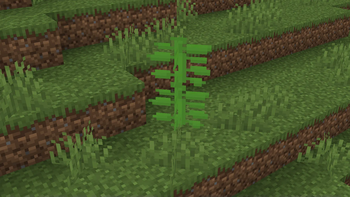
Coca Plant: Cultivate the vibrant Coca Plant, a new addition to your farming endeavors. This plant provides the key ingredient for your Coca Cola recipe. It can be placed on all variants of Grass, Sand, and Dirt.
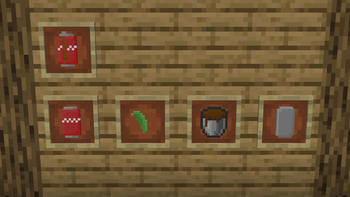
Crafting: Use a simple crafting station to create Coca Cola, combining the harvested coca leaves, sugar, and water.
Containers: Store your Coca Cola in buckets for transport or enjoy it fresh from a can.
Empty Cans: After quenching your thirst, empty cans are left behind. These can be recycled or used for crafting other items.
Unique Injection System: Inject your freshly brewed Coca Cola into an empty can using a spout for a satisfying and realistic experience.
Get ready to:
Explore: Discover the secrets of the Coca Plant and its unique growth requirements.
Enjoy: Sip on a refreshing Coca Cola, a delicious treat that's sure to bring a smile to your face.
Soda Pop: The perfect addition to your game for a touch of sweetness and refreshment!
Available Versions
How to Install Create: Soda Pop on Your Server
Order Server
Order a Minecraft Java server with at least 4 GB RAM (6 GB recommended).
Set forge Loader
In the panel under "Egg", select the forge loader and matching Minecraft version (1.20.1).
Install Mod
Open the mod browser in the dashboard and search for "Create: Soda Pop". Click "Install" – done! Alternatively, upload the .jar via SFTP to the /mods folder.
Compatibility
Mod Loaders
Minecraft Versions
1.20.1
Server-side
✓ RequiredRecommended RAM
6 GB(min. 4 GB)Frequently Asked Questions
Create: Soda Pop server crashes on startup – what to do?
Most common cause: wrong forge version or insufficient RAM. Check the server log (latest.log) for "OutOfMemoryError" or "Mixin" errors. With Mado Hosting: ensure at least 4 GB RAM is allocated and the loader matches the mod version (1.20.1). You can switch loaders with one click in the panel.
Is Create: Soda Pop compatible with forge?
Create: Soda Pop officially supports forge for Minecraft 1.20.1. The Mado dashboard automatically detects incompatible loader combinations.
Server lagging with Create: Soda Pop – how to optimize performance?
Recommended RAM: 6 GB (per 5 players). Use /spark profiler to check if Create: Soda Pop consumes the most tick time. Common fixes: reduce server view-distance to 8-10, install "performant" or "starlight" as supplementary mods on Forge. With Mado Hosting, your server runs on NVMe SSDs with dedicated CPU cores for minimal latency.
Similar Mods



Rent Modded Server
Install Create: Soda Pop with just one click on your server.