
Create: Stock Market
Turn your server's player economy into a real-time stock exchange
Screenshots
About this Mod

Turn your server economy into a live, player-driven stock exchange.
Create: Stock Market adds a single block — the Market Terminal.
Place it. Right-click.
You now see every shop on the server, price history, trends, and the most active traders.
No commands.
No setup.
No admin configuration.
The economy explains itself.
What this mod actually does
This mod scans the world for:
- Numismatics Vendor shops (coin prices)
- Tradeworks TableCloth shops (barter trades)
…and turns them into a live market interface similar to a stock exchange.
Players can:
- Find the best prices instantly
- See how prices change over time
- Track which items are actively traded
- Locate any shop in seconds
- Understand who controls the market
🔧 Dependencies
| Mod | Required | Why |
|---|---|---|
| Create | ✅ | Core mod |
| Create: Numismatics | ⚠️ Optional | Enables coin-priced Vendor shops |
| Tradeworks | ⚠️ Optional | Enables TableCloth barter shops |
| Xaero's Minimap | ⚠️ Optional | One-click waypoint to any shop |
The mod works even if only one shop type exists.
🖥️ Market Interface Overview
The interface scales to any GUI size and has three tabs.
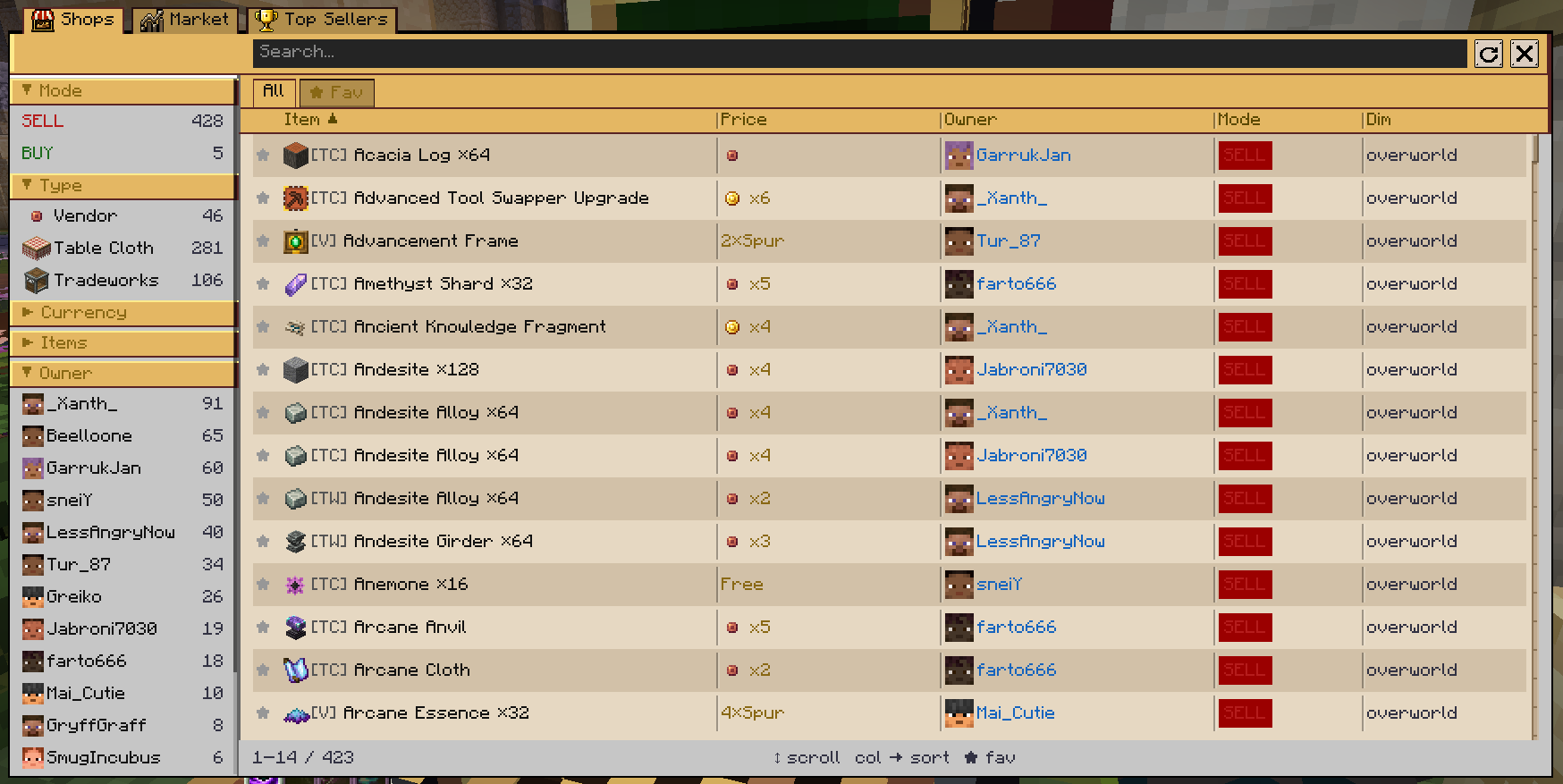
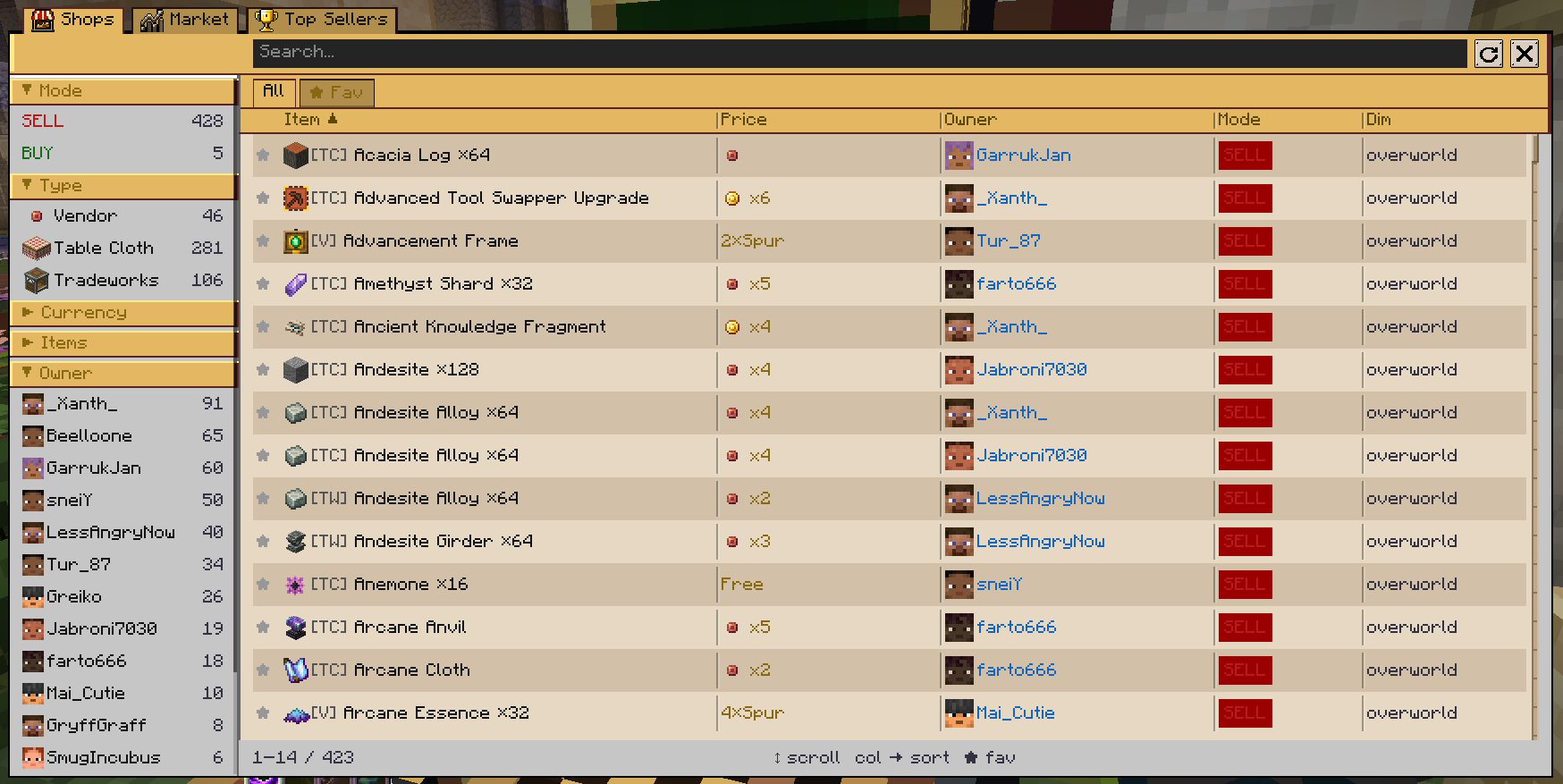
🛍️ Shops — every shop on the server
A sortable, searchable table of all active shops.
Columns
Favourite · Item · Price · Owner · Mode · Dimension
You can
- Search by item or player
- Sort by any column
- Pin favourite shops
- Filter by:
- Buy / Sell
- Vendor / TableCloth
- Currency type or barter item
- Owner
- Dimension
Hover a row → see exact coordinates.
Right-click a row → add Xaero’s waypoint.
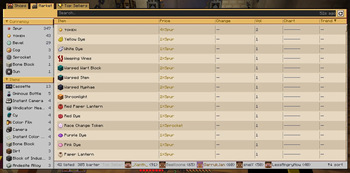
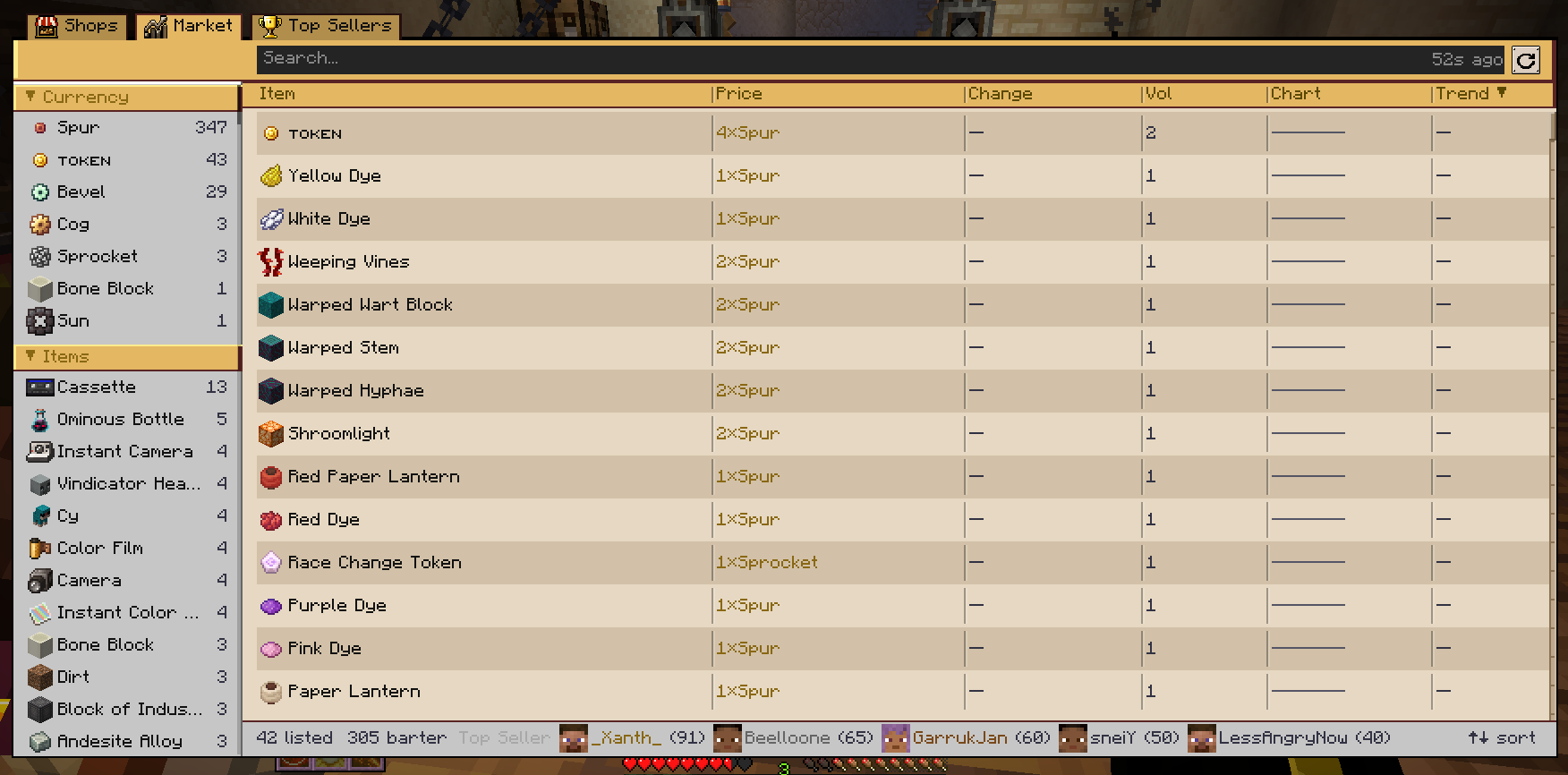
📈 Market — aggregated by item
This is where it becomes a stock exchange.
Each row is an item, not a shop.
Shows
- Average price
- Price change %
- Trade volume
- Trend (rising / falling / stable)
- Sparkline chart of last 24h
Price history engine
- Snapshot every 10 minutes
- 144 snapshots stored (24h)
- Saved in world data
- Survives restarts
Highly traded items are highlighted automatically.
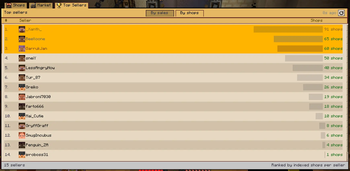
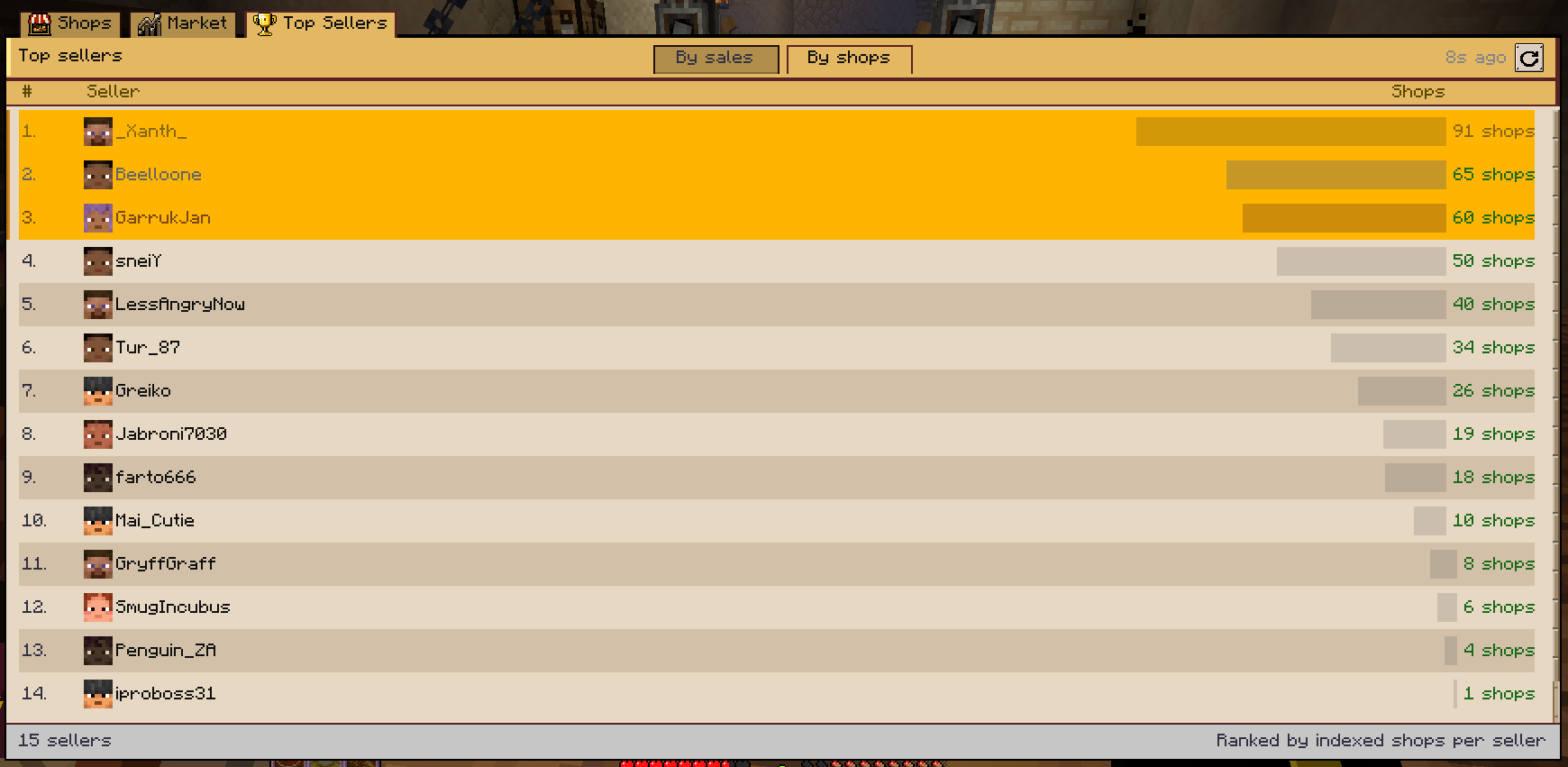
🏆 Top Sellers — who runs the economy
A leaderboard of the most active traders.
- Ranked by real sales if available
- Otherwise by shop count
- Top 3 get medals
- Visual activity bars per player
You immediately see who dominates the market.
⚙️ How it works (technical)
- Shops are indexed automatically on chunk load and block updates
- Data is sent only when UI opens (no background spam)
- Fully serverside logic
🐛 Issues, suggestions, ideas
Report here:
https://github.com/Deokma/create-stockmarket/issues
Available Versions
How to Install Create: Stock Market on Your Server
Order Server
Order a Minecraft Java server with at least 4 GB RAM (6 GB recommended).
Set neoforge Loader
In the panel under "Egg", select the neoforge loader and matching Minecraft version (1.21.1).
Install Mod
Open the mod browser in the dashboard and search for "Create: Stock Market". Click "Install" – done! Alternatively, upload the .jar via SFTP to the /mods folder.
Compatibility
Mod Loaders
Minecraft Versions
1.21.1
Server-side
✓ RequiredRecommended RAM
6 GB(min. 4 GB)Frequently Asked Questions
Create: Stock Market server crashes on startup – what to do?
Most common cause: wrong neoforge version or insufficient RAM. Check the server log (latest.log) for "OutOfMemoryError" or "Mixin" errors. With Mado Hosting: ensure at least 4 GB RAM is allocated and the loader matches the mod version (1.21.1). You can switch loaders with one click in the panel.
Is Create: Stock Market compatible with neoforge?
Create: Stock Market officially supports neoforge for Minecraft 1.21.1. The Mado dashboard automatically detects incompatible loader combinations.
Server lagging with Create: Stock Market – how to optimize performance?
Recommended RAM: 6 GB (per 5 players). Use /spark profiler to check if Create: Stock Market consumes the most tick time. Common fixes: reduce server view-distance to 8-10, install "performant" or "starlight" as supplementary mods on Forge. With Mado Hosting, your server runs on NVMe SSDs with dedicated CPU cores for minimal latency.
Similar Mods




![CobbleDollars [Cobblemon Addon]](https://cdn.modrinth.com/data/s7N7AsqL/684040a264fc1d7f9b856ec5d2da39767398c7ad.png)
Rent Modded Server
Install Create: Stock Market with just one click on your server.