
Create Track Map: Fork²
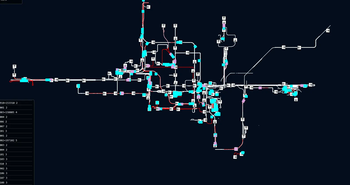
Live web map of your Create train network fork² for huge networks.
Screenshots
About this Mod
Create Track Map: Fork²
A live web map of your Create train network, rebuilt for scale. Same map, dramatically faster on huge networks.
⚠️ This is a fork of a fork. It is not the original and not AyOhEe's unofficial fork. If your network is small, just use one of those.
Why this exists
Original CTM was built around full-state polling and a Leaflet SVG renderer. Both fall over past a few hundred track segments. This fork keeps the user-visible behaviour identical and rewrites everything underneath:
- OpenLayers canvas renderer with incremental updates
- Single SSE endpoint with delta updates instead of four full-state streams
- Train motion interpolated client-side; server polls at 1 Hz instead of 2 Hz
- Gzip on the wire, 3-decimal coords, server-side curve flattening
- Per-edge caches and a topology short-circuit so static networks cost almost nothing per tick
Result on a stress test (3000 segments, 200 signals, 20 trains, 5 clients):
| upstream | this fork | |
|---|---|---|
| Wire bytes/s | ~6.4 MB/s | ~3 KB/s |
| Browser ops/tick | ~6000 DOM | ~20 features |
Compatibility
| Minecraft | Loader | Create |
|---|---|---|
| 1.21.1 | NeoForge 21.1.x | ≥ 6.0 |
| 1.20.1 | Forge 47.1.x (also NeoForge 1.20.1) | ≥ 6.0.6 |
Wire protocol break
The four *.rt SSE endpoints are replaced by /api/v2/stream. Legacy REST GETs still work. Third-party clients on the old streaming API need updating.
Credits
- jenchanws — original Create Track Map
- AyOhEe — unofficial fork that kept it alive across versions
This fork is by NexusRealms and not endorsed by either. Don't file issues with them about anything in this fork — report them on our discord
Available Versions
How to Install Create Track Map: Fork² on Your Server
Order Server
Order a Minecraft Java server with at least 4 GB RAM (6 GB recommended).
Set forge Loader
In the panel under "Egg", select the forge loader and matching Minecraft version (1.21.1).
Install Mod
Open the mod browser in the dashboard and search for "Create Track Map: Fork²". Click "Install" – done! Alternatively, upload the .jar via SFTP to the /mods folder.
Compatibility
Mod Loaders
Minecraft Versions
1.21.1, 1.20.1
Server-side
✓ RequiredRecommended RAM
6 GB(min. 4 GB)Frequently Asked Questions
Create Track Map: Fork² server crashes on startup – what to do?
Most common cause: wrong forge version or insufficient RAM. Check the server log (latest.log) for "OutOfMemoryError" or "Mixin" errors. With Mado Hosting: ensure at least 4 GB RAM is allocated and the loader matches the mod version (1.21.1). You can switch loaders with one click in the panel.
Is Create Track Map: Fork² compatible with forge and neoforge?
Create Track Map: Fork² officially supports forge, neoforge for Minecraft 1.21.1, 1.20.1. The Mado dashboard automatically detects incompatible loader combinations.
Server lagging with Create Track Map: Fork² – how to optimize performance?
Recommended RAM: 6 GB (per 5 players). Use /spark profiler to check if Create Track Map: Fork² consumes the most tick time. Common fixes: reduce server view-distance to 8-10, install "performant" or "starlight" as supplementary mods on Forge. With Mado Hosting, your server runs on NVMe SSDs with dedicated CPU cores for minimal latency.
Similar Mods





Rent Modded Server
Install Create Track Map: Fork² with just one click on your server.