
Create: Utils
Add usefull blocks for Create and more
Screenshots

About this Mod
Some announcements
This mod is indefinitely archived, since i have other priorities and projects. The mod won't receive any updates until i restart working on it. Pretty cool stuff is still planned but, as said, not my priority at the moment
!! Attention: our one and only DnD release for 1.20.1 is bugged and it crashes with command /give
This is for my modpack, i add something when it comes to mind and it's useful.
The mod adds:
Diagonal Redstone Girder
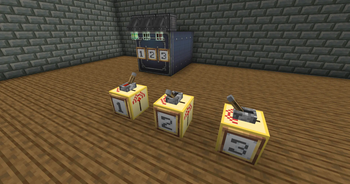
With this mod you can make the diagonal girder (from Create: Design and Decor) emit redstone wirelessly. To do so, right click with the bounder on the diagonal girder; then place the transmitter block (maybe this will change, in favor of using the Create link) and right click with the bounder. And done! Now when you power the transmitter, the girder will emitt redstone.
By right clicking the transmitter, you open the config where you can set the output power level (also displayed in red). When you power the block with any redstone power, the girder will emit a redstone signal with the selected power.
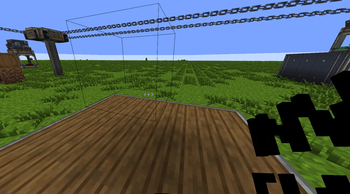
Also, the bounder has a config (right click on air): you can set it to allow overwriting the previous transmitter linking and also to maintain or reset the selected girder position after you use it. I also added an overlay that shows the selected girder coordinates.
Screwdriver: if you right click on a linked transmitter it shows the linked girder coords. If you shift-right click you delete the linking
For now, if you link more than one transmitter to a girder, you can power all transmitters up and when you unpower one of the transmitters the linked girder turns off.
Fully Trasparent Glass
- An invisible glass block that is fully trasparent, crafted with one glass.
Smarter Observer
The smarter observer is a more intelligent version of the Create mod one. You need to select a filter when placed, otherwise it won't work.Select it by right clicking the block with the block you want to detect.
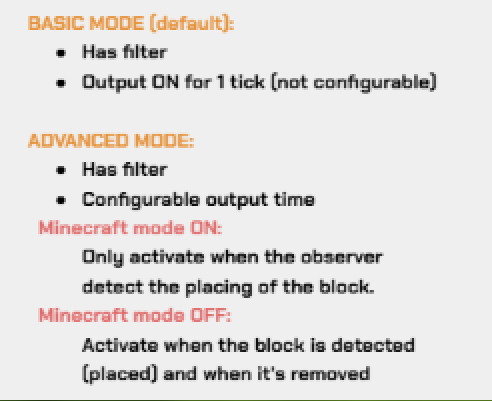
As shown in the gallery, it has 2 main modes:
Basic mode: It outputs a signal for 1 tick when it detects the selected block.
Advanced mode, with a "Minecraft Mode" switch:
- Minecraft Mode OFF: It will detect the block when placed and output a signal for the selected amount of time.
- Minecraft Mode ON: similar, but mimics the behavior of the vanilla observer. It will detect the block when placed or removed, and output a signal for the selected amount of time both times.
You can rotate and break it with the wrench. The observer works with pistons to.
Emergency Lamp
Lamp similar to emergency ones. Right click with screwdriver to change position (top, center, bottom for walls and center/side for ceiling or floor. Right click with the wrench to change type (ceiling, wall or floor). Crafted with one torch and 2 iron plates, the 3 types are usable in stonecutter.I suggest using EMI/JEI for the craftings.
For any question or bug reports, join the Discord server. Also, if you have suggestions for blocks to add, enter and tell me, maybe i'll add them in the next update.
For this mod, Create: Design 'N' Decor is required. Download for 1.20.1 here.
Planned:
- MAYBE - Some textures and models rework. GUI in due time.
- No jumping sign (electrical purpose)
- DONE - Create: Deco cage lamps with less (or configurable) light level. See Create: DDCL.
- CANCELED -
Priority list or similar for multiple trasmitter powering one girder - MAYBE - Improve way to change lamp type
- MAYBE - Wrench rotate sound
- Pulse counter, count the number of redstone pulses and more (
kinda, let me know on discord if you are interested and if you want specific functions).
Mod created with MCreator.
Available Versions
How to Install Create: Utils on Your Server
Order Server
Order a Minecraft Java server with at least 4 GB RAM (6 GB recommended).
Set forge Loader
In the panel under "Egg", select the forge loader and matching Minecraft version (1.21.1).
Install Mod
Open the mod browser in the dashboard and search for "Create: Utils". Click "Install" – done! Alternatively, upload the .jar via SFTP to the /mods folder.
Compatibility
Mod Loaders
Minecraft Versions
1.21.1, 1.20.1
Server-side
✓ RequiredRecommended RAM
6 GB(min. 4 GB)Frequently Asked Questions
Create: Utils server crashes on startup – what to do?
Most common cause: wrong forge version or insufficient RAM. Check the server log (latest.log) for "OutOfMemoryError" or "Mixin" errors. With Mado Hosting: ensure at least 4 GB RAM is allocated and the loader matches the mod version (1.21.1). You can switch loaders with one click in the panel.
Is Create: Utils compatible with forge and neoforge?
Create: Utils officially supports forge, neoforge for Minecraft 1.21.1, 1.20.1. The Mado dashboard automatically detects incompatible loader combinations.
Server lagging with Create: Utils – how to optimize performance?
Recommended RAM: 6 GB (per 5 players). Use /spark profiler to check if Create: Utils consumes the most tick time. Common fixes: reduce server view-distance to 8-10, install "performant" or "starlight" as supplementary mods on Forge. With Mado Hosting, your server runs on NVMe SSDs with dedicated CPU cores for minimal latency.
Similar Mods





Rent Modded Server
Install Create: Utils with just one click on your server.
Details
- License
- Creative Commons Attribution Share Alike 4.0 International
- Server-side
- Required