
Create:Redstone Throttle
Companion to Create. Adds a Redstone Speed Modulator that transforms input rotation by an offset accumulated from redstone signals.
Screenshots
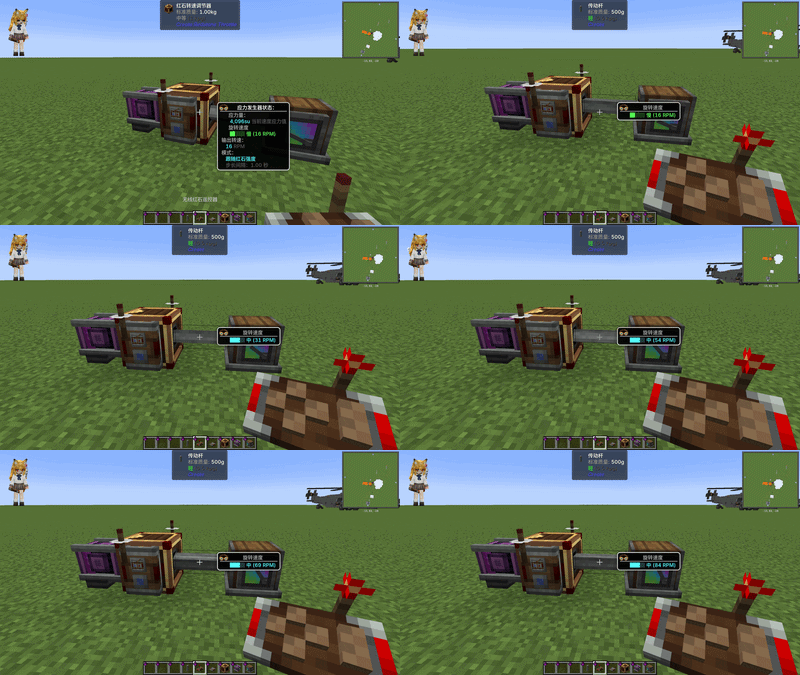
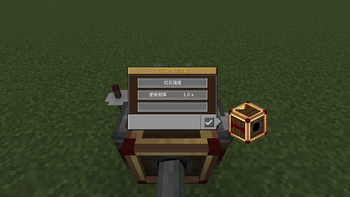
About this Mod
Create: Redstone Throttle
A Create addon that lets you precisely control rotational speed using redstone signals. Place a Redstone Speed Modulator between your power source and machines, apply redstone to its left/right sides, and dial in the exact RPM you need.
Features
- Three control modes for different use cases
- Goggles overlay – see output RPM and current mode at a glance
- In-game GUI – Shift + Right-click to configure (scroll to adjust values, hold Shift for ×10)
- Seamless Create integration – behaves like any kinetic block; works with shafts, gearboxes, chains, etc.
Modes
Strength Mode (default)
The redstone signal strength difference between the left and right inputs determines the speed offset. Each signal level adds ±0.5 RPM per interval. Think of it as an analog fine-tuner — great for precise, gradual adjustments.
Fixed Rate Mode
Each active side (signal > 0) adds or subtracts a fixed RPM step (configurable from 1 to 256). Left = +N RPM, Right = –N RPM, both or neither = no change. Ideal for stepped gear-shifting.
Strength × Multiplier Mode
Instantaneous, no accumulation. Output = Initial Speed + (left_signal - right_signal) × Multiplier. Perfect when you want direct, real-time redstone-to-speed mapping.
How It Works
- Connect the modulator's back face (shaft side) to a rotating power source (water wheel, steam engine, etc.)
- The front face outputs the modulated speed
- Apply redstone signals to the left and right faces to adjust speed offset
- The offset accumulates over time at the configured interval (0.3 – 10 seconds)
Dependencies
- Create 6.0.10+
- Minecraft 1.21.1
- NeoForge
红石调速器 (Create: Redstone Throttle)
一个 机械动力 (Create) 附属模组,通过红石信号精确控制转速。在动力源和机器之间放置一个红石转速调节器,在左右两侧输入红石信号,即可精准调节输出 RPM。
特性
- 三种控制模式,适配不同场景
- 护目镜信息面板 — 佩戴工程师护目镜即可查看输出转速和当前模式
- 内置 GUI — Shift + 右键打开配置界面(滚轮调整数值,按住 Shift 加快 10 倍)
- 无缝 Create 集成 — 如同原版动能元件一般工作,兼容传动杆、齿轮箱、链条等
三种模式
红石强度模式(默认)
左右两侧红石信号强度差决定转速偏移量。每级信号 = ±0.5 RPM/间隔。像模拟微调旋钮一样,适合需要精细渐进调节的场景。
固定速率模式
每侧有信号(强度 > 0)即累加/减去固定 RPM 步长(可配置 1-256 RPM)。左侧 = +N RPM,右侧 = –N RPM。适合档位式变速。
强度倍率模式
即时响应,无累积过程。输出 = 初始转速 + (左信号 - 右信号) × 倍率。适合需要实时直接映射红石到转速的场景。
使用方法
- 将调制器背面(有轴连接面)对准旋转动力源(水车、蒸汽引擎等)
- 正面输出调制后的转速
- 在左/右两侧输入红石信号以调节转速偏移
- 偏移量按配置的间隔时间累积生效(0.3 - 10 秒)
Available Versions
How to Install Create:Redstone Throttle on Your Server
Order Server
Order a Minecraft Java server with at least 4 GB RAM (6 GB recommended).
Set neoforge Loader
In the panel under "Egg", select the neoforge loader and matching Minecraft version (1.21.1).
Install Mod
Open the mod browser in the dashboard and search for "Create:Redstone Throttle". Click "Install" – done! Alternatively, upload the .jar via SFTP to the /mods folder.
Compatibility
Mod Loaders
Minecraft Versions
1.21.1
Server-side
✓ RequiredRecommended RAM
6 GB(min. 4 GB)Frequently Asked Questions
Create:Redstone Throttle server crashes on startup – what to do?
Most common cause: wrong neoforge version or insufficient RAM. Check the server log (latest.log) for "OutOfMemoryError" or "Mixin" errors. With Mado Hosting: ensure at least 4 GB RAM is allocated and the loader matches the mod version (1.21.1). You can switch loaders with one click in the panel.
Is Create:Redstone Throttle compatible with neoforge?
Create:Redstone Throttle officially supports neoforge for Minecraft 1.21.1. The Mado dashboard automatically detects incompatible loader combinations.
Server lagging with Create:Redstone Throttle – how to optimize performance?
Recommended RAM: 6 GB (per 5 players). Use /spark profiler to check if Create:Redstone Throttle consumes the most tick time. Common fixes: reduce server view-distance to 8-10, install "performant" or "starlight" as supplementary mods on Forge. With Mado Hosting, your server runs on NVMe SSDs with dedicated CPU cores for minimal latency.
Similar Mods





Rent Modded Server
Install Create:Redstone Throttle with just one click on your server.