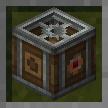
create:air_shield
Added an airflow shield to create
Screenshots
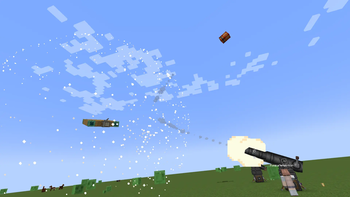
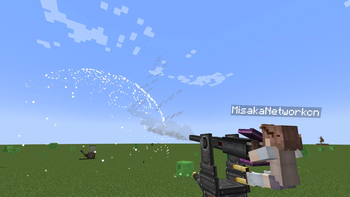
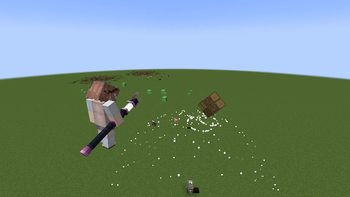
About this Mod
Create: Shield
Create: Shield is a Minecraft NeoForge 1.21.1 mod that adds two powered blocks to Create and optionally Sable: the Clockwork Block (power battery) and the Shield Block (cone-shaped entity pusher).
Dependencies
| Dependency | Version |
|---|---|
| Minecraft | 1.21.1 |
| NeoForge | 21.1+ |
| Create | 6.0.10+ |
| Sable | 1.2.2 (optional, for subspace physics pushing) |
| Java | 21 |
1. Clockwork Block — Power Battery
The Clockwork Block is a mechanical device that can store and release rotational kinetic energy, essentially a giant "rechargeable battery."
1.1 Block Structure
| Face | Function |
|---|---|
| Back | Power input side, connect to a power source (e.g., motor, waterwheel) |
| Front | Power output side, supplies power to the mechanical network |
1.2 Operation Modes
Charging Mode (no redstone signal)
- Receives rotational power from the back, converting kinetic energy into internal stored energy.
- Stress consumption =
RPM × 256(SU) - Maximum energy storage: approximately 2 billion SU·tick
- Requires sufficient stress capacity from the external network while charging.
Discharging Mode (redstone signal applied)
- Releases stored energy and outputs rotational power from the front.
- Provides unlimited stress capacity (backed by stored energy).
- Discharge consumption =
ceil(stress demand)SU·tick, deducted from stored energy. - Automatically stops output when stored energy is depleted.
2. Shield Block — Cone‑Shaped Entity Pusher
The Shield Block is a cone‑area entity pushing device that uses rotational power to generate a repulsion field in front, pushing entities away.
2.1 Block Structure
| Face | Function |
|---|---|
| Back | Power input side |
| Front | Direction of repulsion wave emission; can be fitted with a Nozzle to adjust the cone angle |
| Left | Right‑click to open GUI parameter adjustment panel |
| Right | Two frequency slots; place items to set wireless frequency |
2.3 Cone Scanning Mechanism
When supplied with sufficient stress, the Shield Block creates a cone‑shaped scanning area in front:
- Repulsion angle φ = 45° – 270° (opening angle of the cone). Adjustable only if a Nozzle is installed; fixed at 45° without a nozzle.
- Repulsion range r = RPM / 8 (radius of the cone area)
- Repulsion strength flow = redstone signal strength
- An entity / physical structure (from Sable) is pushed only if it lies within the cone angle and is not blocked by line‑of‑sight.
- When a nozzle pushes a physical structure (Sable) from a subspace into the overworld, the Shield Block itself is pushed back.
2.4 Frequency Linking System
The Shield Block supports wireless frequency linking, enabling multiple blocks to work together:
- Place items in the two frequency slots to set the frequency.
- Supports Create’s wireless redstone adjustment.
- Physical structures belonging to Shield Blocks that share the same frequency pair are "allies" — they will not push each other within the same subspace, preventing same‑frequency structures from being blown away.
License
This mod is licensed under CC BY-NC-SA 4.0 (Creative Commons Attribution‑NonCommercial‑ShareAlike 4.0 International).
- Free to use, modify, and distribute
- Commercial use is prohibited
- Derivative works must be released under the same license
Available Versions
How to Install create:air_shield on Your Server
Order Server
Order a Minecraft Java server with at least 4 GB RAM (6 GB recommended).
Set neoforge Loader
In the panel under "Egg", select the neoforge loader and matching Minecraft version (1.21.1).
Install Mod
Open the mod browser in the dashboard and search for "create:air_shield". Click "Install" – done! Alternatively, upload the .jar via SFTP to the /mods folder.
Compatibility
Mod Loaders
Minecraft Versions
1.21.1
Server-side
✓ RequiredRecommended RAM
6 GB(min. 4 GB)Frequently Asked Questions
create:air_shield server crashes on startup – what to do?
Most common cause: wrong neoforge version or insufficient RAM. Check the server log (latest.log) for "OutOfMemoryError" or "Mixin" errors. With Mado Hosting: ensure at least 4 GB RAM is allocated and the loader matches the mod version (1.21.1). You can switch loaders with one click in the panel.
Is create:air_shield compatible with neoforge?
create:air_shield officially supports neoforge for Minecraft 1.21.1. The Mado dashboard automatically detects incompatible loader combinations.
Server lagging with create:air_shield – how to optimize performance?
Recommended RAM: 6 GB (per 5 players). Use /spark profiler to check if create:air_shield consumes the most tick time. Common fixes: reduce server view-distance to 8-10, install "performant" or "starlight" as supplementary mods on Forge. With Mado Hosting, your server runs on NVMe SSDs with dedicated CPU cores for minimal latency.
Similar Mods




Rent Modded Server
Install create:air_shield with just one click on your server.
Details
- License
- Creative Commons Attribution Non Commercial Share Alike 4.0 International
- Server-side
- Required