
Creative Tabs Organizer
Organize your modded Creative Tabs your way
Screenshots
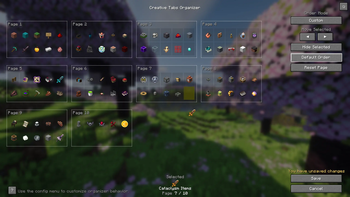
About this Mod
[EN] Description in English first
[ES] Descripción en español más abajo
📦 Creative Tab Organizer
Organize your modded Creative Tabs with a clean and intuitive interface.
This mod lets you fully control how your Creative Tabs are ordered, making large modpacks easier to navigate and use.
✨ Features
- Custom tab ordering with drag & drop
- Automatic sorting (A-Z / Z-A)
- Move tabs manually with precise control
- Reset order (global or per page)
- Multi-page layout for better organization
Compatibility
- Works with modded Creative Tabs
- Client-side only
📦 Creative Tab Organizer
Organiza las pestañas del creativo de tus mods con una interfaz clara e intuitiva.
Este mod te permite controlar completamente el orden de las pestañas, facilitando el uso de modpacks grandes.
✨ Características
- Orden personalizado con arrastrar y soltar
- Orden automático (A-Z / Z-A)
- Movimiento manual preciso de pestañas
- Reinicio del orden (global o por página)
- Sistema de páginas para mejor organización
Compatibilidad
- Funciona con pestañas de mods
- Solo cliente
Available Versions
How to Install Creative Tabs Organizer on Your Server
Order Server
Order a Minecraft Java server with at least 3 GB RAM (4 GB recommended).
Set forge Loader
In the panel under "Egg", select the forge loader and matching Minecraft version (1.21.1).
Install Mod
Open the mod browser in the dashboard and search for "Creative Tabs Organizer". Click "Install" – done! Alternatively, upload the .jar via SFTP to the /mods folder.
Compatibility
Mod Loaders
Minecraft Versions
1.21.1, 1.20.1
Server-side
✗ UnsupportedRecommended RAM
4 GB(min. 3 GB)Frequently Asked Questions
Creative Tabs Organizer server crashes on startup – what to do?
Most common cause: wrong forge version or insufficient RAM. Check the server log (latest.log) for "OutOfMemoryError" or "Mixin" errors. With Mado Hosting: ensure at least 3 GB RAM is allocated and the loader matches the mod version (1.21.1). You can switch loaders with one click in the panel.
Is Creative Tabs Organizer compatible with forge and neoforge?
Creative Tabs Organizer officially supports forge, neoforge for Minecraft 1.21.1, 1.20.1. The Mado dashboard automatically detects incompatible loader combinations.
Server lagging with Creative Tabs Organizer – how to optimize performance?
Recommended RAM: 4 GB (per 8 players). Use /spark profiler to check if Creative Tabs Organizer consumes the most tick time. Common fixes: reduce server view-distance to 8-10, install "performant" or "starlight" as supplementary mods on Forge. With Mado Hosting, your server runs on NVMe SSDs with dedicated CPU cores for minimal latency.
Similar Mods






Rent Modded Server
Install Creative Tabs Organizer with just one click on your server.