
Creative Tabs Sections
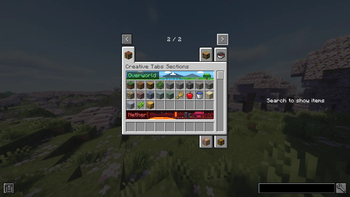
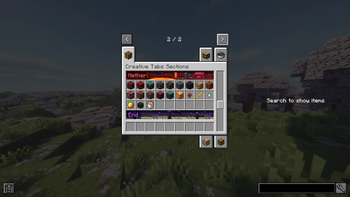
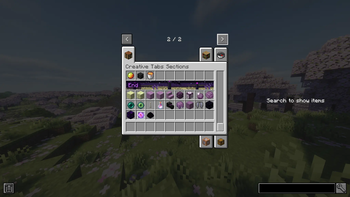
Adds sectioned layouts to Creative Tabs, allowing items to be grouped with headers, banners, and optional animations.
Screenshots
About this Mod
[EN] Description in English first
[ES] Descripción en español más abajo
📦 Creative Tab Sections
A lightweight system for structuring Creative Tabs into ordered sections with custom visuals.
This mod is designed primarily for mod developers, allowing control over how items are grouped and displayed inside Creative Tabs. Sections are defined in code, while their appearance is configured via JSON, enabling flexible and maintainable layouts.
It can be used as a standalone mod or directly integrated into other projects.
✨ Features
- Define sections inside Creative Tabs via code
- Assign items (including dynamic/custom ItemStacks) to each section
- Order sections using priority-based sorting
- Custom headers with text, colors, and backgrounds
- Static or animated banner support (sprite-based)
- Clean layout with automatic spacing between sections
- Search tab remains unaffected (no empty slot pollution)
- Resource reload support for visual configuration (F3+T)
🧪 Developer Tools
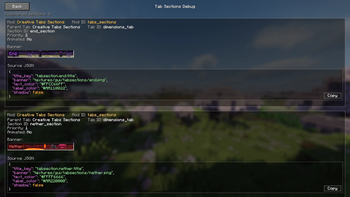
- Includes a built-in debug screen for inspecting registered sections
- Displays section metadata, banner preview, and JSON configuration
- JSON is rendered with syntax highlighting and can be copied to clipboard
- Disabled by default and intended for development use
Additionally, this project includes an internal README/documentation for using the API and integrating the system into your own mod.
🧩 Intended Usage
- Use as a dependency to structure your mod’s Creative Tabs
- Or copy/integrate the system directly into your own mod
- Designed to be flexible and easily adaptable
🔓 Code Usage & Integration
You are explicitly allowed to:
- Copy the code into your own mod
- Modify it to fit your specific needs
- Integrate it without keeping this mod as a dependency
This project follows a permissive approach (MIT-style) to encourage reuse and customization without restrictions.
🧠 Inspiration
This system is inspired by the sectioned Creative Tabs seen in Create: Aeronautics.
The implementation was written from scratch after reviewing the idea and behavior, with the goal of providing a clean, reusable, and API-friendly system, rather than copying or adapting existing code.
💬 Feedback & Improvements
Feedback is welcome.
If you find limitations, edge cases, or areas that could be improved:
- Open an issue
- Share suggestions
- Propose improvements
The goal is to keep the system simple, flexible, and useful for real-world mod development.
📦 Creative Tab Sections
Un sistema ligero para estructurar pestañas del creativo en secciones ordenadas con apariencia personalizada.
Este mod está diseñado principalmente para desarrolladores de mods, permitiendo controlar cómo se agrupan y muestran los ítems dentro de las pestañas del creativo. Las secciones se definen por código, mientras que su apariencia se configura mediante JSON.
Puede usarse como mod independiente o integrarse directamente en otros proyectos.
✨ Características
- Definición de secciones por código dentro de pestañas del creativo
- Asignación de ítems (incluyendo ItemStacks dinámicos) a cada sección
- Ordenación por prioridad
- Encabezados personalizados con texto y colores
- Soporte para banners estáticos o animados (sprites)
- Layout limpio con separación automática entre secciones
- La búsqueda no se ve afectada (sin espacios vacíos)
- Recarga de recursos para configuración visual (F3+T)
🧪 Herramientas para desarrolladores
- Incluye una pantalla de debug para inspeccionar las secciones registradas
- Muestra metadata, preview del banner y configuración JSON
- El JSON se renderiza con syntax highlighting y se puede copiar al portapapeles
- Desactivado por defecto y pensado para uso en desarrollo
Además, el proyecto incluye un README/documentación interna para el uso de la API e integración en otros mods.
🧩 Uso previsto
- Usarlo como dependencia para estructurar tus pestañas
- O copiar/integrar el sistema dentro de tu propio mod
- Diseñado para ser flexible y fácilmente modificable
🔓 Uso del código e integración
Está explícitamente permitido:
- Copiar el código dentro de tu propio mod
- Modificarlo según tus necesidades
- Integrarlo sin depender de este mod como librería
El proyecto sigue un enfoque permisivo (tipo MIT) para facilitar su reutilización sin restricciones.
🧠 Inspiración
Este sistema está inspirado en las pestañas seccionadas vistas en Create: Aeronautics.
La implementación fue desarrollada desde cero tras analizar la idea y su comportamiento, con el objetivo de ofrecer un sistema limpio, reutilizable y orientado a API, en lugar de reutilizar o adaptar código existente.
💬 Feedback y mejoras
Se agradece el feedback.
Si encuentras limitaciones, casos borde o posibles mejoras:
- Abre un issue
- Comparte sugerencias
- Propón cambios
El objetivo es mantener el sistema simple, flexible y útil para desarrollo real de mods.
Available Versions
How to Install Creative Tabs Sections on Your Server
Order Server
Order a Minecraft Java server with at least 3 GB RAM (4 GB recommended).
Set neoforge Loader
In the panel under "Egg", select the neoforge loader and matching Minecraft version (1.21.1).
Install Mod
Open the mod browser in the dashboard and search for "Creative Tabs Sections". Click "Install" – done! Alternatively, upload the .jar via SFTP to the /mods folder.
Compatibility
Mod Loaders
Minecraft Versions
1.21.1
Server-side
✓ RequiredRecommended RAM
4 GB(min. 3 GB)Frequently Asked Questions
Creative Tabs Sections server crashes on startup – what to do?
Most common cause: wrong neoforge version or insufficient RAM. Check the server log (latest.log) for "OutOfMemoryError" or "Mixin" errors. With Mado Hosting: ensure at least 3 GB RAM is allocated and the loader matches the mod version (1.21.1). You can switch loaders with one click in the panel.
Is Creative Tabs Sections compatible with neoforge?
Creative Tabs Sections officially supports neoforge for Minecraft 1.21.1. The Mado dashboard automatically detects incompatible loader combinations.
Server lagging with Creative Tabs Sections – how to optimize performance?
Recommended RAM: 4 GB (per 8 players). Use /spark profiler to check if Creative Tabs Sections consumes the most tick time. Common fixes: reduce server view-distance to 8-10, install "performant" or "starlight" as supplementary mods on Forge. With Mado Hosting, your server runs on NVMe SSDs with dedicated CPU cores for minimal latency.
Rent Modded Server
Install Creative Tabs Sections with just one click on your server.