
Creative Tabs Tweaker
CreativeTabsTweaker (Forge 1.12.2) lets you remove modded creative tabs, add custom ones, and move items between tabs for better organization.
About this Mod
CreativeTabsTweaker - Minecraft Forge 1.12.2
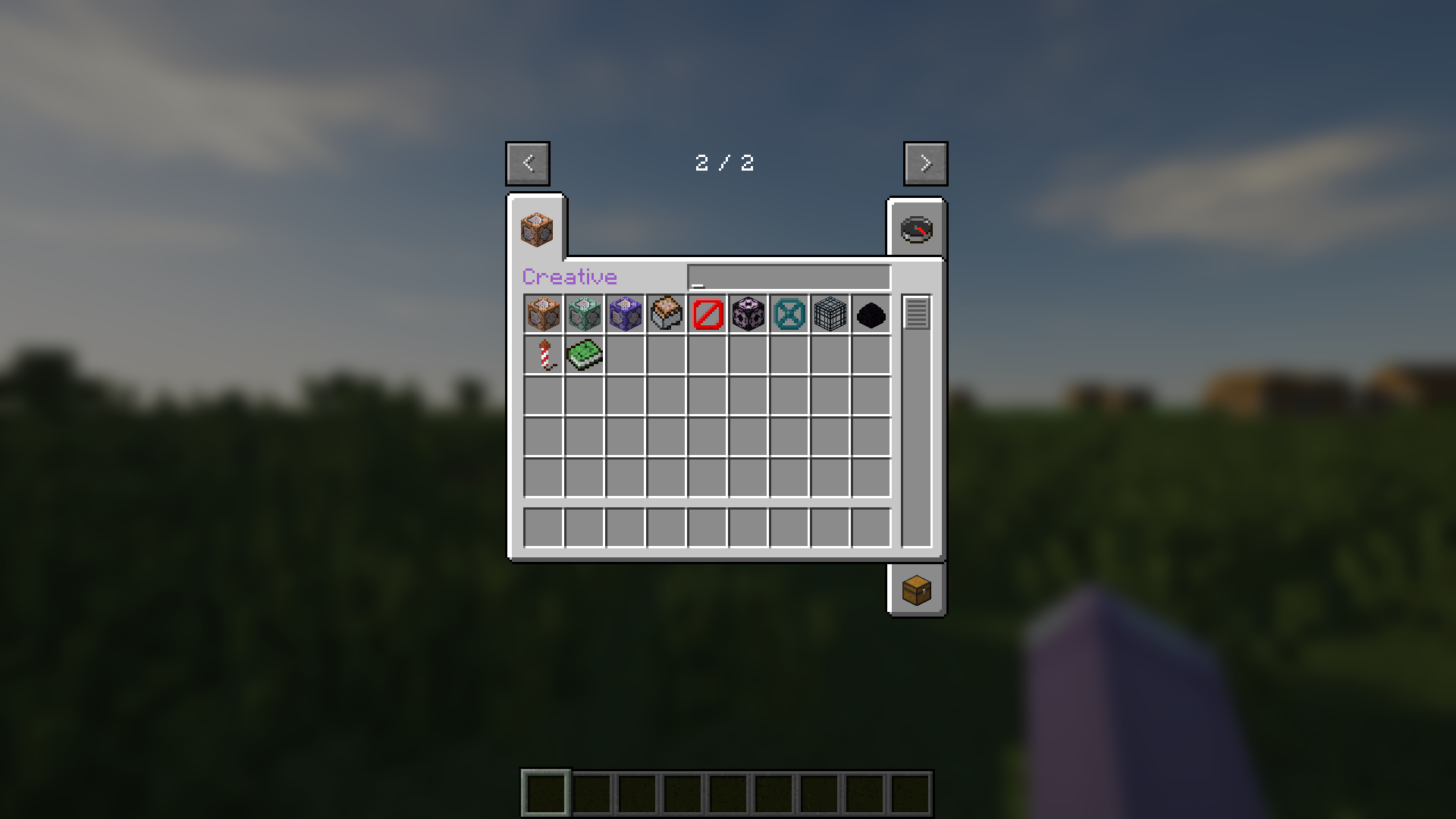
CreativeTabsTweaker (Forge 1.12.2) lets you remove modded creative tabs, add custom ones, and move items between tabs for better organization.
🎉 Features 🎉
- Remove any Creative Tabs from Mod.
- Add custom new Creative Tabs.
- Change Items' Tab.
🚀 Usage 🚀
- Run Minecraft 1 time when installed mod to create config file.
- Edit configured example or just follow below rules.
- Add .lang and .png file of custom tabs to resourcepacks folder.
⚙️ CreativeTabsTweaker.json ⚙️
  "removeTabs": [
    // "tabLabel" What tab you want to remove. You can look for tabs' label in game logs. //
  ],
  "addTabs": {
    "creative": { // What is your custom tab name. //
      "tabBackgroundImage": "tab_creative.png", // Tab's background image from Resource Pack, always start with "tab_" and end with ".png" //
      "tabIconItem": "minecraft:command_block", // Tab's icon item registry name. You can look for the registry name of items in tooltips. //
      "drawTitle": true, // Your tab have title or not. //
      "hasSearchBar": true, // Your tab have search bar or not. //
      "hexLabelColor": "#9A5CC6" // If have title, what is it color in hex. //
      "searchBarWidth": 89, // If have search bar, what is it width. //
    }
  },
  "items": {
    "minecraft:command_block": "creative", // Registry name of item that you want to change tab and tab label of tab to change to. //
    "minecraft:dirt": "" // If want to remove item from any tabs just leave empty//
  }
🖼️ CreativeTabsTweaker.zip 🖼️
CreativeTabsTweaker.zip
├── assets
│   └── ctt
│       ├── lang
│       │   └── .lang
│       └── texture
│           └── gui
│               └── container
│                   └── creative_inventory
│                       └── .png
└── pack.mcmeta
📄 pack.mcmeta 📄
{
  "pack": {
    "description": "ctt mod resources",
    "pack_format": 3
  }
}
🎌 locale_code.lang 🎌
itemGroup.creative=Creative // itemGroup dot then tab label and visual title //
📜 License 📜
- © 2025 by MeowSkyKung is licensed under CC BY-SA 4.0. 🔖
- Credits to MCreator, Blur, Optifine, SEUS
💖 Supporting by 💖
- Star Me on GitHub 🌟
- Donate on Ko-Fi ☕
Available Versions
How to Install Creative Tabs Tweaker on Your Server
Order Server
Order a Minecraft Java server with at least 3 GB RAM (4 GB recommended).
Set forge Loader
In the panel under "Egg", select the forge loader and matching Minecraft version (1.12.2).
Install Mod
Open the mod browser in the dashboard and search for "Creative Tabs Tweaker". Click "Install" – done! Alternatively, upload the .jar via SFTP to the /mods folder.
Compatibility
Mod Loaders
Minecraft Versions
1.12.2
Server-side
✗ UnsupportedRecommended RAM
4 GB(min. 3 GB)Frequently Asked Questions
Creative Tabs Tweaker server crashes on startup – what to do?
Most common cause: wrong forge version or insufficient RAM. Check the server log (latest.log) for "OutOfMemoryError" or "Mixin" errors. With Mado Hosting: ensure at least 3 GB RAM is allocated and the loader matches the mod version (1.12.2). You can switch loaders with one click in the panel.
Is Creative Tabs Tweaker compatible with forge?
Creative Tabs Tweaker officially supports forge for Minecraft 1.12.2. The Mado dashboard automatically detects incompatible loader combinations.
Server lagging with Creative Tabs Tweaker – how to optimize performance?
Recommended RAM: 4 GB (per 8 players). Use /spark profiler to check if Creative Tabs Tweaker consumes the most tick time. Common fixes: reduce server view-distance to 8-10, install "performant" or "starlight" as supplementary mods on Forge. With Mado Hosting, your server runs on NVMe SSDs with dedicated CPU cores for minimal latency.
Similar Mods


Rent Modded Server
Install Creative Tabs Tweaker with just one click on your server.
Details
- License
- Creative Commons Attribution Share Alike 4.0 International
- Server-side
- Unsupported