Creative world
The mod will add various interesting items and blocks to the game.
Screenshots
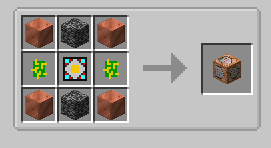
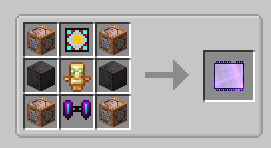
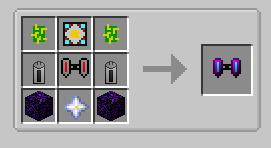
About this Mod
important!
Even though the mod has been developed for a long time, it still contains many bugs and is mostly unbalanced and unfinished! I do not recommend using it in my large builds.
The current description is valid only for the latest version of the mod!
Review.
Introducing a Minecraft modification that allows you to go beyond the limitations of survival mode and unlock the potential of creative mode. This mod not only provides access to exclusive items, but also organically integrates the creative mode when creating certain items, as well as using certain tools and armor.
Ores and materials.
Tin: It is an ore from which armor and tools can be created, which are slightly weaker than iron, but stronger than stone, are common and sometimes used to create mechanisms.
Bronze: An alloy of tin and copper in a ratio of 1 to 3, respectively. It is used to create mechanisms, tools and armor that are equal in strength to iron, and sometimes surpass them.
Composite: a cheap but powerful enough material used to create tools and armor that have good strength and strength approximately equal to diamond. It consists of 3 bronze, carbon and iron plates. It is sometimes used to create mechanisms.
Titanium: This is an ore from which you can create armor and tools that are stronger than non-cerite ones are extremely rare and sometimes used to create mechanisms.
Accumulatium: this is an ore from which you can create armor and tools that are stronger than non-cerite is extremely rare. It is a high-temperature superconductor, has great strength, and can be used to create ultra-high-capacity batteries.
Creativium: this is an ore from which you can create armor and tools that are stronger than non-cerite is extremely rare. It is used to gain abilities similar to those in creativity. A material with colossal strength.
Mechanisms.
Solar panel: The use of solar energy for sustainable electricity generation.
Coal generator: Turning coal into a reliable source of energy.
Rechargeable battery: Efficient storage of excess energy.
Crusher: Crushing of materials for improved ore processing and other applications.
Electric Jetpack: Take to the skies with this advanced vehicle. An improved version is available.
Tools.
Iron key: Turn the mechanisms in any direction. It will help with their dismantling (without using a key, only the case falls out).
Iron hammer: A primitive method of crushing, helps in the creation of plates.
Wire cutters: Necessary to create wires and something else.
Bedrock breaker: Used to destroy the bedrock.
Liquids.
Gas and oil: New liquids appearing underground. They are used for crafting and energy production.
Additional features.
Explore the extensive range of QoL items.
Achieve several achievements, the list of which is constantly expanding.
Available Versions
How to Install Creative world on Your Server
Order Server
Order a Minecraft Java server with at least 3 GB RAM (4 GB recommended).
Set fabric Loader
In the panel under "Egg", select the fabric loader and matching Minecraft version (1.21.1).
Install Mod
Open the mod browser in the dashboard and search for "Creative world". Click "Install" – done! Alternatively, upload the .jar via SFTP to the /mods folder.
Compatibility
Mod Loaders
Minecraft Versions
1.21.1, 1.20.4, 1.20.1 (+6 more)
Server-side
✓ RequiredRecommended RAM
4 GB(min. 3 GB)Frequently Asked Questions
Creative world server crashes on startup – what to do?
Most common cause: wrong fabric version or insufficient RAM. Check the server log (latest.log) for "OutOfMemoryError" or "Mixin" errors. With Mado Hosting: ensure at least 3 GB RAM is allocated and the loader matches the mod version (1.21.1). You can switch loaders with one click in the panel.
Is Creative world compatible with fabric and forge and neoforge and quilt?
Creative world officially supports fabric, forge, neoforge, quilt for Minecraft 1.21.1, 1.20.4, 1.20.1. Note: Forge and Fabric mods are NOT cross-compatible – pick one loader and stick with it. The Mado dashboard automatically detects incompatible loader combinations.
Server lagging with Creative world – how to optimize performance?
Recommended RAM: 4 GB (per 8 players). Use /spark profiler to check if Creative world consumes the most tick time. Common fixes: reduce server view-distance to 8-10, install "performant" or "starlight" as supplementary mods on Forge. With Mado Hosting, your server runs on NVMe SSDs with dedicated CPU cores for minimal latency.
Similar Mods




![[TaCZ] Timeless and Classics Zero](https://cdn.modrinth.com/data/SzzJttH8/fd27766d2bb8390d284696b1dbd358f87e081439_96.webp)

Rent Modded Server
Install Creative world with just one click on your server.