
creeprchain
blockchain for minecraft servers for installation and building, visit github
Screenshots
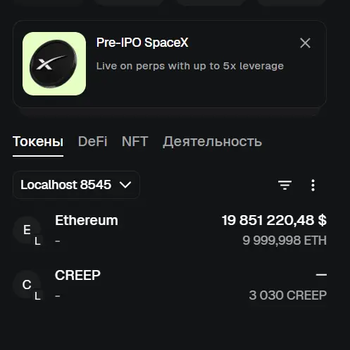
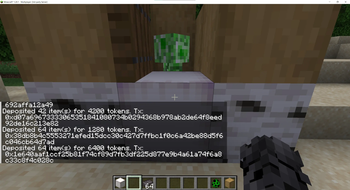
About this Mod
Creeprchain
for installation and building, visit github
Minecraft Fabric 1.20.1 economy mod. Players deposit items at an ATM block and receive ERC-20-style tokens on an Ethereum-compatible blockchain. Tokens are visible in MetaMask.
Requirements
| Tool | Version |
|---|---|
| Java JDK | 21 |
| Fabric Loader | 0.19.2 |
| Fabric API | 0.92.9+1.20.1 |
| Node.js | 18+ (for Hardhat) |
| Hardhat | installed in blockchain/ |
Building the mod
./gradlew build
The output jar is at:
build/libs/creeprchain-1.0.0.jar
On Windows use
gradlew.bat build
Installing on a Fabric server
- Download Fabric Installer and install Fabric server for Minecraft 1.20.1.
- Copy
build/libs/creeprchain-1.0.0.jarinto the server'smods/folder. - Download Fabric API for 1.20.1 and place it in
mods/as well. - Start the server once — it will create the config directory at
config/creeprchain/. - Edit
config/creeprchain/blockchain.json(see Blockchain setup). - Restart the server.
Installing on a client
- Install Fabric Loader for Minecraft 1.20.1 in the launcher.
- Copy
build/libs/creeprchain-1.0.0.jarinto.minecraft/mods/. - Copy Fabric API for 1.20.1 into
.minecraft/mods/as well. - Launch the game and connect to the server.
The client and server must use the exact same jar. A version mismatch causes registry sync errors (
missing creeprchain:atm_block).
Blockchain setup (tested on LINUX)
The blockchain runs on a separate Linux machine. All commands below are run on that machine inside the blockchain/ folder.
Step 1 — Install dependencies
cd blockchain
npm install
Step 2 — Start Hardhat node
scripts/start-local-chain.sh
This starts a local Ethereum node at 0.0.0.0:8545 (chain ID 31337). Leave this terminal open.
Step 3 — Deploy the contract
Open a second terminal on the same machine:
scripts/deploy-contract.sh
Output example:
Token deployed to: 0xAbCd1234...
Copy the contract address.
Step 4 — Configure blockchain.json
On the Minecraft server machine, edit config/creeprchain/blockchain.json:
{
  "rpcUrl": "http://192.168.0.108:8545",
  "chainId": 31337,
  "contractAddress": "0xAbCd1234...",
  "privateKey": "0xd345b787fa175fa22321746c8e0289ad88eac2de8c39ce67215c8b362af621e5"
}
rpcUrl— IP of the Linux machine running the Hardhat nodecontractAddress— address printed by the deploy scriptprivateKey— the Hardhat deployer account; this wallet signs mint/burn transactions on behalf of the server
Restart the Minecraft server. The log will show:
BlockchainService connected: rpc=http://192.168.0.108:8545 chainId=31337 contract=0x...
MetaMask setup
- Open MetaMask → Settings → Networks → Add network manually:
- RPC URL:
http://192.168.0.108:8545 - Chain ID:
31337 - Currency symbol: ETH
- RPC URL:
- Add the token: MetaMask → Tokens → Import token → paste the contract address.
- Note your MetaMask wallet address — you will use it with
/linkwallet.
In-game setup and test
/linkwallet 0xYourMetaMaskAddress
Place an ATM block (/give @p creeprchain:atm_block) and right-click it while holding a diamond (or another configured item). The tokens will appear in MetaMask.
Commands
| Command | Description |
|---|---|
/linkwallet <address> |
Bind your Minecraft account to an Ethereum wallet address |
/balance |
Show your token balance |
/send <player> <amount> |
Transfer tokens to another online player |
/withdraw <amount> |
Burn tokens (blockchain withdraw) |
/withdraw <item> <count> |
Burn tokens and receive Minecraft items |
Configuration
Config files live in config/creeprchain/ on the server. If absent, bundled defaults from src/main/resources/config/ are used.
economy.json — deposit and withdraw rates
{
  "depositRates": {
    "minecraft:diamond": 100,
    "minecraft:iron_ingot": 10,
    "minecraft:gold_ingot": 20
  },
  "withdrawRates": {
    "minecraft:diamond": 95,
    "minecraft:iron_ingot": 9,
    "minecraft:gold_ingot": 18
  },
  "maxDeposit": 10000,
  "maxWithdraw": 5000,
  "maxBalance": 100000
}
blockchain.json — connection to the Ethereum node
{
  "rpcUrl": "http://192.168.0.108:8545",
  "chainId": 31337,
  "contractAddress": "0x0000000000000000000000000000000000000000",
  "privateKey": ""
}
If privateKey is empty or contractAddress is zero, the mod runs in local-ledger mode (transactions stored only in SQLite, no blockchain interaction).
License
MIT
Available Versions
How to Install creeprchain on Your Server
Order Server
Order a Minecraft Java server with at least 3 GB RAM (4 GB recommended).
Set fabric Loader
In the panel under "Egg", select the fabric loader and matching Minecraft version (1.20.6).
Install Mod
Open the mod browser in the dashboard and search for "creeprchain". Click "Install" – done! Alternatively, upload the .jar via SFTP to the /mods folder.
Compatibility
Mod Loaders
Minecraft Versions
1.20.6, 1.20.5, 1.20.4 (+3 more)
Server-side
✓ RequiredRecommended RAM
4 GB(min. 3 GB)Frequently Asked Questions
creeprchain server crashes on startup – what to do?
Most common cause: wrong fabric version or insufficient RAM. Check the server log (latest.log) for "OutOfMemoryError" or "Mixin" errors. With Mado Hosting: ensure at least 3 GB RAM is allocated and the loader matches the mod version (1.20.6). You can switch loaders with one click in the panel.
Is creeprchain compatible with fabric?
creeprchain officially supports fabric for Minecraft 1.20.6, 1.20.5, 1.20.4. The Mado dashboard automatically detects incompatible loader combinations.
Server lagging with creeprchain – how to optimize performance?
Recommended RAM: 4 GB (per 8 players). Use /spark profiler to check if creeprchain consumes the most tick time. Common fixes: reduce server view-distance to 8-10, install "performant" or "starlight" as supplementary mods on Forge. With Mado Hosting, your server runs on NVMe SSDs with dedicated CPU cores for minimal latency.
Similar Mods




![CobbleDollars [Cobblemon Addon]](https://cdn.modrinth.com/data/s7N7AsqL/684040a264fc1d7f9b856ec5d2da39767398c7ad.png)
Rent Modded Server
Install creeprchain with just one click on your server.