
Crop Infuser
The Crop Infuser is a single-block glass automaton that incubates a seed placed in its left seed slot and periodically deposits harvests into a three-row.
Screenshots
About this Mod
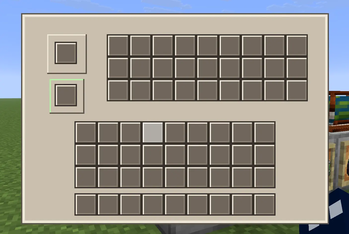
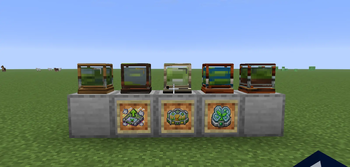
The Crop Infuser is a single-block glass automaton that incubates a seed placed in its left seed slot and periodically deposits harvests into a three-row, 27-slot output inventory on the right, with upgrade slots beneath the seed to speed growth, boost yields, or add bonus drops (Growth Accelerator, Bountiful Harvest, and Lucky Sprout stackable up to four tiers). Right-click the Infuser to insert a seed or open its GUI, right-click while holding upgrades to install them (upgrades and seeds can also be inserted by hoppers from non-bottom faces), extract products from the right side (bottom extraction is limited to product slots), and use quick-move for outputs; the block saves and drops its inventory when broken and now drops the matching Infuser item for non-creative players so you can pick it up and relocate it. Each wood-type Crop Infuser is available as its own placeable item and crafting recipe for all vanilla wood types (Oak, Spruce, Birch, Jungle, Acacia, Dark Oak, Mangrove, Cherry, Pale Oak, Bamboo, Crimson, and Warped), appears in the Crop Infuser creative tab, preserves its variant when broken, and each variant has its own themed item/block textures and proper break particles; the generic base Infuser has been removed so only the wood variants are obtainable.
Available Versions
How to Install Crop Infuser on Your Server
Order Server
Order a Minecraft Java server with at least 3 GB RAM (4 GB recommended).
Set fabric Loader
In the panel under "Egg", select the fabric loader and matching Minecraft version (26.1.2).
Install Mod
Open the mod browser in the dashboard and search for "Crop Infuser". Click "Install" – done! Alternatively, upload the .jar via SFTP to the /mods folder.
Compatibility
Mod Loaders
Minecraft Versions
26.1.2, 26.1.1, 26.1
Server-side
✓ RequiredRecommended RAM
4 GB(min. 3 GB)Frequently Asked Questions
Crop Infuser server crashes on startup – what to do?
Most common cause: wrong fabric version or insufficient RAM. Check the server log (latest.log) for "OutOfMemoryError" or "Mixin" errors. With Mado Hosting: ensure at least 3 GB RAM is allocated and the loader matches the mod version (26.1.2). You can switch loaders with one click in the panel.
Is Crop Infuser compatible with fabric?
Crop Infuser officially supports fabric for Minecraft 26.1.2, 26.1.1, 26.1. The Mado dashboard automatically detects incompatible loader combinations.
Server lagging with Crop Infuser – how to optimize performance?
Recommended RAM: 4 GB (per 8 players). Use /spark profiler to check if Crop Infuser consumes the most tick time. Common fixes: reduce server view-distance to 8-10, install "performant" or "starlight" as supplementary mods on Forge. With Mado Hosting, your server runs on NVMe SSDs with dedicated CPU cores for minimal latency.
Similar Mods



Rent Modded Server
Install Crop Infuser with just one click on your server.