
CropGrowthHUD
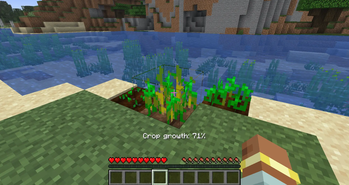
Displays crop growth progress as a percentage directly in your HUD
Screenshots
About this Mod

A lightweight client-side quality-of-life mod that shows crop growth progress directly in your HUD. No more guessing, no opening debug tools, and no extra UI windows — just aim at a crop and instantly see exactly how close it is to full maturity.
Client-side only (no server installation required). Fully compatible with singleplayer and multiplayer.
What it does:
- Displays the exact growth progress of any targeted crop as a percentage directly on your screen.
- Updates in real-time as the crop grows, giving you perfect harvest timing.
- Automatically calculates progress by reading the crop block’s internal
agestate. - Features a clean, unobtrusive overlay that only appears when you look at a valid crop block.
- Extremely useful for survival farming, field checks, and technical setups.
Configuration:
This mod works immediately out of the box with zero configuration required. Just install it, look at a crop, and the minimal HUD overlay will handle the rest!
Details:
- Client-side only. Safe to use on any vanilla or modded server.
- Purely visual — it does not change crop behavior, growth speeds, or drops.
- Fully translated into 10 languages: English, Russian, Simplified Chinese, Spanish, French, German, Japanese, Brazilian Portuguese, Korean, and Italian.
Please report any bugs, errors, or feature suggestions on Discord: https://discord.gg/4XUPywnEyE
Available Versions
How to Install CropGrowthHUD on Your Server
Order Server
Order a Minecraft Java server with at least 3 GB RAM (4 GB recommended).
Set fabric Loader
In the panel under "Egg", select the fabric loader and matching Minecraft version (26.1.2).
Install Mod
Open the mod browser in the dashboard and search for "CropGrowthHUD". Click "Install" – done! Alternatively, upload the .jar via SFTP to the /mods folder.
Compatibility
Mod Loaders
Minecraft Versions
26.1.2, 26.1, 1.21.11 (+2 more)
Server-side
✗ UnsupportedRecommended RAM
4 GB(min. 3 GB)Frequently Asked Questions
CropGrowthHUD server crashes on startup – what to do?
Most common cause: wrong fabric version or insufficient RAM. Check the server log (latest.log) for "OutOfMemoryError" or "Mixin" errors. With Mado Hosting: ensure at least 3 GB RAM is allocated and the loader matches the mod version (26.1.2). You can switch loaders with one click in the panel.
Is CropGrowthHUD compatible with fabric and forge and neoforge?
CropGrowthHUD officially supports fabric, forge, neoforge for Minecraft 26.1.2, 26.1, 1.21.11. Note: Forge and Fabric mods are NOT cross-compatible – pick one loader and stick with it. The Mado dashboard automatically detects incompatible loader combinations.
Server lagging with CropGrowthHUD – how to optimize performance?
Recommended RAM: 4 GB (per 8 players). Use /spark profiler to check if CropGrowthHUD consumes the most tick time. Common fixes: reduce server view-distance to 8-10, install "performant" or "starlight" as supplementary mods on Forge. With Mado Hosting, your server runs on NVMe SSDs with dedicated CPU cores for minimal latency.
Similar Mods



![[TaCZ] Timeless and Classics Zero](https://cdn.modrinth.com/data/SzzJttH8/fd27766d2bb8390d284696b1dbd358f87e081439_96.webp)


Rent Modded Server
Install CropGrowthHUD with just one click on your server.