
Crosshair Customizer
A Fabric mod for Minecraft that lets you customize your crosshair with ease. Create, import, and manage custom crosshairs.
Screenshots
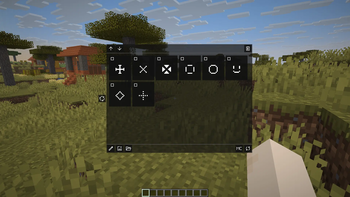
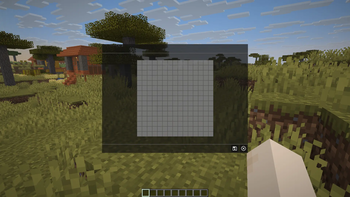
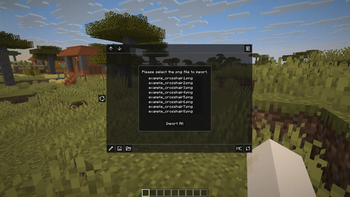
About this Mod
⚠️This mod is currently under development. The UI and features may change as work continues.
CrosshairCustomizer
A Fabric mod that allows you to freely customize in-game crosshairs.
You can replace the default crosshair or create and import your own custom designs.
Features
- Create custom crosshairs (draw pixel-by-pixel on a canvas)
- Import crosshairs from PNG files
- Separate settings for main and target crosshairs
- Reorder or delete saved crosshairs
- Crosshair images are stored in:
config/crosshaircustomizer/crosshairs/
Notes
- This mod may conflict with other crosshair-related mods. Please check compatibility.
- The author assumes no responsibility for any issues arising from the use of this mod.
- Use at your own risk.
License
MIT License. See LICENSE for details.
Third-party resources follow their respective licenses (see NOTICE).
Support
Bug reports and feature requests can be submitted via GitHub Issues.
Development is done personally, so responses may take time.
Responses in languages other than Japanese may also take longer.
Disclaimer
Some English text related to this project including parts of the Modrinth description and in-game messages was created with the help of machine translation tools.
Translation accuracy is not guaranteed.
Available Versions
How to Install Crosshair Customizer on Your Server
Order Server
Order a Minecraft Java server with at least 3 GB RAM (4 GB recommended).
Set fabric Loader
In the panel under "Egg", select the fabric loader and matching Minecraft version (1.21.8).
Install Mod
Open the mod browser in the dashboard and search for "Crosshair Customizer". Click "Install" – done! Alternatively, upload the .jar via SFTP to the /mods folder.
Compatibility
Mod Loaders
Minecraft Versions
1.21.8, 1.21.7, 1.21.6 (+3 more)
Server-side
✗ UnsupportedRecommended RAM
4 GB(min. 3 GB)Frequently Asked Questions
Crosshair Customizer server crashes on startup – what to do?
Most common cause: wrong fabric version or insufficient RAM. Check the server log (latest.log) for "OutOfMemoryError" or "Mixin" errors. With Mado Hosting: ensure at least 3 GB RAM is allocated and the loader matches the mod version (1.21.8). You can switch loaders with one click in the panel.
Is Crosshair Customizer compatible with fabric?
Crosshair Customizer officially supports fabric for Minecraft 1.21.8, 1.21.7, 1.21.6. The Mado dashboard automatically detects incompatible loader combinations.
Server lagging with Crosshair Customizer – how to optimize performance?
Recommended RAM: 4 GB (per 8 players). Use /spark profiler to check if Crosshair Customizer consumes the most tick time. Common fixes: reduce server view-distance to 8-10, install "performant" or "starlight" as supplementary mods on Forge. With Mado Hosting, your server runs on NVMe SSDs with dedicated CPU cores for minimal latency.
Rent Modded Server
Install Crosshair Customizer with just one click on your server.