
CrowBar
Adds skins and nametags to the player locator bar
Screenshots
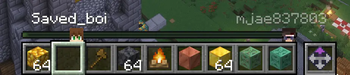
About this Mod





CrowBar is a Fabric client mod for Minecraft 1.21.6-1.21.11 and 26.1.x that extends the locator bar with readable player name tags, skin markers, distance text, team-colored dots, and a self-view capture mode.
Features
- Renders player names above locator bar markers.
- Can replace locator dots with player skin faces.
- Shows optional distance text next to player names.
- Preserves team colors when a team color is available.
- Adds a self-view mode for clean locator bar screenshots.
- Hides hearts, hunger, armor, and the vanilla locator bar while self-view mode is active.
- Works as a client-side mod; servers do not need to install CrowBar.
- Includes Mod Menu support for toggling features in-game.
Allium Servers
Allium Essentials is an optional Paper server plugin that can send CrowBar a dedicated locator payload. When Allium is installed, CrowBar does not have to rely on vanilla locator waypoints: the server can send the player UUID, position, team color, and visibility state needed for the custom locator bar.
That lets CrowBar keep rendering players who are hidden, sneaking, invisible, or otherwise missing from vanilla waypoint data. It also lets the server keep NPC waypoint transmit range at zero while still giving CrowBar the real player data it needs.
Without Allium, CrowBar falls back to normal client-visible players, including LAN and integrated-server sessions.

Requirements
Use the jar that matches your Minecraft line:
CrowBar-1.21.x: Minecraft 1.21.6-1.21.11, Java 21, Fabric Loader 0.18.4 or newer, Fabric API 0.141.4 or newer.CrowBar-26.1.x: Minecraft 26.1.x, Java 25, Fabric Loader 0.19.2 or newer, Fabric API 0.150.0 or newer.
Mod Menu is optional, but recommended for the config screen.
Controls
Default keybinds:
N: Toggle locator name tagsB: Toggle locator skinsZ: View self locator barX: Show distance
Keybinds can be changed from Minecraft's controls menu under the CrowBar category.
Installation
- Install Fabric Loader for your Minecraft version.
- Install Fabric API.
- Put the matching CrowBar jar into your
modsfolder. - Launch the game.
Building
./gradlew :version21:build :version26:build
The built jars are written to version21/build/libs/ and version26/build/libs/.
Links
- Website: https://castled.codes
- Issues: https://github.com/castledking/CrowBar/issues
- Upstream inspiration: https://github.com/MCRcortex/headlocatorbar
Available Versions
How to Install CrowBar on Your Server
Order Server
Order a Minecraft Java server with at least 3 GB RAM (4 GB recommended).
Set fabric Loader
In the panel under "Egg", select the fabric loader and matching Minecraft version (26.1.2).
Install Mod
Open the mod browser in the dashboard and search for "CrowBar". Click "Install" – done! Alternatively, upload the .jar via SFTP to the /mods folder.
Compatibility
Mod Loaders
Minecraft Versions
26.1.2, 26.1.1, 26.1 (+6 more)
Server-side
✗ UnsupportedRecommended RAM
4 GB(min. 3 GB)Frequently Asked Questions
CrowBar server crashes on startup – what to do?
Most common cause: wrong fabric version or insufficient RAM. Check the server log (latest.log) for "OutOfMemoryError" or "Mixin" errors. With Mado Hosting: ensure at least 3 GB RAM is allocated and the loader matches the mod version (26.1.2). You can switch loaders with one click in the panel.
Is CrowBar compatible with fabric?
CrowBar officially supports fabric for Minecraft 26.1.2, 26.1.1, 26.1. The Mado dashboard automatically detects incompatible loader combinations.
Server lagging with CrowBar – how to optimize performance?
Recommended RAM: 4 GB (per 8 players). Use /spark profiler to check if CrowBar consumes the most tick time. Common fixes: reduce server view-distance to 8-10, install "performant" or "starlight" as supplementary mods on Forge. With Mado Hosting, your server runs on NVMe SSDs with dedicated CPU cores for minimal latency.
Similar Mods






Rent Modded Server
Install CrowBar with just one click on your server.