
Crystal Leveling
Assigns every entity a random “difficulty level”, makes fighting more meaningful.
About this Mod

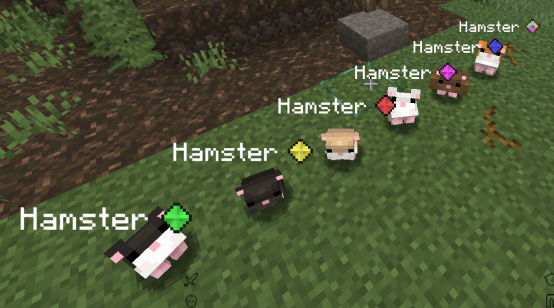
When a entity spawns or joins the world, this mod dynamically assigns it a random “difficulty level” from 1 to 100 and then buffs its stats based on that level. The mob’s display name is then appended with a colored crystal icon that serves as a visual tier/rarity indicator of how tough it is.
So players will encounter mobs with increased:
- Max health
- Attack damage
- Armor
- Armor toughness
Scaled by that random difficulty level.
Their name gets a suffix icon with a color code representing how high the difficulty is (e.g., green for low, colorful for top tier), making it easy to spot stronger-than-normal mobs at a glance.
Example(from lowest to highest):
For devs
The mod defines a syncable difficulty_level attribute (0–100) and attaches it to all entities. Other mods can read that attribute and branch logic (e.g., custom drops, loot tiers, effects) based on its value.
@Mod.EventBusSubscriber
public class CustomDropOnDeathWithTiers {
    @SubscribeEvent
    public static void onLivingDeath(net.minecraftforge.event.entity.living.LivingDeathEvent event) {
        LivingEntity entity = event.getEntityLiving();
        if (entity == null)
            return;

        // Read difficulty level (default to 0 if missing)
        double difficulty = 0;
        if (entity.getAttributes().hasAttribute(CrystalLevelingModAttributes.DIFFICULTY_LEVEL.get())) {
            difficulty = entity.getAttribute(CrystalLevelingModAttributes.DIFFICULTY_LEVEL.get()).getBaseValue();
        }

        // Determine tier and give corresponding drop
        if (difficulty >= 81) {
            // Top tier (colorful): very rare reward
            entity.spawnAtLocation(new ItemStack(Items.NETHER_STAR), 0.0F);
        } else if (difficulty >= 65) {
            // Dark blue tier: rare reward
            entity.spawnAtLocation(new ItemStack(Items.DIAMOND), 0.0F);
        } else if (difficulty >= 49) {
            // Light purple tier: uncommon reward
            entity.spawnAtLocation(new ItemStack(Items.EMERALD), 0.0F);
        } else if (difficulty >= 33) {
            // Red tier: modest reward
            entity.spawnAtLocation(new ItemStack(Items.IRON_INGOT), 0.0F);
        } else if (difficulty >= 17) {
            // Yellow tier: common reward
            entity.spawnAtLocation(new ItemStack(Items.GOLD_INGOT), 0.0F);
        } else {
            // Green tier: baseline reward
            entity.spawnAtLocation(new ItemStack(Items.APPLE), 0.0F);
        }
    }
}
Available Versions
How to Install Crystal Leveling on Your Server
Order Server
Order a Minecraft Java server with at least 3 GB RAM (4 GB recommended).
Set forge Loader
In the panel under "Egg", select the forge loader and matching Minecraft version (1.20.1).
Install Mod
Open the mod browser in the dashboard and search for "Crystal Leveling". Click "Install" – done! Alternatively, upload the .jar via SFTP to the /mods folder.
Compatibility
Mod Loaders
Minecraft Versions
1.20.1
Server-side
✓ RequiredRecommended RAM
4 GB(min. 3 GB)Frequently Asked Questions
Crystal Leveling server crashes on startup – what to do?
Most common cause: wrong forge version or insufficient RAM. Check the server log (latest.log) for "OutOfMemoryError" or "Mixin" errors. With Mado Hosting: ensure at least 3 GB RAM is allocated and the loader matches the mod version (1.20.1). You can switch loaders with one click in the panel.
Is Crystal Leveling compatible with forge?
Crystal Leveling officially supports forge for Minecraft 1.20.1. The Mado dashboard automatically detects incompatible loader combinations.
Server lagging with Crystal Leveling – how to optimize performance?
Recommended RAM: 4 GB (per 8 players). Use /spark profiler to check if Crystal Leveling consumes the most tick time. Common fixes: reduce server view-distance to 8-10, install "performant" or "starlight" as supplementary mods on Forge. With Mado Hosting, your server runs on NVMe SSDs with dedicated CPU cores for minimal latency.
Similar Mods




Rent Modded Server
Install Crystal Leveling with just one click on your server.