
Crystal Macro Mod
Automatically places and breakes Crystals for you, with adjustable settings. NOTE: THIS MOD IS NOT MEANT TO BE USED FOR BREAKING ANY SERVER RULES
Screenshots
About this Mod
Crystal Macro Mod – Advanced Crystal PvP Automation
Crystal Macro Mod is a lightweight, high-performance crystal PvP utility designed for competitive PvP servers and practice environments. It provides precise control over end crystal placement and destruction while maintaining full stability during intense combat sessions.
Built for Fabric, this mod runs smoothly without causing lag, crashes, or desynchronization — even during extended PvP encounters.
⚠️ This mod uses doAttack/doItemUse simulation for seamless integration with Minecraft's native input system.
📌 Note: This mod is intended for use in environments where macros and automation tools are permitted. It is not designed or intended for breaking server rules, bypassing anti-cheat systems, or gaining an unfair advantage on servers that prohibit such tools. Always check and respect the rules of the server you are playing on. The developer assumes no responsibility for misuse.
━━━━━━━━━━━━━━━━━━
✨ Features
━━━━━━━━━━━━━━━━━━
🎮 Crystal Macro
- Automatically places and breaks end crystals
- Targets obsidian and bedrock surfaces for placement
- Randomized attack and place delays for natural behavior
- Pause after nearby player kill to avoid suspicion
- Hold right-click to activate — release to stop
⚔️ Break Only Mode
- Separate module from Crystal Macro
- Automatically breaks any end crystal you look at
- You place crystals manually — mod only handles destruction
- Independent toggle — does not require Crystal Macro to be active
- Adjustable break delay
🖥️ Clean GUI
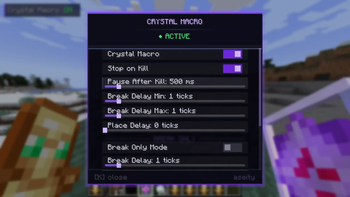
- Scrollable settings menu with modern dark theme
- Purple accent design with smooth animations
- Section dividers for organized layout
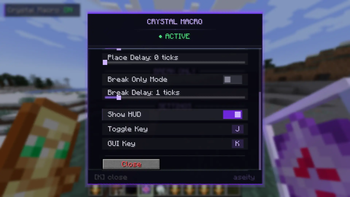
- Keybind rebinding directly from the GUI
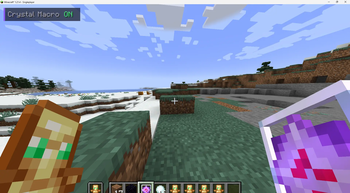
- Compact HUD overlay showing macro status
━━━━━━━━━━━━━━━━━━
⌨️ Hotkeys & Controls
━━━━━━━━━━━━━━━━━━
J — Toggle Crystal Macro on/off
K — Open/close settings menu
⚠️ Keybinds are fully rebindable from the settings menu. Make sure they do not conflict with other mods or Minecraft controls.
━━━━━━━━━━━━━━━━━━
🛠️ How to Use
━━━━━━━━━━━━━━━━━━
- Launch Minecraft with Fabric.
- Ensure there are no keybind conflicts.
- Press K in-game to open the settings menu.
- Enable Crystal Macro or Break Only Mode.
- Configure delays and pause settings to your preference.
- Hold end crystals in your main hand or offhand.
- Hold right-click while looking at obsidian or bedrock — the macro handles the rest.
━━━━━━━━━━━━━━━━━━
⚙️ Settings Overview
━━━━━━━━━━━━━━━━━━
Crystal Macro
- Crystal Macro — Enable/disable the full place and break cycle
- Stop on Kill — Pause the macro when a nearby player dies
- Pause After Kill — Duration to pause after a kill (0–5000ms)
- Attack Delay Min — Minimum ticks between crystal attacks (0–10)
- Attack Delay Max — Maximum ticks between crystal attacks (0–10)
- Place Delay — Ticks between crystal placements (0–10)
Break Only Mode
- Break Only Mode — Enable/disable automatic crystal breaking
- Break Delay — Ticks between breaks (0–10)
Settings
- Show HUD — Toggle the compact status overlay
- Toggle Key — Rebind the macro toggle key
- GUI Key — Rebind the settings menu key
━━━━━━━━━━━━━━━━━━
📦 Requirements
━━━━━━━━━━━━━━━━━━
- Minecraft (Fabric)
- Fabric Loader
- No Fabric API required — fully standalone
━━━━━━━━━━━━━━━━━━
📋 Defaults
━━━━━━━━━━━━━━━━━━
- Pause After Kill — 1000ms
- Attack Delay Min — 1 tick
- Attack Delay Max — 1 tick
- Place Delay — 0 ticks
- Break Delay — 1 tick
━━━━━━━━━━━━━━━━━━
👤 Author
━━━━━━━━━━━━━━━━━━
Developed by aseity
Available Versions
How to Install Crystal Macro Mod on Your Server
Order Server
Order a Minecraft Java server with at least 3 GB RAM (4 GB recommended).
Set fabric Loader
In the panel under "Egg", select the fabric loader and matching Minecraft version (1.21.5).
Install Mod
Open the mod browser in the dashboard and search for "Crystal Macro Mod". Click "Install" – done! Alternatively, upload the .jar via SFTP to the /mods folder.
Compatibility
Mod Loaders
Minecraft Versions
1.21.5, 1.21.4, 1.21.1 (+1 more)
Server-side
✗ UnsupportedRecommended RAM
4 GB(min. 3 GB)Frequently Asked Questions
Crystal Macro Mod server crashes on startup – what to do?
Most common cause: wrong fabric version or insufficient RAM. Check the server log (latest.log) for "OutOfMemoryError" or "Mixin" errors. With Mado Hosting: ensure at least 3 GB RAM is allocated and the loader matches the mod version (1.21.5). You can switch loaders with one click in the panel.
Is Crystal Macro Mod compatible with fabric?
Crystal Macro Mod officially supports fabric for Minecraft 1.21.5, 1.21.4, 1.21.1. The Mado dashboard automatically detects incompatible loader combinations.
Server lagging with Crystal Macro Mod – how to optimize performance?
Recommended RAM: 4 GB (per 8 players). Use /spark profiler to check if Crystal Macro Mod consumes the most tick time. Common fixes: reduce server view-distance to 8-10, install "performant" or "starlight" as supplementary mods on Forge. With Mado Hosting, your server runs on NVMe SSDs with dedicated CPU cores for minimal latency.
Similar Mods




Rent Modded Server
Install Crystal Macro Mod with just one click on your server.