
CrystalForge
Forge your legend across dimensions with crystals of extraordinary power.
Screenshots
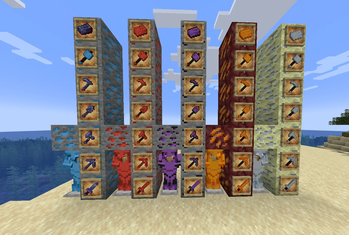
About this Mod
CrystalForge is a content expansion mod that enriches your Minecraft experience with 5 new mystical ores, each possessing unique characteristics and spawn locations.
🌍 Overworld Ores
Azurite (Y-levels -64 to 64) - The most common ore, perfect for starting out
Crimsonite (Y-levels -32 to 48) - A balanced ore with crimson hues
Voidstone (Y-levels -64 to -32) - Rare and powerful, hidden in the depths
🔥 Nether Ore
Emberite (Y-levels 10 to 120) - Infused with the Nether's burning essence
✨ End Ore
Celestium (Y-levels 20 to 80) - The ultimate ore with legendary capabilities
⚔️ Armor Tier Ranking (Best to Worst)
Celestium - The supreme armor with exceptional bonuses
Emberite - Specialized for the Nether
Voidstone - Maximum defense and regeneration
Crimsonite - Balance between protection and power
Azurite - Versatile with night vision
Each ore allows you to create a complete arsenal: armor sets, standard tools (sword, pickaxe, axe, shovel, hoe), and the Hammer, a special tool capable of mining in a 3x3 area. Full armor sets grant unique set bonuses tailored to each material's playstyle.
Available Versions
How to Install CrystalForge on Your Server
Order Server
Order a Minecraft Java server with at least 4 GB RAM (6 GB recommended).
Set forge Loader
In the panel under "Egg", select the forge loader and matching Minecraft version (1.21).
Install Mod
Open the mod browser in the dashboard and search for "CrystalForge". Click "Install" – done! Alternatively, upload the .jar via SFTP to the /mods folder.
Compatibility
Mod Loaders
Minecraft Versions
1.21, 1.20.6, 1.20.5 (+5 more)
Server-side
✓ RequiredRecommended RAM
6 GB(min. 4 GB)Frequently Asked Questions
CrystalForge server crashes on startup – what to do?
Most common cause: wrong forge version or insufficient RAM. Check the server log (latest.log) for "OutOfMemoryError" or "Mixin" errors. With Mado Hosting: ensure at least 4 GB RAM is allocated and the loader matches the mod version (1.21). You can switch loaders with one click in the panel.
Is CrystalForge compatible with forge?
CrystalForge officially supports forge for Minecraft 1.21, 1.20.6, 1.20.5. The Mado dashboard automatically detects incompatible loader combinations.
Server lagging with CrystalForge – how to optimize performance?
Recommended RAM: 6 GB (per 5 players). Use /spark profiler to check if CrystalForge consumes the most tick time. Common fixes: reduce server view-distance to 8-10, install "performant" or "starlight" as supplementary mods on Forge. With Mado Hosting, your server runs on NVMe SSDs with dedicated CPU cores for minimal latency.
Similar Mods




Rent Modded Server
Install CrystalForge with just one click on your server.