
CSmain
CSmain adds CS2 mode to Minecraft: rounds, bomb, economy, store, ranking.
Screenshots
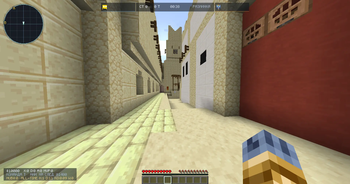
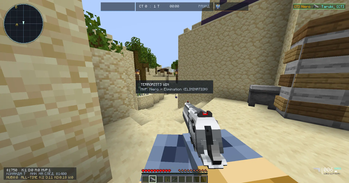
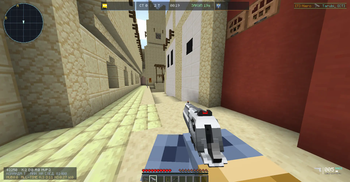
About this Mod
# CSmain [BETA]
CSmain [BETA] brings a Counter-Strike style competitive experience to Minecraft using TACZ weapons.
SETUP GAIDE: https://github.com/kaptyter-del/Setup_CSMAIN/blob/main/README.md
Fight in structured rounds with economy, buy phase, bomb plant/defuse gameplay, and strict team limits for a balanced 5v5 format.
Features
- CS-style match flow: warmup -> freeze/buy -> live round -> round end
- Bomb gameplay: 2 bomb sites, plant and defuse logic
- Team system: CT / T / Spectator with auto-balance support
- Competitive economy:
- round win/loss rewards
- kill rewards
- plant/defuse rewards
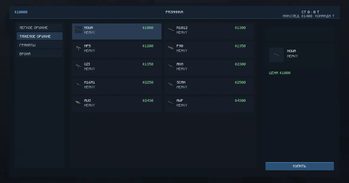
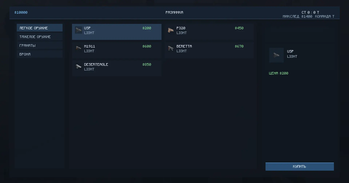
- In-game shop with categories:
- LIGHT
- HEAVY
- GRENADES
- ARMOR
- Admin shop configuration commands (add/edit/remove items live)
- Custom HUD elements and match state sync
- Player progress:
/rank/rank top/hubmoney
- Optional rank hologram for hub
Requirements
- Minecraft 1.20.1
- Forge 47.x (tested on 47.4.16)
- Java 17
- TACZ is required (hard dependency)
Server + Client Setup
Install both mods on:
- server
- all clients
Required jars in mods:
csmain-1.0.0-beta.1.jar- TACZ jar
First Admin Setup
Run once after joining as OP/admin:
/cs hub on/cs setspawn hub/cs setspawn t/cs setspawn ct/cs setspawn bomb1/cs setspawn bomb2/cs save
Start match:
/cs start
Shop / Economy Notes
- Shop key: B (default)
- Buy rules:
- max 1 HEAVY
- max 1 LIGHT
- grenades: max 4 total, no duplicates
- defuse kit is CT-only
- Shop catalog can be configured in-game with
/cs shop ...commands
Important
This mod is in BETA.
Balance values, item presets, and configs may change between updates.
Available Versions
How to Install CSmain on Your Server
Order Server
Order a Minecraft Java server with at least 3 GB RAM (4 GB recommended).
Set forge Loader
In the panel under "Egg", select the forge loader and matching Minecraft version (1.20.6).
Install Mod
Open the mod browser in the dashboard and search for "CSmain". Click "Install" – done! Alternatively, upload the .jar via SFTP to the /mods folder.
Compatibility
Mod Loaders
Minecraft Versions
1.20.6, 1.20.5, 1.20.4 (+3 more)
Server-side
✓ RequiredRecommended RAM
4 GB(min. 3 GB)Frequently Asked Questions
CSmain server crashes on startup – what to do?
Most common cause: wrong forge version or insufficient RAM. Check the server log (latest.log) for "OutOfMemoryError" or "Mixin" errors. With Mado Hosting: ensure at least 3 GB RAM is allocated and the loader matches the mod version (1.20.6). You can switch loaders with one click in the panel.
Is CSmain compatible with forge?
CSmain officially supports forge for Minecraft 1.20.6, 1.20.5, 1.20.4. The Mado dashboard automatically detects incompatible loader combinations.
Server lagging with CSmain – how to optimize performance?
Recommended RAM: 4 GB (per 8 players). Use /spark profiler to check if CSmain consumes the most tick time. Common fixes: reduce server view-distance to 8-10, install "performant" or "starlight" as supplementary mods on Forge. With Mado Hosting, your server runs on NVMe SSDs with dedicated CPU cores for minimal latency.
Similar Mods




![[TaCZ] Timeless and Classics Zero](https://cdn.modrinth.com/data/SzzJttH8/fd27766d2bb8390d284696b1dbd358f87e081439_96.webp)

Rent Modded Server
Install CSmain with just one click on your server.