
Curios compass hud
Curios compass slot with a compact navigation HUD for NeoForge.
Screenshots
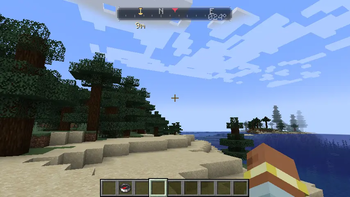
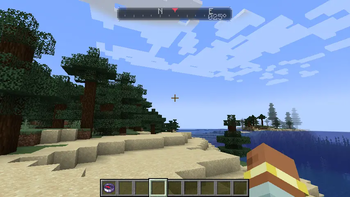
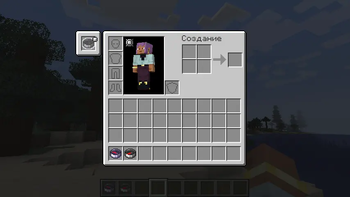
About this Mod
Compass HUD
Compass HUD adds a dedicated Curios compass slot and a compact navigation HUD for Minecraft NeoForge.
The mod is meant for players who want compass navigation without keeping a compass in the hotbar or opening the inventory. Equip a compass in the Curios compass slot and a small HUD appears at the top of the screen.
Features
- Adds a Curios
compassslot. - Supports
minecraft:compass. - Supports
minecraft:recovery_compass. - Shows a compact top-center navigation HUD.
- Displays cardinal markers:
N,E,S,W. - Displays a subtle azimuth readout.
- Shows a target marker and distance for lodestone-bound compasses.
- Uses a muted vanilla-style slot icon.
Lodestone Compass Support
If the equipped compass is bound to a lodestone in the current dimension, Compass HUD shows a small gold marker and distance to the lodestone target.
If the lodestone target is in another dimension, the marker is hidden so the HUD does not point to a misleading direction.
Requirements
- Minecraft 1.21.1
- NeoForge 21.1+
- Curios API 9.x
Environment
Install on both client and server.
The HUD is rendered on the client, but the Curios slot is gameplay data and should be available on the server as well.
Credits
Created by AJIOE1111.
Compass HUD
Compass HUD добавляет отдельный Curios-слот для компаса и компактный навигационный HUD для Minecraft NeoForge.
Мод нужен для игроков, которые хотят пользоваться компасом, не занимая хотбар и не открывая инвентарь. Положите компас в Curios-слот, и сверху экрана появится маленькая навигационная шкала.
Возможности
- Добавляет Curios-слот
compass. - Поддерживает
minecraft:compass. - Поддерживает
minecraft:recovery_compass. - Показывает компактный HUD сверху по центру.
- Показывает стороны света:
N,E,S,W. - Показывает приглушённый азимут.
- Показывает метку и дистанцию для компаса, привязанного к магнетиту.
- Использует приглушённую иконку слота в стиле ванильного компаса.
Поддержка Магнетита
Если компас в слоте привязан к магнетиту в текущем измерении, Compass HUD показывает маленькую золотую метку и дистанцию до цели.
Если цель находится в другом измерении, метка скрывается, чтобы HUD не показывал ложное направление.
Требования
- Minecraft 1.21.1
- NeoForge 21.1+
- Curios API 9.x
Окружение
Ставить на клиент и сервер.
HUD рисуется на клиенте, но Curios-слот является игровыми данными и должен быть доступен на сервере.
Авторство
Создано AJIOE1111.
Available Versions
How to Install Curios compass hud on Your Server
Order Server
Order a Minecraft Java server with at least 3 GB RAM (4 GB recommended).
Set neoforge Loader
In the panel under "Egg", select the neoforge loader and matching Minecraft version (1.21.1).
Install Mod
Open the mod browser in the dashboard and search for "Curios compass hud". Click "Install" – done! Alternatively, upload the .jar via SFTP to the /mods folder.
Compatibility
Mod Loaders
Minecraft Versions
1.21.1
Server-side
~ OptionalRecommended RAM
4 GB(min. 3 GB)Frequently Asked Questions
Curios compass hud server crashes on startup – what to do?
Most common cause: wrong neoforge version or insufficient RAM. Check the server log (latest.log) for "OutOfMemoryError" or "Mixin" errors. With Mado Hosting: ensure at least 3 GB RAM is allocated and the loader matches the mod version (1.21.1). You can switch loaders with one click in the panel.
Is Curios compass hud compatible with neoforge?
Curios compass hud officially supports neoforge for Minecraft 1.21.1. The Mado dashboard automatically detects incompatible loader combinations.
Server lagging with Curios compass hud – how to optimize performance?
Recommended RAM: 4 GB (per 8 players). Use /spark profiler to check if Curios compass hud consumes the most tick time. Common fixes: reduce server view-distance to 8-10, install "performant" or "starlight" as supplementary mods on Forge. With Mado Hosting, your server runs on NVMe SSDs with dedicated CPU cores for minimal latency.
Similar Mods




Rent Modded Server
Install Curios compass hud with just one click on your server.