
CurrencyCraft
A fully featured, realistic economy mod including coins and notes, Vending Machines, Wallets, Debit Cards, ATMs, Cash Registers, Banker Villager, and more!
Screenshots

About this Mod
CurrencyCraft - A Complete Economy & Banking System for Minecraft
Transform your Minecraft world into a thriving economy with CurrencyCraft, a comprehensive currency and banking mod that adds realistic financial systems to your gameplay!
🏦 What is CurrencyCraft?
CurrencyCraft introduces a complete monetary infrastructure to Minecraft, featuring a multi-denomination currency system, functional ATMs, banking accounts, vending machines, and more. Whether you're running a multiplayer server economy or just want to add depth to your single-player world, CurrencyCraft provides all the tools you need for a realistic financial experience.
💰 Currency System
Experience a 15-denomination currency system with both coins and notes:
Coins (Fractional Currency):
- 1¢, 2¢, 5¢, 10¢, 20¢, 50¢ coins
- 1 Unit (100¢) and 2 Unit (200¢) coins
Notes (Higher Denominations):
- 5, 10, 20, 50, 100, 200, and 500 Unit notes
All currency items are beautifully designed and can be used for trading, storing wealth, or making purchases!
🏧 Banking & ATMs
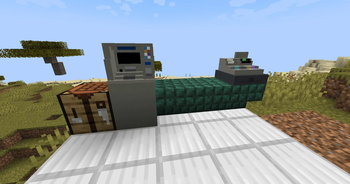
ATM Machine
Set up your personal bank account at any ATM:
- Card Setup: Create your own debit card with a secure 4-digit PIN
- Deposits & Withdrawals: Convert physical currency to digital balance and vice versa
- Security Features: PIN authentication and fingerprint verification for card management
- Persistent Accounts: Your balance is saved across server restarts
Debit Cards
Personal financial instruments for accessing your bank account:
- Unique card ID tied to your player account
- 4-digit PIN protection
- Cancel or disable cards at any ATM
- Required for all banking transactions
🎒 Wallets
Carry your wealth in style with customizable Wallets:
- Portable currency storage with dedicated GUI
- Dyeable colors - customize your wallet like leather armor
- Displays total value in the tooltip
- Perfect for organizing your coins and notes on the go
🏪 Commerce & Trading
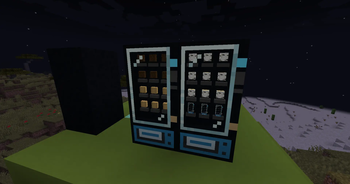
Vending Machines
Create automated shops for players:
- 12 product slots for selling items
- Customizable prices for each product
- Automatic change dispensing - get exact change back
- Out of Order state when money storage is full
- Lockable using a named item, so only the owner can restock
- Perfect for player shops and server economies!
- Crafting Recipe:
- X = Black Concrete, Y = Comparator, Z = Glass, A = Cash Register
- Pattern:
XYZ
XAZ
XYZ
Cash Registers
Professional commerce stations:
- 30-slot storage (2 slots per denomination)
- Real-time display of total currency value
- Used by Banker villagers as their job POI
- Lockable using a named item, so only the owner can use
Banker Villagers
New villager profession with 5 trading tiers:
- Novice: Trade basic materials for small coins
- Apprentice: Exchange copper and iron for currency
- Journeyman: Gold trades unlock note denominations
- Expert: Premium emerald and diamond trades
- Master: Top-tier trades for netherite and nether stars
⚙️ Server-Friendly Features
Perfect for multiplayer servers with fully configurable economy settings:
- Adjustable transaction limits (deposits/withdrawals)
- Optional transaction fees
- Card setup fees
- Minimum withdrawal amounts
- All settings configured via easy-to-edit config files
Persistent data-blocked: All bank accounts, balances, and machine inventories are saved and persist across server restarts using NBT data storage.
🎵 Immersive Sound Design
Enhanced audio experience with custom sounds:
- Cash register: Opening, closing, coin/note insertion sounds
- Vending machines: Purchase sounds, item dispensing, change return, rejection sounds
- Proximity-based audio for realistic ambiance
🎮 How to Get Started
- Earn Currency: Trade items with Banker villagers to get your first coins and notes
- Set Up Banking: Craft a debit card and visit an ATM to create your account with a secure PIN
- Store Your Wealth: Deposit currency at ATMs to keep it safe in your digital account
- Organize Money: Use wallets to carry and organize your physical currency
- Create Shops: Set up vending machines to sell items to other players automatically
- Build an Economy: Watch your world transform into a bustling economy!
📋 Technical Information
- Minecraft Version: 1.20.1
- Mod Loader: Forge 47.4.0+
- Java Version: 17+
- Current Version: 1.1.0
- Authors: R2bEEaton, mcstud1o
✨ Key Features at a Glance
✅ 15 unique currency denominations (coins & notes)✅ Functional ATM machines with PIN security✅ Personal bank accounts with persistent storage✅ Debit cards with unique IDs and authentication✅ Customizable
wallets for portable currency storage✅ Automated vending machines with change dispensing✅ Cash registers for merchant operations✅ New Banker villager profession with 5 trade tiers✅ Fully configurable
economy settings✅ Redstone-compatible locking mechanisms✅ Immersive sound effects✅ Server-friendly with persistent data✅ Shift-click quick purchasing support
🌟 Perfect For:
- Multiplayer Servers: Create complex player-driven economies
- Roleplay Servers: Add realism to your roleplay experience
- Adventure Maps: Design quest rewards and shop systems
- Single Player: Add depth and progression to your world
CurrencyCraft - Building economies, one coin at a time.
Transform your Minecraft experience with a complete financial system today!
All Rights Reserved | Created by R2bEEaton & mcstud1o
Available Versions
How to Install CurrencyCraft on Your Server
Order Server
Order a Minecraft Java server with at least 3 GB RAM (4 GB recommended).
Set forge Loader
In the panel under "Egg", select the forge loader and matching Minecraft version (1.20.1).
Install Mod
Open the mod browser in the dashboard and search for "CurrencyCraft". Click "Install" – done! Alternatively, upload the .jar via SFTP to the /mods folder.
Compatibility
Mod Loaders
Minecraft Versions
1.20.1
Server-side
✓ RequiredRecommended RAM
4 GB(min. 3 GB)Frequently Asked Questions
CurrencyCraft server crashes on startup – what to do?
Most common cause: wrong forge version or insufficient RAM. Check the server log (latest.log) for "OutOfMemoryError" or "Mixin" errors. With Mado Hosting: ensure at least 3 GB RAM is allocated and the loader matches the mod version (1.20.1). You can switch loaders with one click in the panel.
Is CurrencyCraft compatible with forge?
CurrencyCraft officially supports forge for Minecraft 1.20.1. The Mado dashboard automatically detects incompatible loader combinations.
Server lagging with CurrencyCraft – how to optimize performance?
Recommended RAM: 4 GB (per 8 players). Use /spark profiler to check if CurrencyCraft consumes the most tick time. Common fixes: reduce server view-distance to 8-10, install "performant" or "starlight" as supplementary mods on Forge. With Mado Hosting, your server runs on NVMe SSDs with dedicated CPU cores for minimal latency.
Similar Mods




![CobbleDollars [Cobblemon Addon]](https://cdn.modrinth.com/data/s7N7AsqL/684040a264fc1d7f9b856ec5d2da39767398c7ad.png)
Rent Modded Server
Install CurrencyCraft with just one click on your server.