
Currency Fun
A mod that adds rupees like zelda that drops when mobs dies
Screenshots
About this Mod

Overview
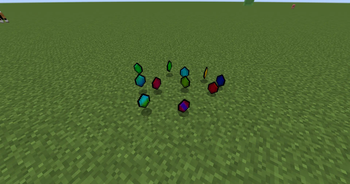
You know those rupees in The Legend of Zelda games? I've added them to minecraft and when mobs dies, they will drop some rupees. What can you do with them? A currency! This mod is aimed to give a currency for a minecraft server and sell items using this "ingame coin" (I do not support selling those rupees using real money or bitcoins or whatever other currency you use in real life. Rupees should only be obitainable in the game without any external payment).
Rupees can be crafted into rupees (5), rupees (10), rupees (50), rupees (100), and so on up to rupees (100K). To make them, simply put rupees in a crafting table!
Modpacks
Yes. You can use this in your modpacks, wether they are on Modrinth or Curseforge.
Config
The config is named currencyfun.cfg and inside it'll have the mobdrops category, and inside of it, you'll have the mobs which is a list of strings where the strings are the name of the mob followed by a space and then a number (min: 0, max: 32767) or a range of numbers:
Sheep 2-5 This means that the sheep will drop 2 to 5 rupees;
Sheep 3 This means that the sheep will drop 3 rupees (so if you want the sheep to drop no rupees, replace 3 with 0).
And then we have the special names:
_*: This name will target any mob/animal/boss, anything._Animals: This name will target animals so Sheeps, Rabbits, Cows and so on..._Mobs: This name will target mobs so Creepers, Zombies, Skeletons and so on..._Bosses: This name will target the Wither and the EnderDragon.
Example: _Mobs 3-5.
So like if we don't have _Mobs 3-5 but we have _* 3-5 the mod, since it'll not find the _Mobs, it'll get the _*. And if we have no _* we'll have a default of 3 to 5 (even if I might do it to not drop anything in the future).
Have fun!
Available Versions
How to Install Currency Fun on Your Server
Order Server
Order a Minecraft Java server with at least 3 GB RAM (4 GB recommended).
Set forge Loader
In the panel under "Egg", select the forge loader and matching Minecraft version (1.8.9).
Install Mod
Open the mod browser in the dashboard and search for "Currency Fun". Click "Install" – done! Alternatively, upload the .jar via SFTP to the /mods folder.
Compatibility
Mod Loaders
Minecraft Versions
1.8.9
Server-side
✗ UnsupportedRecommended RAM
4 GB(min. 3 GB)Frequently Asked Questions
Currency Fun server crashes on startup – what to do?
Most common cause: wrong forge version or insufficient RAM. Check the server log (latest.log) for "OutOfMemoryError" or "Mixin" errors. With Mado Hosting: ensure at least 3 GB RAM is allocated and the loader matches the mod version (1.8.9). You can switch loaders with one click in the panel.
Is Currency Fun compatible with forge?
Currency Fun officially supports forge for Minecraft 1.8.9. The Mado dashboard automatically detects incompatible loader combinations.
Server lagging with Currency Fun – how to optimize performance?
Recommended RAM: 4 GB (per 8 players). Use /spark profiler to check if Currency Fun consumes the most tick time. Common fixes: reduce server view-distance to 8-10, install "performant" or "starlight" as supplementary mods on Forge. With Mado Hosting, your server runs on NVMe SSDs with dedicated CPU cores for minimal latency.
Similar Mods



![CobbleDollars [Cobblemon Addon]](https://cdn.modrinth.com/data/s7N7AsqL/684040a264fc1d7f9b856ec5d2da39767398c7ad.png)

Rent Modded Server
Install Currency Fun with just one click on your server.